


Reviewed by Thomas Costello
Founder & CEO of REACHRIGHT (since 2016) and Executive Pastor at New Hope Hawaii Kai. REACHRIGHT has activated and managed Google Ad Grants for 600+ churches, totaling over $14.24 million in free ad spend with a 98% account compliance rate. We are Google Ads certified.
Last reviewed: May 2026 · Data sources: Google for Nonprofits docs, internal REACHRIGHT client data across 600+ churches
What If Your Church Had $10,000 a Month for Free Advertising?
That’s $120,000 a year in Google Search Ads. Completely free. No catch. No hidden fees. No “free trial” that suddenly starts billing you.
The Google Ad Grant is real, and your church almost certainly qualifies for it.
Here’s what that looks like in practice: the average church we manage gets 1,400+ free website visits per month from their grant. That’s people in your community who are actively searching for things your church offers, and Google is putting your church in front of them at no cost to you.
We’ve managed Google Ad Grants for 600+ churches. This guide is everything we’ve learned: how to apply, how to stay in compliance, how to build campaigns that actually drive results, and what real churches are seeing from their grants.
Whether you’re hearing about the Google Ad Grant for the first time or you’ve had one for years and want to get more from it, this is the most complete resource you’ll find.

Quick Check: Is Your Church Eligible? Most churches qualify if they have (1) 501(c)(3) status, (2) a functioning website, (3) no discriminatory practices in their operations, and (4) they’re not a government entity, hospital, or school. Check your eligibility in 2 minutes →
What Is the Google Ad Grant (And Why Should Your Church Care)?
The Google Ad Grant is a program through Google for Nonprofits that gives eligible organizations, including churches, up to $10,000 per month in free Google Search Ads. These are the text-based ads that appear at the top of Google’s search results when people search for relevant keywords.
It’s been running since 2003. It’s not a promotion, it’s not going away, and it’s not too good to be true. Google has given over $10 billion in free advertising through this program.
How It Works: The Basics
Your church gets a Google Ads account pre-loaded with $10,000 in monthly ad credits. You build search campaigns targeting keywords related to your church’s mission, things like “churches near me,” “community worship services,” “free counseling near me,” or “Easter service in [your city].”
When someone searches for those terms, your ad can appear at the top of the results. They click, they land on your website, and now you have a new potential visitor who was actively looking for what your church offers.
You don’t pay per click. Google does. Up to $10,000 worth every month.
Google Ad Grant vs. Regular Google Ads: What’s Different?
The grant is generous, but it comes with some restrictions compared to a standard paid Google Ads account:
| Feature | Google Ad Grant | Paid Google Ads |
|---|---|---|
| Monthly budget | $10,000 (free) | You pay whatever you set |
| Max CPC bid | $2.00 (with some exceptions) | Unlimited |
| Campaign types | Search campaigns (primarily) | All campaign types (Search, Display, YouTube, Shopping, Performance Max) |
| Compliance rules | Strict, monthly requirements | Flexible |
| Best for | Awareness, events, content, local reach | Direct conversions, remarketing, video ads |
| Keyword restrictions | No single-word keywords, quality score minimums | No restrictions |
The $2.00 bid cap means you won’t outbid commercial advertisers on expensive keywords. But for church-related searches, which tend to have low competition, $2.00 is more than enough to appear at the top of results. For a full breakdown of when the grant is enough and when paid ads make sense, read our Google Ad Grant vs paid Google Ads comparison.
Who Qualifies?
Most churches and nonprofits qualify. The basic eligibility requirements are:
- 501(c)(3) status (or equivalent nonprofit registration in your country)
- Goodstack validation (formerly TechSoup) to verify your nonprofit status
- A functioning website that reflects your organization’s mission
- Not a government entity, hospital, or academic institution
- No discriminatory practices in your operations
If your church has 501(c)(3) status and a website, you’re almost certainly eligible. Use our free eligibility checker to find out in 2 minutes, or read the full eligibility requirements breakdown below.
Eligibility Requirements in Detail
Most churches qualify, but the application process has specific checkboxes that trip people up. Here is exactly what Google requires and what gets churches denied.
Organizational Requirements
Your church needs:
- Valid 501(c)(3) status. Either your own determination letter from the IRS or a group exemption letter from your national denomination (Southern Baptist, United Methodist, Presbyterian, Assemblies of God, and many others have these). The letter must be on the denomination’s official letterhead and specifically name your church as a subordinate organization.
- Church plants without their own letter: You can still qualify if you operate under a parent church’s 501(c)(3). Get written documentation from the parent church on official letterhead confirming your church as an affiliated ministry.
- Verification through Percent (formerly Goodstack, formerly TechSoup). Apply from an email address on your church’s domain (like admin@yourchurch.org), not a personal Gmail. Applications from personal addresses often get delayed or denied.
Website Requirements
This is where most churches fail their eligibility check. Google wants to see a website worth sending traffic to.
| Requirement | What Google Wants |
|---|---|
| HTTPS | Every page must use HTTPS. No exceptions. Free SSL certificates available through most hosts. |
| Minimum 5 pages of content | At least 300 words of original, meaningful text per page. About, service times, ministries, events, sermons, staff, contact. |
| Clear mission statement | Easy to find within 1-2 clicks from the homepage. Articulates who you are and what you do. |
| No broken links | Click every link. Run a free broken-link checker. Fix every 404 before applying. |
| Mobile responsive, fast loading | Site should load in under 3-4 seconds on mobile. Test with Google’s PageSpeed Insights. |
| No “under construction” pages | Either finish them or remove them before applying. |
| Not primarily commercial | A small bookstore or merchandise link is fine. A site that feels like an online store first and a church second is not. |
Top 5 Reasons Churches Get Denied (And How to Fix Each)
- Website doesn’t meet quality standards. By far the most common reason. Fix: invest in content depth, fix broken features, install SSL, add a clear mission page. Consider working with a church web design team that knows what Google looks for.
- Incomplete or incorrect nonprofit documentation. Fix: contact your denomination’s national office for an updated group exemption letter on official letterhead. Have a digital copy ready.
- Applied with a personal email address. Fix: set up a professional email on your church’s domain. Google Workspace for Nonprofits is free for qualifying organizations.
- Church plant without clear documentation. Fix: get a letter from the parent church or planting network confirming your affiliation, on official letterhead.
- Website has too much commercial content. Fix: make ministry the primary focus. Move online stores to a subdomain or reduce their prominence.
Want to confirm you qualify before you spend time on the application? Use our free eligibility checker to walk through the requirements in 2 minutes.
What $10,000 a Month in Free Google Ads Actually Gets Your Church
Theory is one thing. Let’s talk about what this looks like when a real church activates their grant and starts running campaigns.
Real Numbers from Real Churches
Case Study #1: A 200-member church in Texas was averaging 5 website visitors a day before activating their Google Ad Grant. Within 3 weeks, that number jumped to 47 daily visitors. Within 6 months, they traced 30+ first-time in-person visitors directly to Google Ad Grant campaigns. Their total spend: $0.
Case Study #2: A mid-size church in the Southeast used their grant to promote a community counseling program and weekly food distribution. In 12 months, their grant drove over 800 event registrations and 200+ volunteer signups, all from people who found them through Google Search. The equivalent cost if they’d paid for those clicks: over $14,000.
These aren’t outliers. Across the 600+ churches we manage, the pattern is consistent: churches that properly set up and maintain their Google Ad Grant see measurable increases in website traffic, event attendance, and first-time visitors.
The average church we work with sees about 1,400 free website visits per month from their grant. Even if only 2-3% of those visitors eventually walk through the door, that’s 28-42 new people a year, from free advertising.
The ROI Math: What This Would Cost If You Paid for It
Let’s put the grant’s value in perspective by comparing it to what churches typically spend on other marketing:
| Marketing Channel | Monthly Cost for Equivalent Reach | Annual Cost |
|---|---|---|
| Google Ad Grant | $0 (up to $10,000 value) | $0 |
| Facebook/Instagram Ads | $500-2,000 for similar traffic | $6,000-24,000 |
| Direct mail campaign | $1,500-5,000 per send | $18,000-60,000 |
| Local radio advertising | $1,000-3,000/month | $12,000-36,000 |
| Billboard | $1,500-4,000/month | $18,000-48,000 |
The Google Ad Grant isn’t just free. It’s also more targeted than any of these alternatives because it reaches people who are actively searching for what your church offers. A billboard reaches everyone who drives past it. Google Ads reach the person typing “churches near me” at 10 PM on a Saturday night.
If you want to estimate your church’s specific potential, contact our team for a personalized projection based on your city, denomination, and church size.
How to Apply for the Google Ad Grant (Step by Step)
The application process is straightforward, but skipping steps or setting things up incorrectly can delay approval or create compliance problems down the road. Here’s the full process.
It’s worth noting that the non-discrimination clause in the application has given some churches pause. We’ve written a detailed breakdown of how to navigate that section.
Step 1: Verify Your Nonprofit Status
Before anything else, make sure your church has its 501(c)(3) determination letter from the IRS. You’ll need this documentation throughout the process. If you’re not sure about your status, check with your denomination or consult a nonprofit attorney.
Step 2: Register with Google for Nonprofits
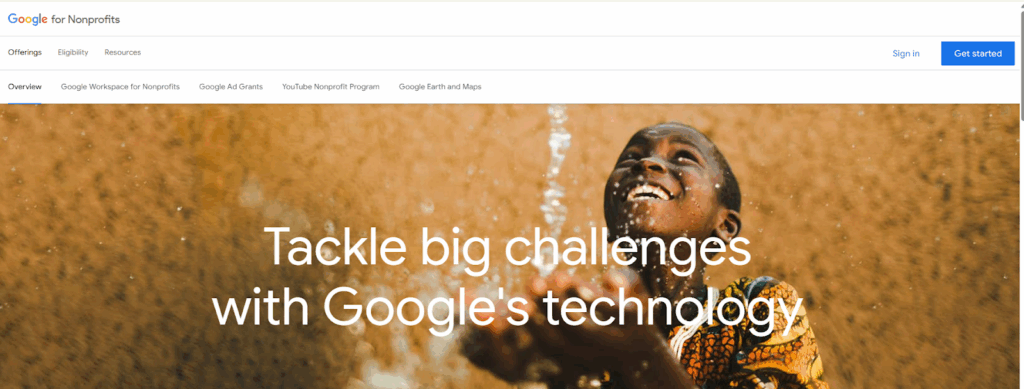
Go to Google for Nonprofits and create an account. This is the parent program that gives you access to the Google Ad Grant along with other tools like Google Workspace for Nonprofits and YouTube Nonprofit features.
Step 3: Complete Goodstack Validation
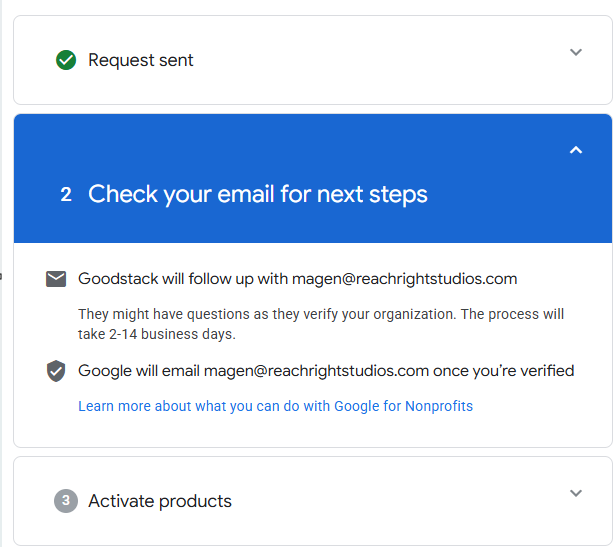
Google uses Goodstack (formerly TechSoup) to verify that your organization is a legitimate nonprofit. You’ll submit your 501(c)(3) documentation and basic organizational information. Approval typically takes 7-14 business days. This is usually the longest step in the process.
Step 4: Activate Google Ad Grants
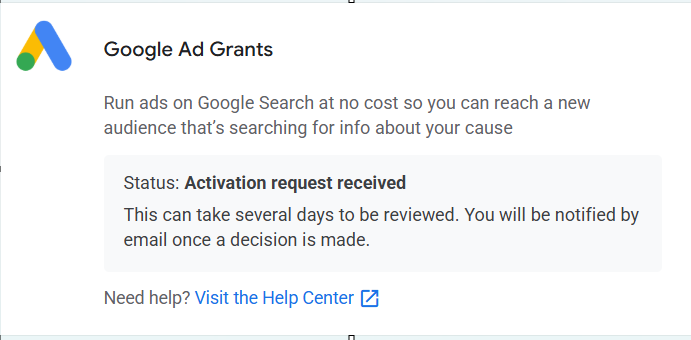
Once Goodstack verifies your nonprofit status, go back to your Google for Nonprofits dashboard and activate the Google Ad Grants product. This creates a special Google Ads account that’s preconfigured for the grant program.
Step 5: Build Your First Campaign
Before you can launch ads, your account needs at least one properly structured Search campaign. This means:
- Multiple ad groups organized by theme
- Relevant keywords (no single-word keywords)
- Responsive search ads with multiple headline and description variations
- Sitelink assets pointing to important pages on your website
- Geo-targeting set to your relevant area
- Conversion tracking configured and active
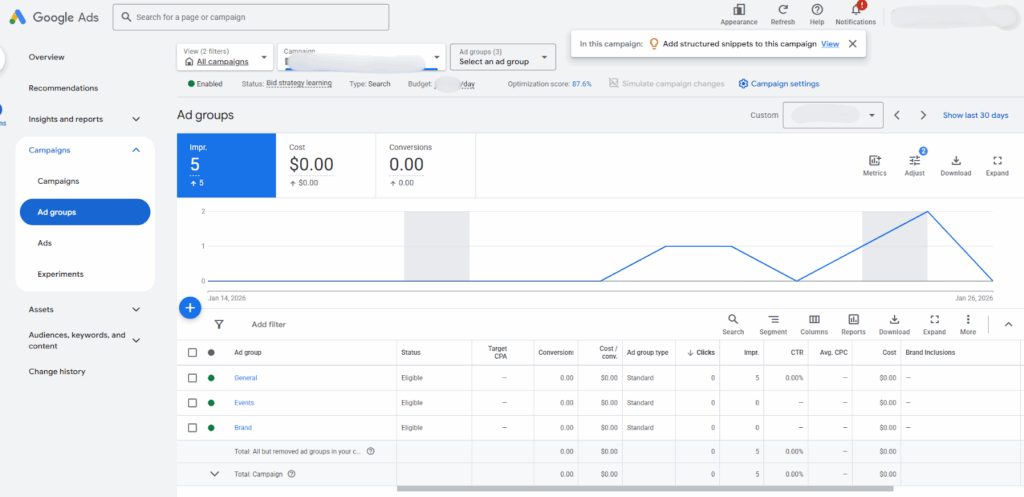
This is where most churches get stuck. Building a compliant campaign that also performs well requires some Google Ads knowledge. If you want to skip the learning curve, our Google Ad Grant management service handles all of this, or you can follow the campaign strategy section later in this guide to build it yourself.
How Long Does This Take? Most churches complete the full process in 2-4 weeks. The longest step is Goodstack validation (7-14 business days). Everything else can be done in a day or two.
Common Application Problems (And How to Fix Them)
A few snags come up repeatedly. Here is how to handle each.
“We can’t verify your organization.” Percent can’t find your church in their nonprofit database. Send your IRS determination letter directly to Percent, double-check your EIN for typos, and if you’re under a group exemption, provide the denomination’s group exemption letter.
“Your website doesn’t meet our quality standards.” Usually means thin content, missing HTTPS, broken features, or no clear mission. Walk through the eligibility checklist above and fix every box before resubmitting.
“Application has been pending for weeks.” Check spam for emails from verifications@mail.goodstack.org. Log into your Google for Nonprofits account to check status. Contact Goodstack support directly through their help portal if more than 14 business days have passed.
“We already have a Google Ads account.” You have two options: apply for the grant on the same account (Google can convert it), or create a separate account for the grant (usually cleaner — keeps paid and grant campaigns separate).
Tips for Faster Approval
Before you apply:
- Make sure your website has 5 to 10 pages of real content
- Add an “About Us” page with your church’s mission statement
- Ensure your site loads fast and works on mobile
- Install an SSL certificate if you haven’t already
- Have your EIN and IRS determination letter ready
During the application:
- Use a Google account tied to your church domain, not personal Gmail
- Double-check your EIN before submitting (one wrong digit delays everything)
- Respond to any Percent emails within 24 hours
- Be specific when describing your church’s mission and community impact
After approval:
- Set up conversion tracking BEFORE launching any campaigns
- Start with Maximize Conversions bidding from day one
- Focus on local, relevant keywords your community actually searches for
- Check your account weekly for the first month to catch compliance issues early
Google Ad Grant Compliance Rules (The Complete 2026 Checklist)
This is where most churches lose their grant. Google has strict compliance requirements, and breaking them, even unintentionally, can result in your account being suspended.
The good news: every rule is manageable once you know what they are. Here’s the complete checklist.
| Rule | Requirement | What Happens If You Break It |
|---|---|---|
| Click-Through Rate (CTR) | 5% minimum monthly CTR | Account suspension after 2 consecutive months below 5% |
| Single-Word Keywords | Not permitted (exceptions: brand name, recognized medical terms) | Keyword disapproval |
| Quality Score | No keywords scoring 1 or 2 | Keyword disapproval; can trigger compliance flags |
| Ad Groups | Minimum 2 per campaign | Non-compliance warning |
| Sitelink Assets | Required on all campaigns (minimum 2) | Non-compliance warning |
| Geo-Targeting | Must be set on all campaigns | Non-compliance warning |
| Conversion Tracking | Valid tracking required with at least 1 meaningful conversion per month | Account suspension |
| Responsive Search Ads | Required for all ad groups | Reduced ad serving |
| Generic Keywords | No overly broad terms (“free videos,” “news,” “things to do”) | Keyword disapproval |
| Landing Page Quality | Ads must point to specific, relevant pages, not generic homepages | Reduced performance; potential compliance flag |
| Program Survey | Complete annual survey when sent | Required for continued participation |
| Account Activity | Must log in and manage account regularly | Potential deactivation for prolonged inactivity |
For the full deep dive, see our dedicated Google Ad Grants compliance guide.
The 5% CTR Rule: How to Hit It Every Month
The 5% click-through rate requirement is the rule that trips up most churches. If your overall account CTR drops below 5% for two consecutive months, Google will suspend your grant.
Here’s how to stay above 5%:
Write compelling ad copy. Generic ads like “Visit Our Church” get scrolled past. Specific ads like “Sunday Services at 9 & 11 AM. Free Parking, Kids Program Available” get clicked. Focus on what makes someone want to click.
Use tight, relevant keyword groups. Don’t dump 50 keywords into one ad group. Create small, themed ad groups with 5-10 closely related keywords each, and write ads that speak directly to those keywords.
Pause underperforming keywords. Check your account weekly. Any keyword with a CTR below 2% is dragging your average down. Pause it or refine it.
Negative keywords are your friend. Add negative keywords to prevent your ads from showing for irrelevant searches. If you’re targeting “church in Dallas,” add negative keywords like “chicken church,” “church shoes,” or “church of scientology” to avoid wasting impressions on searches that will never convert.
Keyword Quality: What Google Actually Wants
Google wants your grant-funded ads to be relevant and helpful to searchers. That means:
- No single-word keywords (except your church name)
- No generic keywords that could apply to anything
- Keywords should have clear intent related to your church’s mission
- Focus on 2-4 word phrases that are specific to what your church offers
Good examples: “baptist church in nashville,” “sunday church service near me,” “community food pantry dallas,” “free marriage counseling church”
Bad examples: “church,” “free,” “community,” “help,” “faith”
What to Do If Your Grant Gets Suspended
Don’t panic. Grant suspensions are common and usually fixable.
- Log into your Google Ads account and check the notification. It will tell you exactly why
- Fix the compliance issue (usually CTR below 5% or a conversion tracking problem)
- Submit a compliance review request through the Google Ad Grants Help Center
- Wait for Google to review (typically 5-10 business days)
If you need help navigating this, consider working with a Google Ad Grants professional. Getting reinstated is usually straightforward, but preventing suspension in the first place is obviously better.
5 Google Ad Grant Campaigns Every Church Should Be Running
Having a compliant account is step one. Running campaigns that actually drive results is step two. Here are the 5 campaign types that produce the best ROI for churches (and for a deeper dive with 10 proven campaigns, see our Google Ad Grant campaign ideas guide):
1. “Churches Near Me”: New Visitor Acquisition
This is your most important campaign. It targets people actively searching for a church in your area.
Target keywords: “churches near me,” “church in [city],” “[denomination] church in [city],” “churches near [neighborhood],” “church service near me”
Sample ad copy: “Looking for a Church in [City]? | Join Us This Sunday at [Church Name]. Services at 9 & 11 AM. Friendly community, great kids program, free parking. Plan your visit today.”
Landing page: Your “I’m New” or “Plan Your Visit” page, NOT your homepage
Expected results: This campaign typically accounts for the largest share of grant-driven traffic
Pro Tip: The “churches near me” campaign alone accounts for 40-60% of grant-driven website visits for most churches we manage. If you only set up one campaign, make it this one.
2. Easter & Christmas Outreach Campaigns
Seasonal campaigns around Easter and Christmas capture the massive surge in church-related searches during these periods. “Easter church service near me” searches spike by 500%+ in the weeks before Easter.
Target keywords: “Easter church service [city],” “Christmas Eve service near me,” “Easter Sunday church [city],” “Christmas worship service”
Landing page: A dedicated seasonal landing page with service times, what to expect, and a “Plan Your Visit” button
Timing: Launch 3-4 weeks before each holiday
3. Sermon Series & Event Promotion
Use the grant to promote specific sermon series, conferences, workshops, and community events.
Target keywords: “[Topic] church event [city],” “church marriage workshop,” “community worship night [city],” “Bible study group near me”
Landing page: Event-specific page with registration
4. Community Service Campaigns
If your church runs a food pantry, counseling center, support groups, or any community service, the grant can connect people in need with your programs.
Target keywords: “free counseling near me,” “food bank [city],” “support group [city],” “community help [city]”
Landing page: Your community services or outreach page
These campaigns often have the highest CTR because the search intent is so strong. These people need help right now.
5. Volunteer & Ministry Team Recruitment
Use the grant to find people who want to serve, not just attend.
Target keywords: “volunteer opportunities [city],” “church volunteer [city],” “community service volunteer near me”
Landing page: Your volunteer or “get involved” page
For each campaign, make sure you have proper conversion tracking set up (form submissions, event registrations, direction requests) and that you’re reviewing performance at least monthly.
Making the Most of Your $10,000: Advanced Optimization Tips
Once your campaigns are running and compliant, here’s how to squeeze more value from your grant.
Keyword Research for Churches
Use Google’s Keyword Planner (free inside your Google Ads account) to find keywords relevant to your church. Focus on:
- Location-specific terms with decent search volume
- Long-tail phrases (3-5 words) that show clear intent
- Questions people are asking (“what to wear to church,” “how to find a good church”)
Avoid high-competition commercial keywords that you’ll never win with a $2.00 max bid. The grant works best on church-specific and community-specific terms where competition is low.
Ad Copy That Converts: Church-Specific Examples
The best Google Ad Grant ads follow a simple pattern: specific benefit + clear invitation + relevant detail.
Strong examples:
- “Welcome to [Church Name] in [City] | Sunday Services at 9 & 11 AM. Kids programs for all ages. Come as you are.”
- “Free Community Counseling | [Church Name]. Confidential, professional counseling available at no cost. Book your appointment.”
- “Easter at [Church Name] | April 20, 2026. Three service times. Egg hunt for kids. Free parking. Everyone welcome.”
Weak examples:
- “Visit Our Church” (too vague, no specific benefit)
- “Welcome to [Church Name]” (no reason to click)
- “We Love Jesus and So Should You” (doesn’t match search intent)
Landing Page Strategy: Where to Send the Traffic
Never send ad traffic to your homepage. Your homepage is a general-purpose page. Ad traffic should land on a specific page that matches what the person searched for.
- Searching “churches near me” → “Plan Your Visit” page
- Searching “Easter service [city]” → Easter event page
- Searching “free counseling near me” → Counseling program page
- Searching “community food bank” → Food pantry / outreach page
The more closely your landing page matches the search intent, the higher your conversion rate, and the higher your Quality Score, which helps your ads show more often.
This is why having a well-built church website matters so much. Your grant drives traffic, but your website converts it.
Monthly Maintenance Routine (15-Minute Checklist)
Set a recurring calendar reminder to spend 15 minutes per month on your grant account:
- Check overall CTR. Is it above 5%? If not, pause low-CTR keywords
- Review keyword Quality Scores. Pause anything scoring 1 or 2
- Check conversion tracking. Is at least 1 conversion recorded this month?
- Review search terms report. Add negative keywords for irrelevant searches
- Pause any ad groups that aren’t performing
- Add new keywords or ad copy variations if needed
That’s it. 15 minutes a month keeps your grant healthy and performing.
DIY vs Professional Management: Which Path Makes Sense?
The most common question we get: should we manage the grant ourselves or hire help?
The honest answer depends on three things: who is doing the work, how much time they have, and what your church’s risk tolerance is for losing the grant entirely.
When DIY Works
DIY Google Ad Grant management can work if:
- Someone on your team has Google Ads certification and active experience (not just a course they took three years ago)
- That person has 5-10 hours per month dedicated specifically to grant management
- They stay current on Google’s policy updates (which change multiple times per year)
- They have experience with nonprofit grant accounts specifically, not just regular Google Ads
- Your church is comfortable with the risk of losing the grant while they learn
That is a short list. Even churches that check every box often find the opportunity cost doesn’t make sense.
The Numbers Tell the Story
Here is the side-by-side from REACHRIGHT client data across 600+ church accounts:
| Metric | Self-Managed (avg) | Professionally Managed (avg) |
|---|---|---|
| Monthly ad spend used | $300 to $800 | $4,000 to $8,000 |
| Click-through rate | 2 to 3% | 8 to 15% |
| Monthly website visitors from grant | 50 to 200 | 500 to 3,000 |
| Compliance suspensions per year | 1 to 3 | Near zero |
| Grant utilization rate | 5 to 10% | 40 to 80% |
The math is straightforward. Professional management costs a few hundred dollars per month but unlocks thousands of dollars in additional free advertising that was already yours.
Why DIY Usually Fails
The “set it and forget it” problem. A volunteer sets up the account, life happens, nobody logs in for three months. Google suspends for inactivity. Months of free advertising gone, church has to reapply.
The compliance trap. Google’s rules are technical and change without much fanfare. A church admin checking the account monthly misses that Google updated its bidding requirements last week. By the time they notice, the account is suspended.
The underutilization problem. The average self-managed church uses less than $500 of their $10,000 monthly budget. That is $9,500 per month left on the table, or $114,000 per year in free advertising wasted.
The opportunity cost. Even if your admin is capable, the hours spent learning compliance rules, writing ad copy, and analyzing reports are hours not spent on pastoral care, event planning, or community outreach.
Real Results from Professional Management
Across the 600+ churches we manage, the pattern is consistent. A few specific examples:
- One church (Michelle Rux’s account) switched from self-management to REACHRIGHT and saw 46,982 more impressions, 2,727 more clicks, and 946 more conversions in a single month. Plus $7,471 more in grant spending that had been going unused.
- A Lutheran church we manage invested over $26,000 in free Google Ads in their first year, drove over 4,000 new visitors, and became the #1 search result for Lutheran churches in their area.
- Our average managed church sees 1,400+ monthly website visits from their grant.
What the Grant Won’t Do
Be wary of any company that promises the grant will:
- Replace all other marketing efforts
- Guarantee specific attendance numbers
- Work effectively without a good church website
- Produce results with zero effort on your end
The grant amplifies what is already working. If your website is outdated and your church has no online presence, the grant can help once those fundamentals are fixed. But you need a solid website to convert the traffic the grant sends your way.
How to Choose a Manager (If You Hire Help)
If you decide to bring in professional help, look for:
- Church-specific experience. Ask how many churches they currently manage. Fewer than 20 means they are still learning on clients’ dime.
- Transparent compliance track record. Ask for their compliance rate. If they cannot tell you, walk away. 95%+ is the floor.
- Clear monthly reports. A good report answers three questions: How much did we spend, what did we get, what are we doing next. Avoid 30-page PDFs full of acronyms.
- Pricing transparency. Standard management runs $200 to $500/month. Be cautious of percentage-of-spend fees (creates wrong incentives), setup fees over $2,000 without justification, and long contracts with no performance guarantees.
- Defined process. They should walk you through application handling, keyword research approach, optimization cadence (weekly is standard), compliance monitoring frequency (daily is best), reporting format, and response times.
Walk away from any agency that guarantees specific traffic numbers, can’t explain compliance requirements, has no church references, or wants a multi-year contract upfront.
REACHRIGHT manages Google Ad Grants for 600+ churches with a 98% compliance rate. Our standard service is $397/month. See our Google Ad Grant management service for details, or check your eligibility first if you are not sure where to start.
Google Ad Grant vs. Facebook Ads for Churches
This is one of the most common questions we get: “Should we do Google Ads or Facebook Ads?”
The honest answer: they do different things, and the best strategy uses both. But if you can only start with one, start with the grant, because it’s free.
| Factor | Google Ad Grant | Facebook Ads |
|---|---|---|
| Cost | Free ($10,000/mo) | Paid ($200-2,000+/mo typically) |
| Targeting | Intent-based, reaches people actively searching | Interest-based, reaches people passively scrolling |
| Best for | People actively looking for a church or service | Awareness among people who aren’t actively searching |
| Audience quality | Higher intent; they searched for something specific | Lower intent; they’re browsing, not searching |
| Effort | Moderate (compliance requirements) | Low-moderate |
| Content format | Text-only search ads | Images, video, carousels |
| Our recommendation | Start here. It’s free and reaches high-intent searchers | Layer on once your grant is running smoothly |
Google Ads reach people who are already looking. Facebook Ads reach people who might be interested. Both have value. But the grant gives you the high-intent channel for free. Use that as your foundation, then add Facebook Ads when you have budget.
For more on the paid advertising side, see our Google Ad Grant vs paid Google Ads comparison.
Frequently Asked Questions About the Google Ad Grant
How much is the Google Ad Grant worth?
$10,000 per month in Google Search Ad credits, which equals $120,000 per year. The grant renews monthly as long as your account stays in compliance.
Can churches get Google Ads for free?
Yes. The Google Ad Grant provides churches with $10,000/month in free Google Search Ads. Churches must have 501(c)(3) status, complete the application process through Google for Nonprofits, and maintain compliance with program rules.
What are the Google Ad Grant requirements?
The main requirements are: 501(c)(3) nonprofit status, Goodstack validation, a functioning website, no discriminatory practices, and ongoing compliance including 5% minimum CTR, valid conversion tracking, and proper account structure. See the eligibility requirements section above for the full breakdown.
How long does it take to get approved?
Most churches complete the process in 2-4 weeks. Goodstack validation (7-14 business days) is the longest step. Account setup and first campaign creation can be done in 1-2 days.
Can you lose the Google Ad Grant?
Yes. Your grant can be suspended if you violate compliance rules, most commonly for CTR dropping below 5% for two consecutive months or for invalid conversion tracking. Suspension is usually temporary and reversible once you fix the issue.
Is the Google Ad Grant worth the effort?
For most churches, absolutely. The grant provides $120,000/year in free advertising that reaches people actively searching for churches and community services. The average church we manage sees 1,400+ monthly website visits from their grant. Even a basic setup drives meaningful traffic.
Do you need a website for the Google Ad Grant?
Yes. Google requires that your organization has a functioning website. Your ads need landing pages to send traffic to, and a quality website is essential for converting that traffic into visitors. If your website needs work, start with our church website design guide.
Can a church use the grant for YouTube ads?
The Google Ad Grant is primarily designed for Search campaigns. Some grant accounts may have limited access to Performance Max campaigns, but YouTube and Display campaigns are not the primary intended use of the grant. For YouTube advertising, you’d need a separate paid Google Ads account.
Do churches have to spend the full $10,000 each month?
No. The $10,000 is a maximum monthly budget, not a requirement. Most churches don’t use the full amount, and that’s perfectly fine. There’s no penalty for underspending.
What is a meaningful conversion?
A meaningful conversion is an action that reflects genuine engagement: a contact form submission, event registration, volunteer signup, prayer request, “Plan Your Visit” form completion, or direction request. Page views and time-on-site alone don’t count.
Ready to Claim Your Church’s $10,000 in Free Advertising?
The Google Ad Grant is one of the most powerful marketing tools available to churches. $120,000 a year in free, targeted advertising that reaches people actively searching for a church or community service.
You’ve got three paths forward:
DIY: Use this guide to apply, build your campaigns, and manage your grant yourself. Everything you need is here.
Check eligibility: Not sure if your church qualifies? Use our free eligibility checker → and find out in 2 minutes.
Let us handle it: We’ve managed Google Ad Grants for 600+ churches. As a church digital marketing agency, we handle the application, campaign setup, monthly optimization, compliance monitoring, and reporting, so you can focus on ministry.
We’ve helped 600+ churches activate and manage their Google Ad Grant. Most churches we work with see results within the first 30 days. Check your eligibility → or see our Google Ad Grant management service →
Pair your Google Ad Grant with local SEO for maximum local visibility, and make sure your church website is ready to convert the traffic your grant sends.
More Resources on the Google Ad Grant
- Google Ad Grants Compliance: Staying in Good Standing
- Google Ad Grant vs Paid Google Ads
- Google Ad Grant Campaign Ideas
- The Non-Discrimination Clause Explained
- Working with Google Ad Grants Professionals
- 4 Google Nonprofit Tools That Will Change Your Marketing
Related Guides
- Local SEO for Churches: Pair your grant with local SEO for maximum visibility
- Church Website Design Guide: Your website is your landing page for grant traffic
- Church Social Media Strategy Guide: Complete your digital marketing strategy
- Growing Your Church: 7 Website Tips That Work: Convert grant traffic into real growth
- 72 Sermon Series Ideas To Draw People In: Content that keeps visitors engaged