QuickBooks for nonprofits is not a separate product. It’s the same QuickBooks Online your church treasurer already knows, donated through TechSoup for a yearly admin fee. And yes, churches qualify. Intuit says so on its own nonprofit page.
The gap is big. As of November 5, 2026, Intuit’s regular price for QuickBooks Online Plus is $140 a month (new customers get half off the first three months). Through TechSoup, a qualifying church pays an $80 admin fee for a full year of the same plan.
I’m the executive pastor of a church in Hawaii Kai, and I sit in the budget meetings where software line items get questioned. This is one of the easiest wins on the list. The catch is paperwork, and the paperwork is where most churches get stuck.
Before you start: TechSoup will not take a church’s word that it’s tax exempt. If your church has never received an IRS determination letter and you’re not sure whether your denomination’s group exemption covers you, read how to prove your church is a nonprofit first. It will save you a rejected application.
How much does QuickBooks for nonprofits cost a church?
QuickBooks for nonprofits costs a qualifying church $80 a year for QuickBooks Online Plus or $170 a year for QuickBooks Online Advanced, paid to TechSoup as an admin fee (TechSoup’s QuickBooks offer page, November 2026). Intuit’s own list prices for those plans are $140 and $340 a month (quickbooks.intuit.com/pricing, checked November 5, 2026). Intuit also runs a public “50% off for 3 months” promotion, but it covers only a new customer’s first three months, then reverts to the regular price. It is not a nonprofit discount.
The math for one year, same plan, same user count:
| Plan | Intuit list price (12 months) | Intuit year one with 3-month promo | TechSoup admin fee | Church saves vs list |
|---|---|---|---|---|
| Plus (5 users) | $1,680 ($140/mo) | $1,470 | $80/yr | $1,600 a year ($1,390 in a promo first year) |
| Advanced (25 users) | $4,080 ($340/mo) | $3,570 | $170/yr | $3,910 a year ($3,400 in a promo first year) |
Sources: Intuit pricing page and TechSoup QuickBooks Online offer page, both checked November 5, 2026. The promo column assumes 3 months at half price and 9 months at the regular price; the promo is for new Intuit customers only.
Two things the fee does not cover. TechSoup’s page says “Add-on services such as Payroll are not available through TechSoup,” so pastor payroll lives somewhere else (see our church payroll services guide). And the fee is annual: you renew through TechSoup each year, not through Intuit.
A church paying Intuit's list price for QuickBooks Online Plus spends $1,680 a year on software it could get through TechSoup for $80. That's $1,600 a year back in the ministry budget for one afternoon of paperwork.
Does QuickBooks give a discount to churches?
Yes. Intuit’s nonprofit page answers the question directly in its FAQ: QuickBooks offers discounted products for nonprofits through TechSoup, and Intuit recommends “that churches and other houses of worship use QuickBooks Online Plus or QuickBooks Advanced” (quickbooks.intuit.com/industry/non-profits, November 2026). Intuit doesn’t sell a church price directly, and its nonprofit page shows only the same public prices everyone sees.
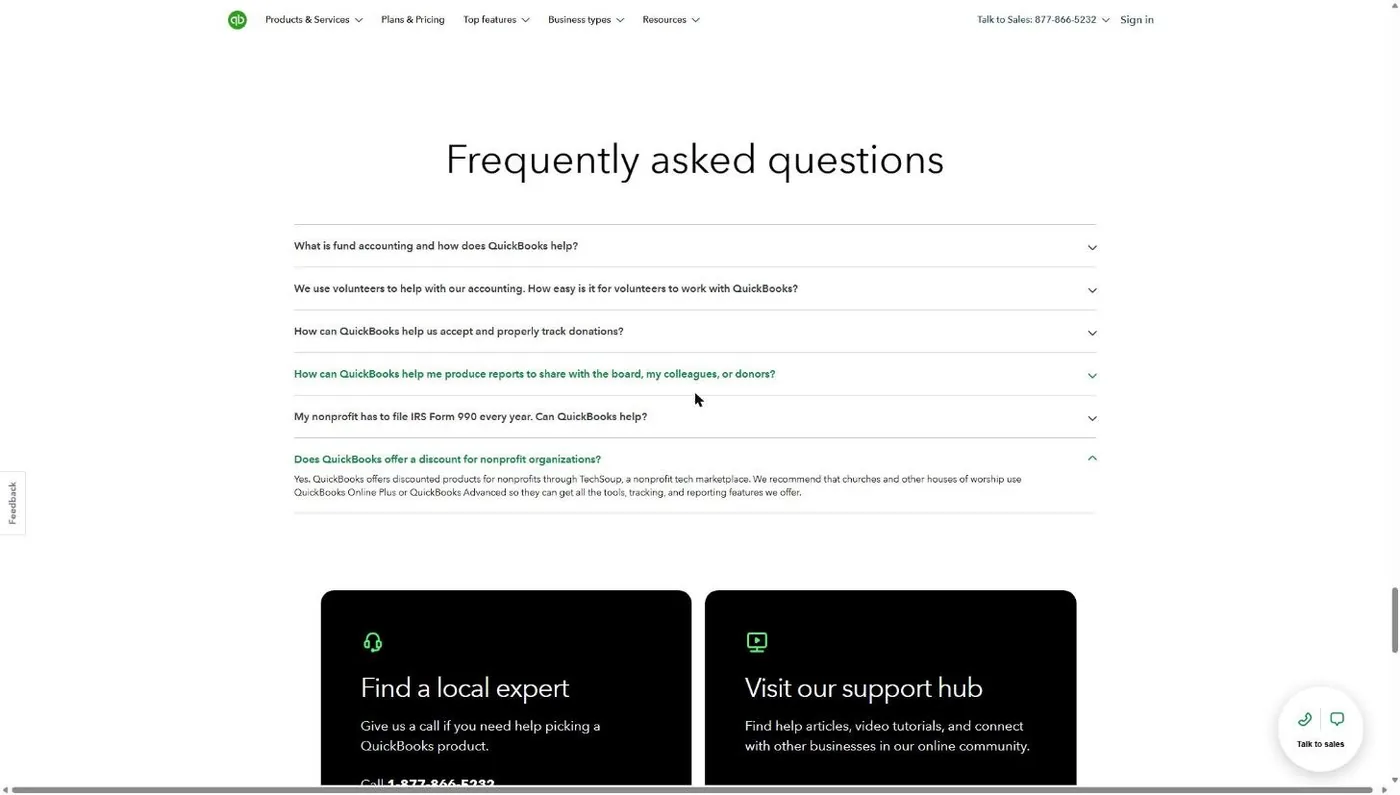
That matters because plenty of software companies quietly exclude churches from their nonprofit programs. Intuit names churches and points them to the door. The only gate is TechSoup’s verification, which I cover in Step 1.
How to get QuickBooks through TechSoup, step by step
Getting QuickBooks Online through TechSoup takes six steps: confirm your church passes TechSoup’s place-of-worship rule, register, open the Intuit offer, choose Plus or Advanced, set up a new QuickBooks account, and calendar the renewal. TechSoup handles verification, and Intuit delivers the subscription once TechSoup approves the request.
Step 1: Confirm your church can pass TechSoup’s church rule
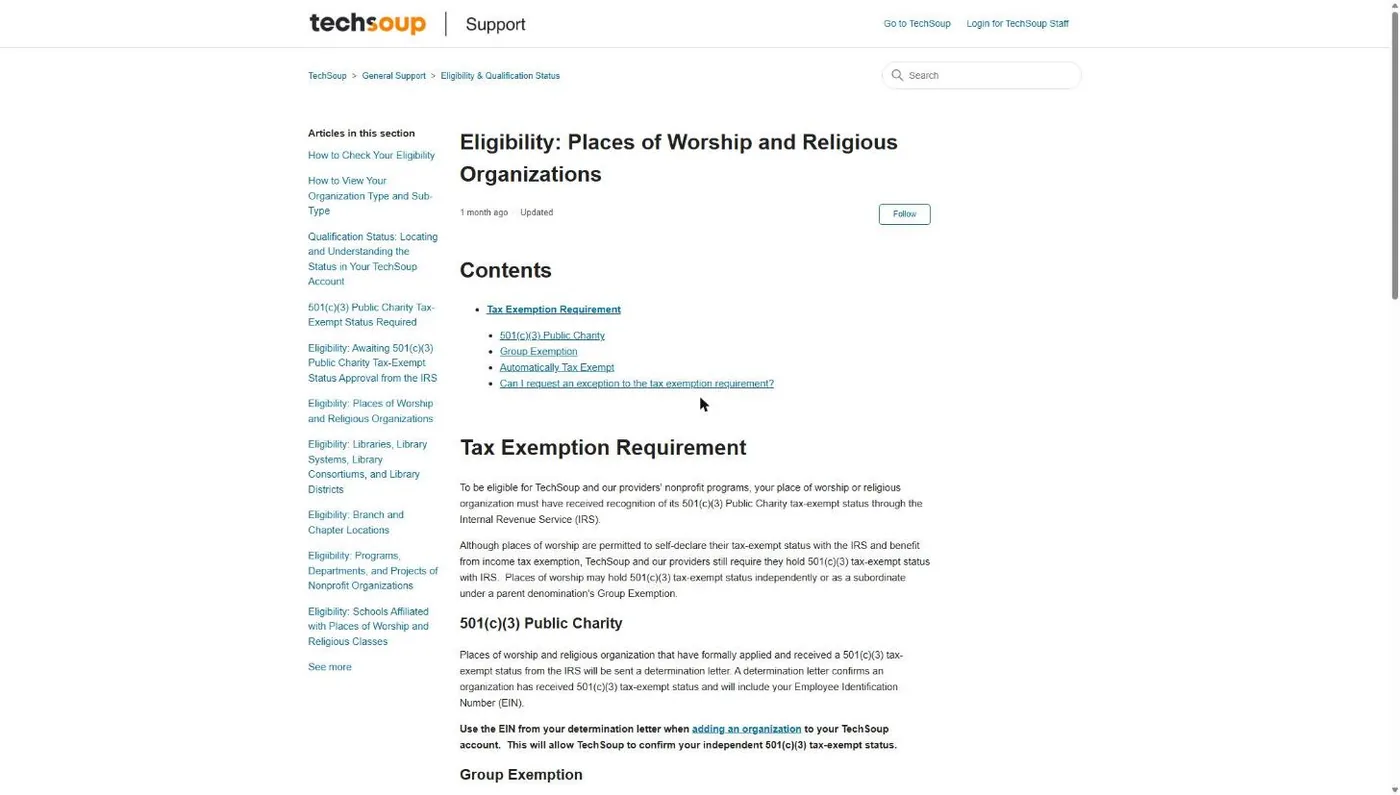
Open TechSoup’s support article on places of worship. The rule is plain: your church “must have received recognition of its 501(c)(3) Public Charity tax-exempt status through the Internal Revenue Service” (TechSoup support, checked November 5, 2026). Churches that are automatically tax exempt or self-declare are not eligible, and TechSoup says it makes no exceptions.
You pass with one of two documents. Either your church’s own IRS determination letter, or a group exemption letter from your national denomination. TechSoup wants that letter on denominational letterhead, signed by a representative, usually with a directory or introduction packet.
Common snag: a group-exempt church enters its own EIN. TechSoup tells group-exempt churches to use the parent denomination’s EIN. (Google for Nonprofits wants the opposite, your church’s own EIN, which trips up a lot of church admins who apply to both.)
Step 2: Register your church with TechSoup
TechSoup registration is a separate account from QuickBooks. You create a member login, confirm your email, add the church with its EIN and budget, and then check your qualification status. If TechSoup asks for documents, you email them to qualification@techsoup.org.
I walk through every screen in the TechSoup for churches guide, including what TechSoup is, what it charges, and what’s still worth buying there. If your church is already registered and qualified, skip to Step 3.
Common snag: registering under a staff member’s personal email. Use a church address the next treasurer will inherit. You’ll be renewing this every year, and a login tied to someone who left is a headache.
Step 3: Open the QuickBooks offer on TechSoup
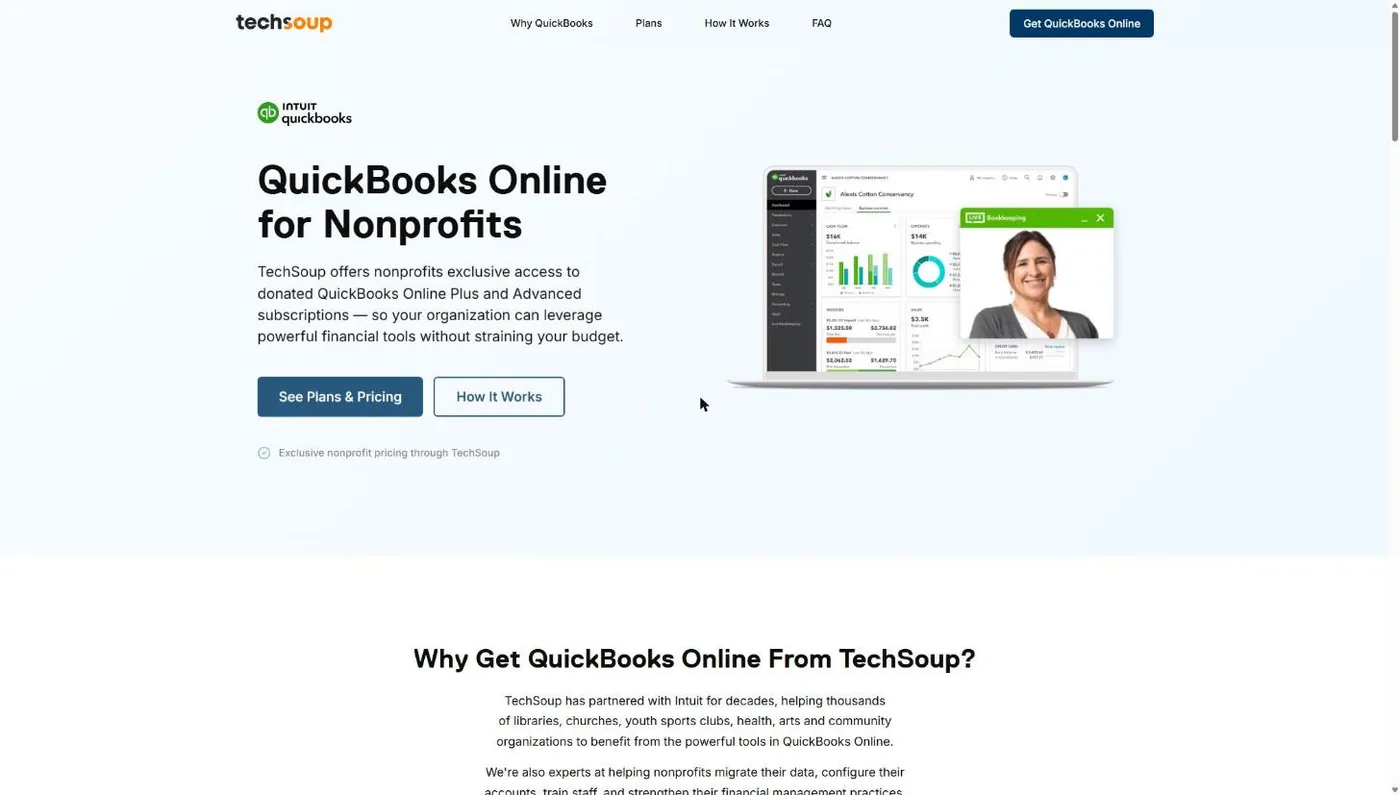
Go to TechSoup’s QuickBooks Online for Nonprofits page (page.techsoup.org/intuit-quickbooks-online-nonprofits). This page lists both donated plans and links to the request. TechSoup says the plans are “exclusively for eligible nonprofits through TechSoup.”
Step 4: Choose Plus or Advanced and pay the admin fee
Scroll to the plan cards. Plus is a 1-year subscription for 5 users at an $80 admin fee. Advanced is 25 users at $170. Click the request button for your plan. It asks you to sign in to TechSoup, and from there you complete the request and pay the admin fee to TechSoup, not Intuit.
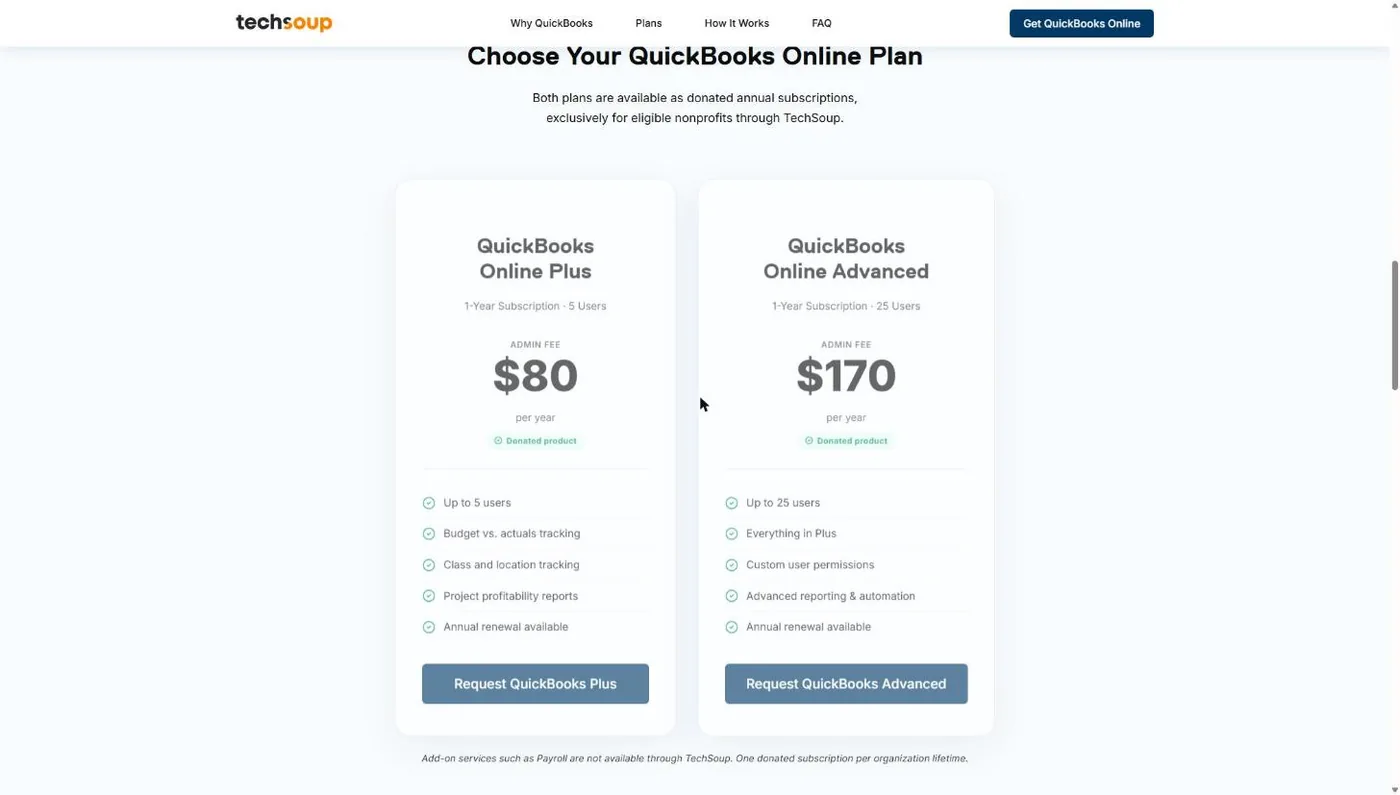
Common snag: picking a plan by price instead of by need. TechSoup allows “One donated subscription per organization lifetime,” so choose carefully. The Plus vs Advanced section below will help.
Step 5: Set up a new QuickBooks Online account
The donated subscription has to start as a new QuickBooks account. TechSoup’s page says organizations “are not able to apply the QuickBooks Online offer to an existing account.” If your church already pays Intuit for QuickBooks Online, you move your data into the new donated account instead.
TechSoup points churches to the QuickBooks Made Easy (QBME) Data Migration Service for that move, or you can start fresh. QBME also sells help desk plans in 3-month and 1-year terms if your volunteer treasurer wants a person to call. Once the new account is running, cancel the old paid subscription with Intuit so you don’t pay twice.
Common snag: canceling the old account before the migration is checked. Run a balance sheet and a profit and loss in both accounts for the same dates and make sure they match first.
Step 6: Put the renewal on the church calendar
Your donated subscription runs one year. TechSoup lists “Annual renewal available” for both plans, with the renewal fee paid to TechSoup. Put the renewal date on the finance calendar with the treasurer’s name next to it. A lapsed subscription in the middle of year-end giving statements is a bad week.
What if TechSoup rejects your church?
Most TechSoup rejections for churches trace back to missing IRS recognition, the wrong EIN, or a group exemption letter that doesn’t meet TechSoup’s format. Each one has a specific fix, and none of them require starting over with a new TechSoup account. The table below pairs each rejection with what to send back.
| Why it got rejected | The fix |
|---|---|
| The church never received IRS recognition (it relies on automatic church exemption) | Get a group exemption letter from your denomination, or file IRS Form 1023 for your own letter. See proving your church is a nonprofit. |
| Group exemption letter not accepted | Ask your denomination for a letter on its letterhead, signed by an officer, naming your church as a subordinate, plus the directory or introduction packet. |
| EIN not found or doesn't match | Group-exempt churches use the parent denomination's EIN at TechSoup. Independent churches use the EIN on their own IRS letter. |
| Church name doesn't match the paperwork | Enter the legal name exactly as it appears on the IRS or denomination letter, not the name on your sign out front. |
| The church already received a donated subscription | Contact TechSoup Customer Service for a new registration link (TechSoup's offer page says this is the path). |
| A ministry or department applied on its own | TechSoup says programs and departments usually can't request their own subscription. Request it once for the church. Separate branch locations may qualify. |
Which QuickBooks plan should a church use, Plus or Advanced?
Most churches should start with QuickBooks Online Plus: 5 users, class and location tracking, and the donor and grant budgeting features Intuit reserves for Plus and Advanced. Move to QuickBooks Online Advanced when you need more than 5 users or more than 40 combined classes and locations. Intuit’s pricing page lists Plus at “Track classes and locations (40)” and Advanced at “unlimited classes, locations, and custom KPIs” (November 2026).
| What a church cares about | Plus ($80/yr via TechSoup) | Advanced ($170/yr via TechSoup) |
|---|---|---|
| Users | 5 | 25 |
| Classes and locations (your funds and campuses) | 40 combined | Unlimited |
| Accountant access | 2 accountants | 3 accountants |
| Budget by fund or program, donor and grant management | Included | Included |
| Best fit | One campus, a treasurer, a bookkeeper, a pastor or two | Multisite churches, schools or preschools, big finance teams |
Sources: Intuit pricing and nonprofit pages, checked November 5, 2026. The 40 cap on Plus is shared: Intuit’s usage-limits help article counts classes and locations together.
Think about the 40 this way. A one-campus church with a class for each fund (General, Missions, Building, Benevolence, Youth Camp) and one location uses six. A church that creates a class for every ministry, every mission trip and every special offering can hit 40 in a few years. If that’s you, either pay the extra $90 a year for Advanced or archive old trip classes each year.
Can QuickBooks track designated and restricted funds for a church?
QuickBooks Online can track designated and restricted church funds, but it does it with workarounds, not true fund accounting. Intuit’s nonprofit page says you can “Tag donations to a specific program or fund” and “Categorize revenue expenditures by fund or program.” In practice that means classes. A class tags income and expenses so you can run a profit and loss by fund.
Not tax or accounting advice. I'm a pastor and a marketer, not your CPA. Restricted gifts carry legal obligations. Have a CPA who works with churches review how you set up funds before you rely on it.
Where classes fall short is the balance sheet. Classes show what came in and went out of the missions fund. They don’t carry a running fund balance for missions from year to year the way church fund accounting software does. Churches on QuickBooks usually close that gap one of two ways:
- A separate equity or liability account for each restricted fund, with the treasurer posting a monthly entry to move that month’s restricted giving and spending into it.
- A simple fund balance spreadsheet the finance team reconciles to QuickBooks every month.
Both work. Both depend on one person doing them every month. If that person changes every two years, that’s your real risk.
Donor receipts have limits too. Intuit’s nonprofit page says you can “Send your donors yearly donation statement with thank you letters attached.” Before you rely on that statement, check it against the IRS. For any single gift of $250 or more, the IRS says the acknowledgment must include the church’s name, the amount, and whether the church provided goods or services in return, including a statement about “intangible religious benefits” where that applies (IRS written acknowledgment guidance). Many churches keep giving records and statements in their church management or giving platform and send only totals into QuickBooks. More on that in our tax-deductible donations guide.
One more church-specific note. Intuit markets its nonprofit reports as help preparing IRS Form 990. Most churches don’t file a 990: the IRS exempts churches from that filing (IRS Publication 1828). So the reports that matter to you are the ones your board and congregation see, like the ones in our church financial statements guide.
What should churches on QuickBooks Desktop do now?
Churches on QuickBooks Desktop should plan a move to QuickBooks Online, because the donated desktop route is gone. TechSoup’s help center says that “In February 2026, Intuit for Nonprofits retired the last QuickBooks desktop offer available on TechSoup: QuickBooks Premier 2021,” and no desktop plans are coming back (TechSoup support, checked November 5, 2026). Intuit also stopped selling new Desktop Pro Plus and Premier Plus subscriptions to US customers after September 30, 2024 (Intuit’s QuickBooks blog).
If your church is still running a donated desktop copy, it’s an old one. Intuit’s discontinuation policy page says QuickBooks Desktop 2023 lost live support, Desktop Payroll, Desktop Payments, online bank feeds, and critical security updates after May 31, 2026. A 2021 copy is older than that. It may still open, but you’re keeping the church’s financial records on software that gets no security patches.
If I were moving a church off Desktop this year, I’d go in this order:
- Pick a cutover date. January 1 or the first day of your fiscal year is cleanest. Fewer partial-year reports.
- Request the TechSoup donation first (Steps 1 through 4 above), so the new account is ready before you need it.
- Migrate or start fresh. TechSoup points to the QBME Data Migration Service for a full history move. Some churches bring over only opening balances and keep the old desktop file as a read-only archive.
- Rebuild funds as classes. If you used classes in Desktop, keep the same names. If you didn’t, this is the time to set them up.
- Keep a backup of the old file somewhere the next treasurer can find it.
When should a church use church-specific accounting software instead?
A church should use church-specific accounting software instead of QuickBooks when restricted funds are a big share of its giving, when the bookkeeper is a rotating volunteer, or when it wants giving, member records and the ledger in one system. QuickBooks Online is a strong general ledger at a donated price. It’s a business tool adapted for churches, and that adaptation costs your treasurer time every month.
My test is simple. If your church has two or three funds and a treasurer who knows QuickBooks, the $80 TechSoup donation is hard to beat. If you have a building campaign, a missions fund, a benevolence fund, a preschool and designated gifts nobody wants to reconcile by hand, true fund accounting pays for itself in fewer Tuesday nights at the church office.
Church-built tools handle fund balances natively and usually tie giving to member records. Several good ones exist, at very different price points. We compare them side by side in our church accounting software guide. Look at both before you decide, and weigh your treasurer’s hours as a real cost. Books that stay accurate every month are worth more than a lower invoice.
Frequently asked questions
Saved on software? Now make sure people can find your church.
The money you free up only matters if your church is reaching new people. Book a free Church Marketing Review and we'll look at your website, your Google visibility and how new families find you. You leave with a plan whether you work with us or not.
Related guides
- Nonprofit software discounts for churches: every program, who accepts churches, and what it costs
- How to prove your church is a nonprofit: the documents TechSoup and Goodstack accept
- TechSoup for churches: registration, admin fees and what’s still worth buying
- Church accounting software: church-built options compared
- Microsoft 365 for nonprofits: what’s still free for churches after the grant change
- Nonprofit payment processing rates: PayPal, Stripe and Square for church giving
- Church payroll services: since payroll isn’t part of the TechSoup donation