Proving church tax exempt status to a nonprofit software program is harder than most pastors expect, because the IRS never asked your church to prove anything. A church that meets the 501(c)(3) rules is exempt automatically. Google, TechSoup and Goodstack don’t care. They want paper.
Here’s how it usually goes. An admin clicks “Get started” on Google for Nonprofits, types in the church name, and the church can’t be found. Nothing is wrong with the church. It never filed for an IRS letter, and the software world runs on that letter.
This page is Step 0 for every guide in our nonprofit software discounts for churches series. Get your proof together once, and every application after this goes faster.
One plain note before we start: this is not legal or tax advice, so confirm your church’s specific situation with your denomination or your CPA.
Is a church automatically tax exempt?
Yes. A church that meets the requirements of Section 501(c)(3) is tax exempt whether or not it ever files anything. The IRS says churches “are not required to apply for and obtain recognition of exempt status from the IRS” (IRS, Churches page, checked November 5, 2026). Gifts to that church are still deductible for donors.
So why do so many churches apply anyway? The same IRS page gives the answer: a determination letter “provides reliance to church leaders, members and contributors.” In plain terms, it’s a piece of paper anyone can check.
That’s the catch for software. A church that never applied has no determination letter, and it doesn’t show up in the IRS Tax Exempt Organization Search (TEOS), the public database most validators check first. Your church is exempt. It’s just invisible to the systems that hand out discounts.
If your question is bigger, like “should our church file for 501(c)(3) status at all,” read our 501(c)(3) church guide. It covers the trade-offs. This page sticks to one job: proving your status to a software vendor.
Why do Google, TechSoup and Goodstack want more than automatic exemption?
Software programs want proof they can check without calling your pastor. Each one runs its own rule, and three of the biggest spell out the church problem in writing.
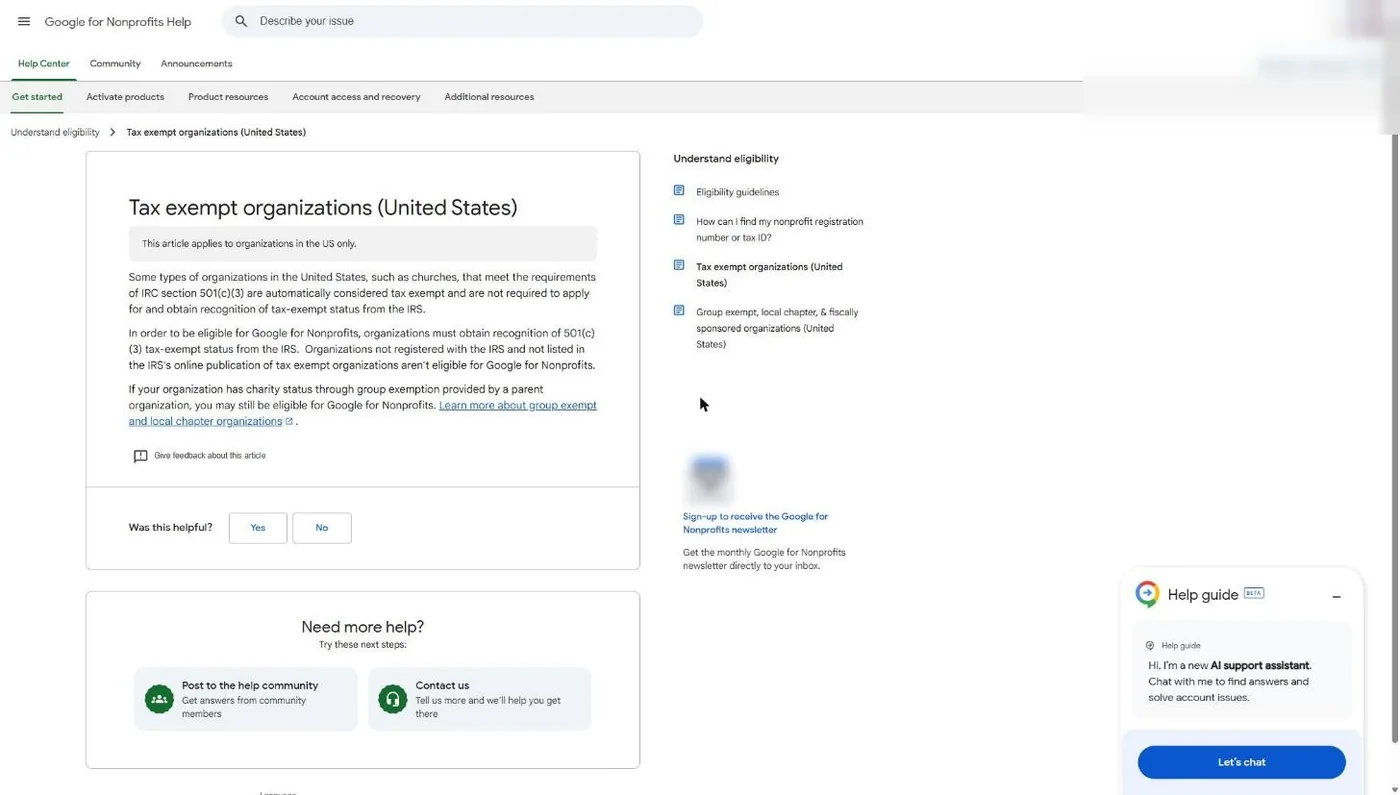
Google for Nonprofits names churches directly. Its help article says churches “are automatically considered tax exempt and are not required to apply,” and then adds that organizations “not registered with the IRS and not listed in the IRS’s online publication of tax exempt organizations aren’t eligible” (Google Help, verified November 5, 2026).
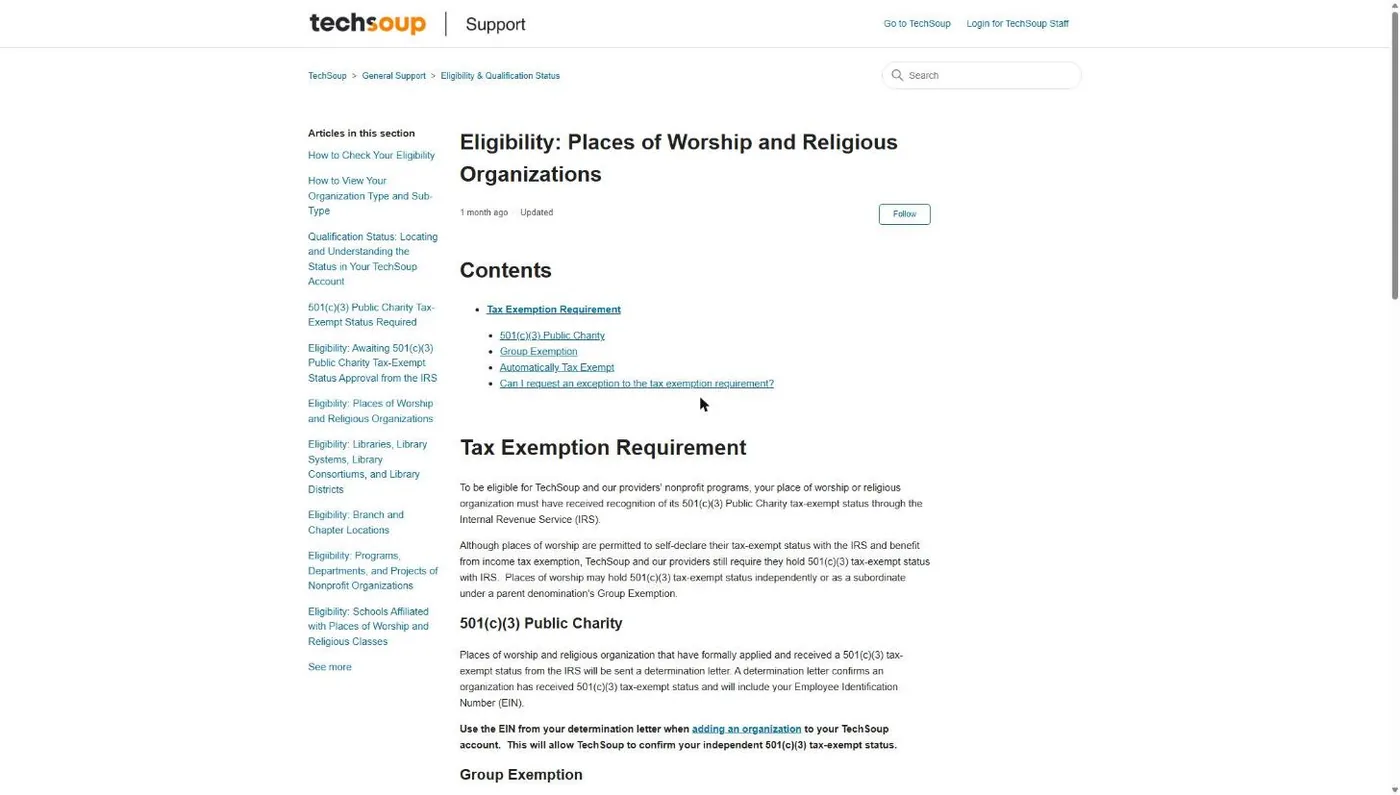
TechSoup is even blunter. Its places-of-worship article says “Places of worship that are automatically tax-exempt, or self declare, are not eligible” (TechSoup Support, read November 5, 2026). No exceptions, either: TechSoup’s rules come from its agreements with the companies that donate the software.
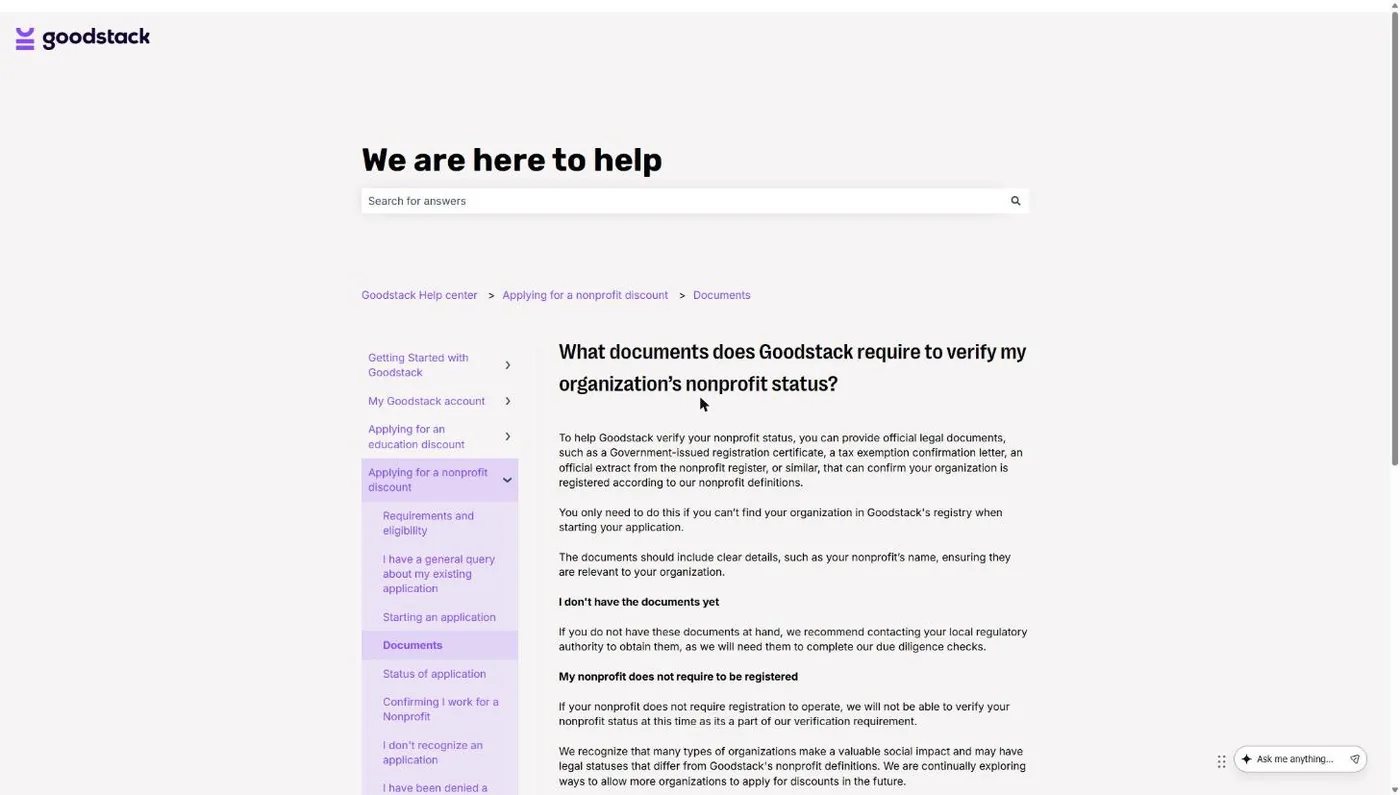
Goodstack, the validator behind Google, Canva, Zoom, ChatGPT and Claude nonprofit pricing, has its own hard stop: “If your nonprofit does not require registration to operate, we will not be able to verify your nonprofit status” (Goodstack Help Center, verified November 5, 2026). For a deeper look at how it works, see what Goodstack is and how churches get verified.
A church doesn't need an IRS letter to be tax exempt. It needs one, its own or its denomination's, to get a nonprofit software discount.
Which of the four church situations are you in?
Every church falls into one of four buckets, and the bucket decides what proof you can show. Figure out yours before you open a single application.
| Your situation | How to tell | Your proof | Difficulty |
|---|---|---|---|
| 1. Own IRS determination letter | Your church's name comes up in TEOS | The determination letter and your EIN | Easy. Accepted everywhere. |
| 2. Covered by a denomination's group exemption | Your denomination says you're covered; your church isn't in TEOS by name | The group exemption letter plus a letter from the denomination naming your church | Medium. Each validator wants it packaged differently. |
| 3. Independent church, never applied | Not in TEOS, no denomination | Nothing most validators accept | Hard. File Form 1023 first. |
| 4. Church plant or campus inside a parent church | No separate legal entity; you use the parent's EIN | The parent's documents, usually with the parent applying | Depends on the parent's status |
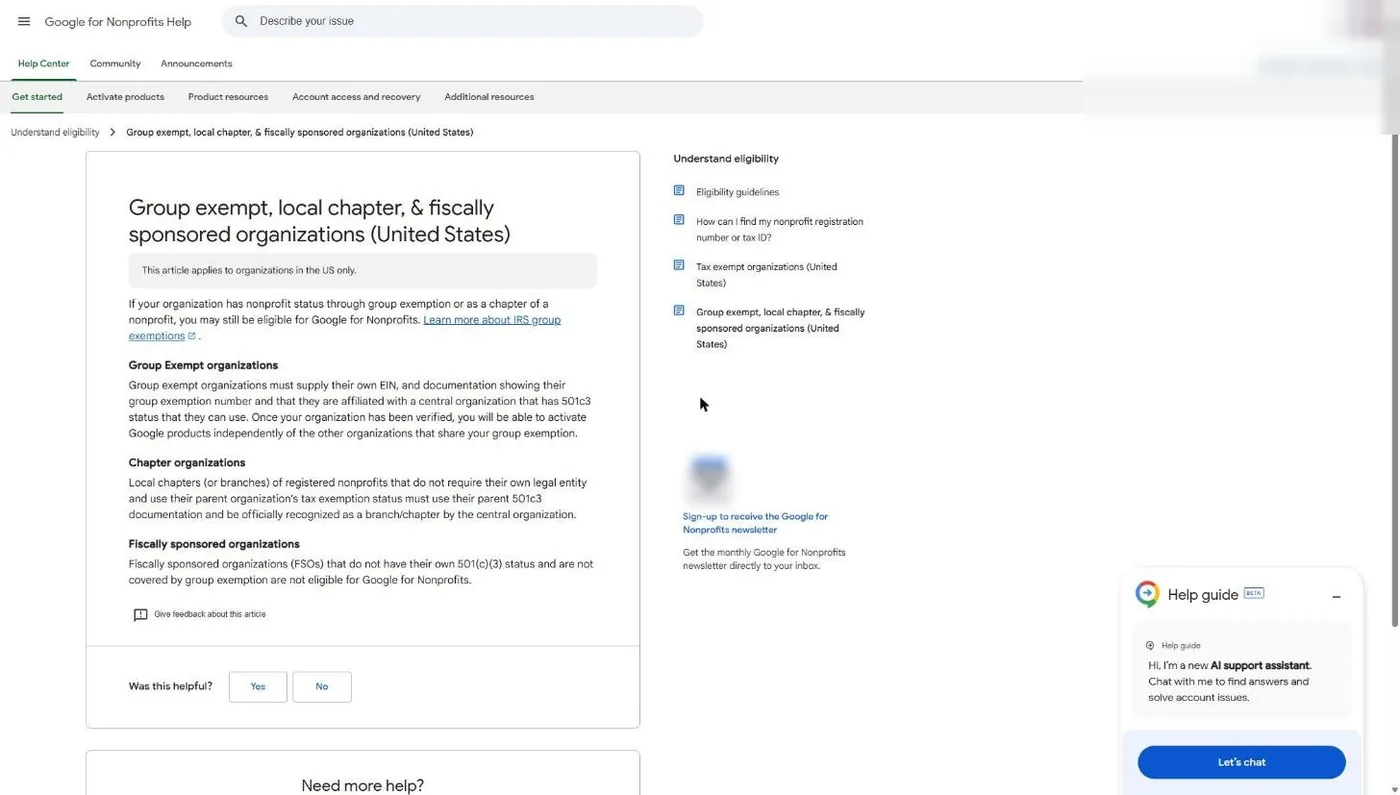
Bucket 4 needs one more sentence. Google says a chapter or branch with no legal entity of its own uses the parent’s 501(c)(3) documentation and must be officially recognized by the parent, while fiscally sponsored groups without their own status or a group exemption “are not eligible for Google for Nonprofits” (Google Help, verified November 5, 2026). If your plant is its own corporation, it belongs in bucket 2 or 3.
What does each program accept from a church?
Each program sets its own document rule, and the rules don’t match. The biggest trap: Google wants your church’s own EIN, while TechSoup wants your denomination’s EIN. Same church, two different numbers, depending on where you apply.
| Program (validator) | Own IRS letter | Group-exempt church | Which EIN | No letter at all |
|---|---|---|---|---|
| Google for Nonprofits (Goodstack) | Yes | Yes, with "documentation showing their group exemption number" and affiliation | Your church's own | Not eligible |
| TechSoup (QuickBooks, Adobe Creative Cloud) | Yes | Yes, with a Group Exemption Letter on denominational letterhead, signed | Your denomination's | Not eligible |
| Goodstack for other partners (Zoom, ChatGPT, Claude) | Yes, from its registry or an uploaded "tax exemption confirmation letter" | Not addressed in its help center; the partner decides | Yours; an EIN Verification Letter is "strongly recommended" | Can't verify if registration isn't required |
| Canva Nonprofits (Goodstack) | Yes, plus "governing documents showing your structure and charitable purpose" | Not addressed; Goodstack's document rules apply | Yours (Goodstack) | Can't verify (Goodstack's rule) |
| Microsoft 365 nonprofit (Microsoft, direct) | Yes ("recognized charitable status," 501(c)(3) in the US) | Not addressed on its eligibility page | Not stated; it asks for a "legal identifier" | Not stated; Microsoft decides "at its sole discretion" |
| Constant Contact (direct) | Yes, "Letter of Determination" only | Not mentioned | Not stated | "Tax Pay ID paperwork does not count" |
| Mailchimp (direct) | Yes; may ask for your 501(c)(3) letter | Not mentioned | Yours, added to the account | Not stated |
Sources: Google Help articles 2659443 and 1699858; TechSoup Support article 360030982713; Goodstack Help Center; Canva Nonprofits eligibility guidelines; Microsoft nonprofit eligibility and getting-started pages; Constant Contact Knowledge Base article 5374 (updated August 21, 2026); Mailchimp Help. All read November 5, 2026.
If you’re group-exempt, keep both EINs on file. And “not mentioned” doesn’t mean “no.” It means a human reviews your documents and you wait.
Path 1: Where is your church’s IRS determination letter?
If your church ever filed Form 1023 and was approved, you have an IRS determination letter, and that letter is the strongest proof a church can hold. Every program on this page accepts it.
Start by searching your church’s legal name or EIN in the IRS Tax Exempt Organization Search. If it shows up, you’re in bucket 1. Next, find the paper. Check the church safe, the treasurer’s files and the files of whoever handled the church’s founding paperwork.
Lost it? The IRS will send an affirmation letter that confirms your exempt status. Request it from IRS Customer Account Services by phone, letter or fax (IRS, checked November 5, 2026). The phone number is 877-829-5500 (IRS Publication 4573). A written request needs the church’s full legal name, EIN and a signature from an officer who states their title.
Path 2: How do I get a group exemption letter from my denomination?
Ask your denomination’s national office for two things: a copy of its IRS group exemption letter, and a signed letter on its letterhead confirming your church is a subordinate under that ruling. Together, that pair does the job a determination letter does.
Here’s why it works. IRS Publication 4573 says a group exemption letter “has the same effect as an individual exemption letter,” and that subordinates “do not receive individual exemption letters” (Rev. 10-2019). The same publication says subordinates “are not listed separately in Tax Exempt Organization Search,” and that the central organization, not the IRS, decides who’s included. So the IRS itself tells outsiders to check with your denomination. That’s the letter you’re asking for.
A real example: Foursquare churches
I serve as Executive Pastor at New Hope Hawaii Kai, which is a Foursquare church. Foursquare puts its rule in writing in its FAQ for churches joining by covenant: if a church “does not already have 501(c)(3) exempt status from the IRS, the church will be included in Foursquare’s group exemption” (Foursquare Covenant Church FAQ, revised August 31, 2023). The same FAQ tells churches sharing that status to contact Foursquare’s Corporate Secretaries office.
So for a church like ours, the proof runs through Foursquare’s group exemption, not an IRS letter with our name on it. Your denomination will have its own office and its own process. Many denominations have one; some independent fellowships don’t. Ask before you assume.
What to request (copy this)
Send this to your denomination’s national office (the legal, finance or corporate secretary team usually owns it):
We’re applying for nonprofit technology programs, including Google for Nonprofits and TechSoup. Please send: (1) a copy of the denomination’s IRS group exemption letter showing the group exemption number; (2) a letter on denominational letterhead, signed by an officer, confirming that [exact legal name of church], [street address], EIN [church EIN], is a subordinate included in the group exemption; (3) the denomination’s EIN; and (4) any directory listing or introduction packet page that lists our church.
Item 4 isn’t busywork. TechSoup says the group letter “must be composed on your national parent denomination’s letterhead and signed by a representative,” and that “a directory or introduction packet is typically included” (TechSoup Support, November 2026). Then register with the denomination’s EIN, as TechSoup instructs.
For Google for Nonprofits, use the same packet but your church’s own EIN. Google’s group-exempt article says these organizations “must supply their own EIN,” plus documentation of the group exemption number and the church’s affiliation with the 501(c)(3) central organization (Google Help, verified November 5, 2026). Once verified, your church activates Google products on its own, apart from other churches in the group. Full walkthrough in our Google for Nonprofits guide, and the TechSoup side is in TechSoup for churches.
Path 3: Should our church file Form 1023?
File Form 1023 if your church is independent, has no denomination with a group ruling, and wants nonprofit software pricing. A determination letter is the only proof that clears every program on this page. The question of whether it’s worth it for your church overall lives in our 501(c)(3) church guide.
The facts, all from the IRS and checked November 5, 2026:
- The fee is $600. The IRS user fee page says “The user fee for Form 1023 is $600” and that the amounts “are subject to change,” so confirm on the IRS user fee page before you pay.
- You file online. The IRS says “Organizations must electronically file this form,” and you submit and pay through Pay.gov (About Form 1023). The IRS Form 1023 FAQ says Pay.gov takes only one uploaded file, so combine your attachments into a single PDF.
- Churches can’t use the cheaper 1023-EZ. The $275 Form 1023-EZ (same IRS user fee page) is off the table: “If you are seeking recognition as a church, school, or hospital, you are not eligible to use Form 1023-EZ” (Instructions for Form 1023-EZ, revised January 2025).
- No published turnaround. The IRS says it “processes applications in the order we receive them” and doesn’t post a timeline. Expedited handling needs a “compelling reason.” Don’t promise your staff a date.
A heads-up on bad advice: plenty of articles online still list the 1023-EZ as an option for churches. The IRS instructions say otherwise.
What is IRS Letter 147C, and does it prove nonprofit status?
No. Letter 147C and the CP 575 notice prove your church has an EIN and that the name on file matches it. They say nothing about tax exempt status, and Goodstack warns applicants not to confuse an EIN letter with a determination letter.
- CP 575 is the notice the IRS sends when it first assigns an EIN. The IRS says eligible Business Tax Account users can download a digital copy (IRS EIN page, November 2026).
- 147C is the EIN verification letter you request later if the CP 575 is gone. The IRS Business and Specialty Tax Line is 800-829-4933, open Monday to Friday, 7 a.m. to 7 p.m. local time. If your church office is in Hawaii like ours, note the IRS line: “Residents of Alaska and Hawaii should follow Pacific time.”
These letters still matter. Goodstack says that for US organizations, “providing an EIN Verification Letter is strongly recommended” to confirm you’re connected to the organization. Pair it with a determination or group letter. Never send it alone.
Why was my church rejected?
Most church rejections come down to a mismatch: the name, EIN, address or email on your application doesn’t match the documents behind it. Validators compare everything, and small differences sink applications.
| Rejection or snag | What usually caused it | The fix |
|---|---|---|
| Organization not found | Church never applied, so it's not in TEOS | Use the group exemption path, or file Form 1023 |
| Name mismatch | You typed "Grace Church" but the legal name is "Grace Community Church of Smithville, Inc." | Use the exact legal name from your articles of incorporation and IRS records |
| EIN doesn't match | Group-exempt church used the wrong number for that program | Own EIN for Google; denomination's EIN for TechSoup |
| Address mismatch | IRS or state records show an old office or a pastor's home | Apply with the address on record, then update the IRS and state separately |
| Association not confirmed | Applicant used a personal Gmail or isn't listed on the church site | Apply from a church-domain email; otherwise get a role letter signed by a board member, director or officer |
| Verification email never arrived | Goodstack wrote to an old staff address it found on your website | Remove dead addresses from the site and check spam before applying |
| Only the denomination's letter sent | Nothing ties your specific church to the group ruling | Add the signed letterhead letter that names your church |
| Documents refused | Scans, screenshots, redactions, or documents dated within the last 30 days | Send original unredacted PDFs; organization and bank documents dated more than 30 days before you apply |
| Application expired | Email check or extra documents not finished within 30 days | Start over and finish every step inside 30 days |
Sources: Goodstack Help Center (rejected applications; association documents); Google Help article 12016036 on personal email addresses; TechSoup Support. Read November 4-5, 2026.
The email problem is the easiest one to prevent. If your pastor applies from a personal Gmail, Google says Goodstack may ask for an official letter signed by a board member, director or executive officer confirming the role. A church-domain address skips that step. And watch the name: Foursquare’s FAQ notes a church can keep its existing legal name even if it calls itself a Foursquare church. Validators check the legal one.
The church nonprofit status document checklist
Gather everything below into one shared folder before your first application. Print it, hand it to your admin, and check items off as they come in.
Church Nonprofit Proof Checklist
Last verified: November 5, 2026. Keep originals as PDFs, unredacted.
Every church
☐ Exact legal name (from articles of incorporation or state record)
☐ Church EIN, plus CP 575 notice or 147C EIN verification letter
☐ Physical address that matches IRS and state records
☐ Applicant email on the church's own domain
☐ Church website lists current staff contacts only (no dead addresses)
If your church has its own IRS letter
☐ IRS determination letter, or an IRS affirmation letter if lost
☐ Confirmed listing in IRS Tax Exempt Organization Search
If your church is under a denomination's group exemption
☐ Copy of the denomination's IRS group exemption letter (with group exemption number)
☐ Signed letter on denominational letterhead naming your church as a subordinate
☐ Directory listing or introduction packet page showing your church
☐ Denomination's EIN (for TechSoup) and your church's own EIN (for Google)
For Goodstack's association check
☐ One signed church document dated 30+ days back (board minutes, bylaws or an employment letter)
☐ One original electronic PDF bank statement dated 30+ days back, showing the legal name
☐ Role letter signed by a board member or officer, if applying from a personal email
With this folder done, the rest is clicking. Google for Nonprofits opens the door to Google Workspace’s $0 nonprofit edition and the Google Ad Grant’s “$10,000 USD of in-kind advertising every month for text ads” (Google, November 2026). TechSoup is where churches request QuickBooks Online; see QuickBooks for nonprofits. If the Ad Grant is your goal, our Google Ad Grant guide covers what comes after approval, and our Google Grant team can run it for you.
Frequently Asked Questions
Got your proof together? See if your church qualifies for the Google Ad Grant.
The same paperwork that gets you through Google for Nonprofits is the first gate for $10,000 a month in Google search ads. Our free checker walks through the rest of the requirements in a couple of minutes.