Every list of nonprofit software discounts on the internet is written for food banks and animal shelters. None of them answers the question a pastor or church admin actually has: will they take a church?
So we checked. On November 5, 2026, we opened 42 programs on the vendors’ own pages and read the eligibility rules line by line. Most of the big ones accept churches. Two exclude churches by name. And a church that gets turned down usually loses on paperwork, not policy.
I’m Thomas Costello. I’ve run REACHRIGHT, a marketing agency that serves only churches, since 2016, and I’m the Executive Pastor at New Hope Hawaii Kai, a Foursquare church covered by our denomination’s group exemption. That setup is the one most likely to confuse a software company’s verification partner, so I wrote this guide with it in mind.
Bookmark this page. Use the matrix to see who will take your church, then follow the start order further down so you don’t waste an afternoon on an application that was never going to clear.
Do churches qualify for nonprofit software discounts?
Yes. Most major nonprofit software programs accept churches, including Google for Nonprofits, Microsoft 365, Canva Nonprofits, Adobe, Claude and ChatGPT, as of November 2026. The catch is proof: nearly every program wants IRS recognition of 501(c)(3) status, and many churches have never asked the IRS for it.
The IRS treats churches as tax exempt automatically, so most never file for a determination letter. That’s fine for your donors. It’s a problem for a software vendor, because the vendor’s checker looks your church up in the IRS database and finds nothing. Google’s own help article spells it out: churches “are automatically considered tax exempt,” but organizations not listed in the IRS’s online publication of exempt organizations “aren’t eligible” (Google for Nonprofits Help, read November 5, 2026).
Of the 42 programs in our matrix, 17 accept churches on the same terms as any 501(c)(3), 18 add a real condition, 2 exclude churches outright, 3 have no nonprofit program at all, and 2 publish a discount with no eligibility rules.
Most software companies will give a church the nonprofit discount. The church that gets rejected usually has a paperwork problem, not a policy problem: fix the proof of 501(c)(3) status once, and most of these programs open up.
The eligibility matrix: every program, checked for churches
The matrix below lists 42 nonprofit software programs, what a church gets from each, the price as of November 5, 2026, whether churches qualify, and who checks your paperwork. Verdicts come from the eligibility page of each vendor, read in a live browser that day. Where we have a full step-by-step guide, it’s linked in the last column.
How to read the verdicts:
- Accepts churches The vendor’s page sets a 501(c)(3) test and names no religious exclusion. A church with proof qualifies.
- Conditional A real extra test: a budget cap, a donation-share rule, one specific document, TechSoup’s church rules, a nondiscrimination clause, or a vague definition of “nonprofit.”
- Excludes churches The vendor names churches as ineligible.
- No program No nonprofit discount exists.
- Rules not published The discount is on the vendor’s page; eligibility rules are not. Ask before you pay.
| Program | What a church gets | Price or value (Nov 2026) | Churches? | Who verifies | Guide |
|---|---|---|---|---|---|
| Google and Microsoft | |||||
| Google for Nonprofits | The account that gives access to Workspace, Ad Grants and Google's other nonprofit products | Free | Accepts churches | Goodstack | Guide |
| Google Workspace for Nonprofits | Gmail, Drive, Meet and Docs on your church domain, plus the Gemini app and NotebookLM (Gemini inside Gmail and Docs is not on the $0 edition); up to 2,000 users on the first three tiers | $0 edition; Business Standard $3.50 and Business Plus $6.16 per user/month (1-year commitment) | Accepts churches | Goodstack | Guide |
| Google Ad Grants | Search ads on Google, paid for by Google | $10,000 in-kind advertising per month | Accepts churches | Goodstack (via Google for Nonprofits) | Guide |
| YouTube Nonprofit Program | Link Anywhere cards that point viewers to your giving or sign-up page, plus creator support | Free | Conditional needs Google for Nonprofits approval first | Google for Nonprofits (Goodstack) | Guide |
| Microsoft 365 nonprofit plans | Email and Office apps; free grants cover paid staff and unpaid executives, discounted licenses cover volunteers too | Business Basic free up to 300 users; Standard $3.50; Premium $5.50 per user/month (annual) | Accepts churches | Microsoft, at its "sole discretion" | Guide |
| Design, video and documents | |||||
| Canva Nonprofits | Canva Pro features for your team | Free for up to 50 users | Accepts churches | Goodstack | Guide |
| Adobe Express Premium | Quick graphics, social posts, flyers | Free to qualified 501(c)(3)s | Accepts churches | Adobe (verification email) | Guide |
| Adobe Acrobat Pro | PDF editing and e-signatures | $15 per year; reapply every year | Accepts churches | Adobe (verification email) | Guide |
| Adobe Creative Cloud | Photoshop, Premiere and the full suite | Discounted through TechSoup (TechSoup sets the fee) | Conditional | TechSoup church rules | Guide |
| Descript | Video and podcast editing for sermon clips; up to 3 editor seats | $8 per editor/month annual, $12 monthly | Accepts churches | Descript, by application form | Descript page |
| Vimeo | Video hosting; US nonprofits, self-serve plans only | One-time 25% off code | Accepts churches | Vimeo support (asks for 501(c)(3) forms) | Vimeo page |
| Figma | Design tool | No nonprofit discount; free Starter plan open to anyone | No program | n/a | n/a |
| AI tools | |||||
| Claude for Nonprofits | Claude Team plan for staff | $8 per user/month, 2-seat minimum | Accepts churches | Goodstack | Guide |
| ChatGPT for Nonprofits | ChatGPT Business Standard seats (Premium seats not discounted) | $8 per user/month annual, $10 monthly | Accepts churches | Goodstack | Guide |
| Meetings, chat and project tools | |||||
| Zoom Cares | 50% off Workplace, Large Meetings and Webinars | Workplace Pro $7.08 per user/month annual (list $14.16) | Conditional budget of $10M or less | Goodstack | Guide |
| Slack for Nonprofits | Free Pro up to 250 members; 85% off above that and on Business+ | Not available to churches | Excludes churches | TechSoup | Guide |
| Airtable | 50% off Team plans ($12 per collaborator/month) | Not available to churches | Excludes churches | Airtable | Guide |
| Atlassian (Jira, Confluence) | Community and discounted licenses | 50% to 100% off | Accepts churches | Goodstack; Atlassian has sole discretion | Guide |
| monday.com | Project boards for staff and ministry teams | First 10 seats free; 70% off from seat 11; Enterprise 33% off | Conditional page silent on churches | Goodstack definitions; sole discretion | Guide |
| Asana | Project management | 50% off a paid plan for as long as you stay | Conditional verifiers' anti-discrimination policies apply | Goodstack | Guide |
| Notion | Docs and wikis for staff | 50% off the Business plan only; up to 3 workspaces | Accepts churches page silent on religion | Notion, in house (3 to 7 business days) | Guide |
| Zapier | Automation between apps | 15% off a single plan | Rules not published | Not stated | Zapier page |
| DocuSign | E-signatures for contracts and forms; annual plans only | 30% off eSignature; 50% off IAM plans (first 25 seats) | Accepts churches | Goodstack | DocuSign page |
| Money: accounting and giving | |||||
| QuickBooks Online (via TechSoup) | Donated 1-year subscription; one per organization, ever | Plus (5 users) $80/year admin fee; Advanced (25 users) $170/year | Accepts churches | TechSoup | Guide |
| PayPal charity rate | Lower card fees on donations | 1.99% + $0.49 per domestic charity transaction | Conditional PayPal pre-approval | PayPal | Guide |
| Stripe nonprofit discount | Lower processing fees | Rate not published | Conditional 80% of volume must be donations | Stripe | Guide |
| Square | Card readers and online payments | Standard 2.6% + 15¢ per tap, dip or swipe | No program | n/a | Guide |
| Facebook and Instagram fundraising | Donate buttons, nonprofit fundraisers and Instagram Support button; donations granted by PayPal Giving Fund | 1.99% + $0.49 per US donation (Meta covers fees on fundraisers supporters start) | Accepts churches PayPal Giving Fund lists religious institutions | PayPal Giving Fund, then Meta | Guide |
| CRM and business apps | |||||
| Zoho for Nonprofits | Credit across Zoho apps; Zoho pays half of each purchase | One-time $5,000 credit, valid 5 years | Conditional TechSoup token or US documents | TechSoup token, or documents sent to Zoho (7 to 10 business days) | Zoho page |
| HubSpot for Nonprofits | Professional and Enterprise tiers; new customers only, 1-year contract | 40% off list | Conditional new customers; mission nondiscrimination policy | HubSpot | Guide |
| Salesforce Power of Us | 10 Nonprofit Cloud or Sales/Service Cloud licenses | Free | Conditional religious nonprofits listed; IRS determination letter required | Salesforce, at its "sole discretion" | Guide |
| Email and social media | |||||
| Mailchimp | Discount on marketing plans; request before you buy | 15% off | Conditional EIN, may ask for 501(c)(3) letter | Mailchimp billing | Guide |
| Constant Contact | Prepay discount; none on monthly billing | 20% off 6-month prepay; 30% off 12-month prepay | Conditional federal Letter of Determination only | Constant Contact billing | Guide |
| Hootsuite | Social media scheduling | Up to 60% off | Conditional hiring nondiscrimination clause | Goodstack | Guide |
| Buffer | Social media scheduling | 50% off | Conditional manual review, page silent on churches | Buffer, by hand | Guide |
| Sprout Social | Social media management; 2-seat minimum, annual only | Professional $239 (vs $299); Advanced $299 (vs $399) per seat/month | Accepts churches US 501(c)(3)s | Sprout Social | Sprout page |
| LinkedIn for Nonprofits | Talent, Learning, Fundraising and Sales Navigator contracts; not Premium, not ads | Up to 50% off | Conditional anti-discrimination attestation | LinkedIn FAQ | |
| Flodesk | Email marketing | No nonprofit discount on paid plans | No program | n/a | n/a |
| Website builders | |||||
| Wix | 2-year Premium plan for one site plus a 1-year domain; renews at the standard rate | 70% off | Conditional TechSoup members only | TechSoup | Wix page |
| Squarespace | Code NONPROFIT at checkout | 10% off the first payment | Rules not published | None stated | Squarespace page |
| Marketplace | |||||
| TechSoup | Donated and discounted software and hardware (QuickBooks, Adobe Creative Cloud, Microsoft, Dell) | Free to join; admin fee per request; optional $200/year Plus membership | Conditional IRS-recognized 501(c)(3) only | TechSoup | Guide |
| Amazon Business | Sales tax exemption on purchases through the Amazon Tax Exemption Program; no nonprofit price discount | Free account; tax savings depend on your state | Conditional state exemption certificate required | Amazon, against your state certificate | Guide |
Sources: each vendor's nonprofit or eligibility page, read November 5, 2026. Google Ad Grants appears in the count with Google for Nonprofits as two rows because you activate them separately. DocuSign's percentages come from Goodstack's DocuSign offer page; Salesforce's verdict comes from its Power of Us eligibility guidelines, which list religious nonprofits among those considered. Prices change often; confirm on the vendor's page before you budget.
Two patterns jump out of that table. First, the programs that matter most to a church staff (email, documents, design and AI) all accept churches. Second, the gatekeeper matters more than the vendor: Goodstack checks for Google, Canva, Claude, ChatGPT, Zoom, Atlassian, Asana, DocuSign and Hootsuite, and TechSoup checks for QuickBooks, Adobe Creative Cloud, Wix and Slack. Pass those two and most of the matrix follows.
What changed in 2025-2026?
Nonprofit software programs changed more in the last 18 months than in the five years before. Microsoft ended its free Business Premium grant, Zoom left TechSoup, and three companies dropped or disavowed religious restrictions after legal pressure in 2025. If you read a guide written before mid-2025, some of what it told you is now wrong.
| What changed | When | What it means for your church |
|---|---|---|
| Microsoft ended the free 10-seat Business Premium grant | At renewals on or after July 1, 2025 | Business Basic is still free for up to 300 users. Premium now costs $5.50 per user/month on Microsoft's nonprofit page. |
| Zoom's nonprofit offer left TechSoup | May 2025 (TechSoup Help Center) | Apply through Zoom Cares and Goodstack instead. Old TechSoup coupon codes don't apply. |
| OpenAI removed its religious exclusion | Settlement announced July 16, 2025 | OpenAI's help article has no religious language as of November 2026. Churches can get ChatGPT Business Standard seats at $8. |
| Asana removed its religious exclusion | Settlement in April 2025 | Asana's nonprofit page no longer mentions religion. Goodstack verifies, and Asana still screens against its verifiers' anti-discrimination policies. |
| Microsoft agreed not to discriminate against religious nonprofits | Signed October 10, 2025; reported November 2025 | The only religious exclusion left on Microsoft's eligibility page is for India. US churches qualify. |
| QuickBooks Desktop disappeared from TechSoup | February 2026 | Only QuickBooks Online Plus and Advanced remain. Intuit's own FAQ now points churches to those two plans through TechSoup. |
| Atlassian's page no longer lists a religious category | Seen November 5, 2026 | Older guides (including our own research notes) said Atlassian excluded places of worship. The live page doesn't. |
| monday.com's old exclusion article is gone | Seen November 5, 2026 | The support article that excluded religious organizations now returns "page doesn't exist." The current eligibility page is silent on churches. |
| Adobe Express and Acrobat run direct from Adobe | In place as of November 2026 | Apply on adobe.com for Express (free) and Acrobat Pro ($15/year). Creative Cloud still goes through TechSoup. |
Sources: Microsoft nonprofit pricing and eligibility pages; TechSoup Help Center, "Zoom for Nonprofits No Longer Available"; OpenAI Help Center; Alliance Defending Freedom case pages (Holy Sexuality v. OpenAI and v. Asana); Asana nonprofit page; Bloomberg, November 14, 2025; TechSoup "Discontinued QuickBooks Desktop"; Atlassian and monday.com nonprofit pages; Adobe nonprofit pages. Live pages read November 5, 2026.
The Asana, OpenAI and Microsoft changes all came out of legal pressure from Alliance Defending Freedom: lawsuits on behalf of a Christian ministry against Asana and OpenAI, and a shareholder agreement with Microsoft (Bloomberg, November 14, 2025).
Which software companies exclude churches from their nonprofit programs?
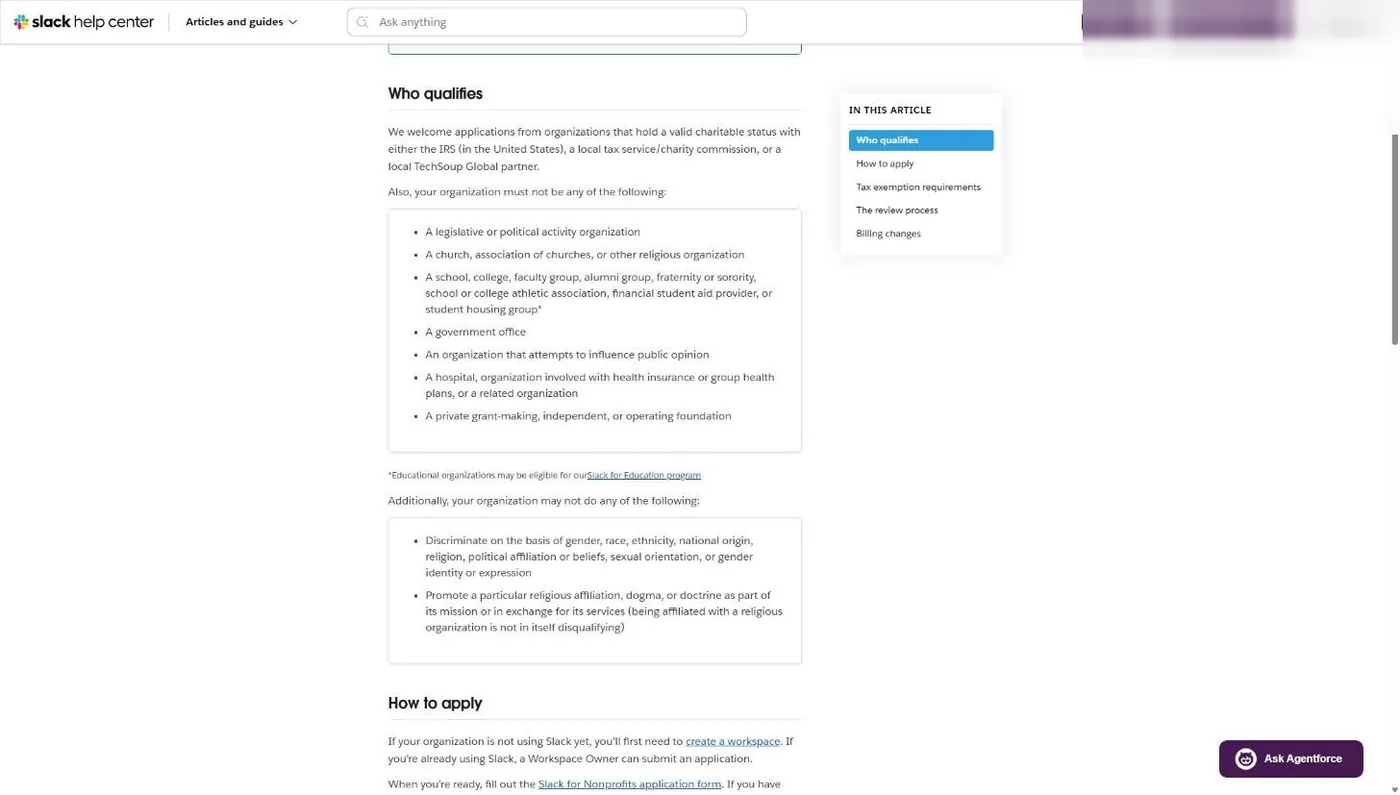
Two programs exclude churches by name as of November 5, 2026: Slack and Airtable. Both use nearly identical wording that rules out “a church, association of churches, or other religious organization.” Square isn’t an exclusion; it has no nonprofit rate for anyone.
Slack’s help center lists churches among the organizations its nonprofit program won’t serve. It also excludes groups that promote “a particular religious affiliation, dogma, or doctrine as part of its mission,” while noting that being affiliated with a religious organization isn’t disqualifying by itself. A ministry with a secular community mission might clear that bar. A church won’t.
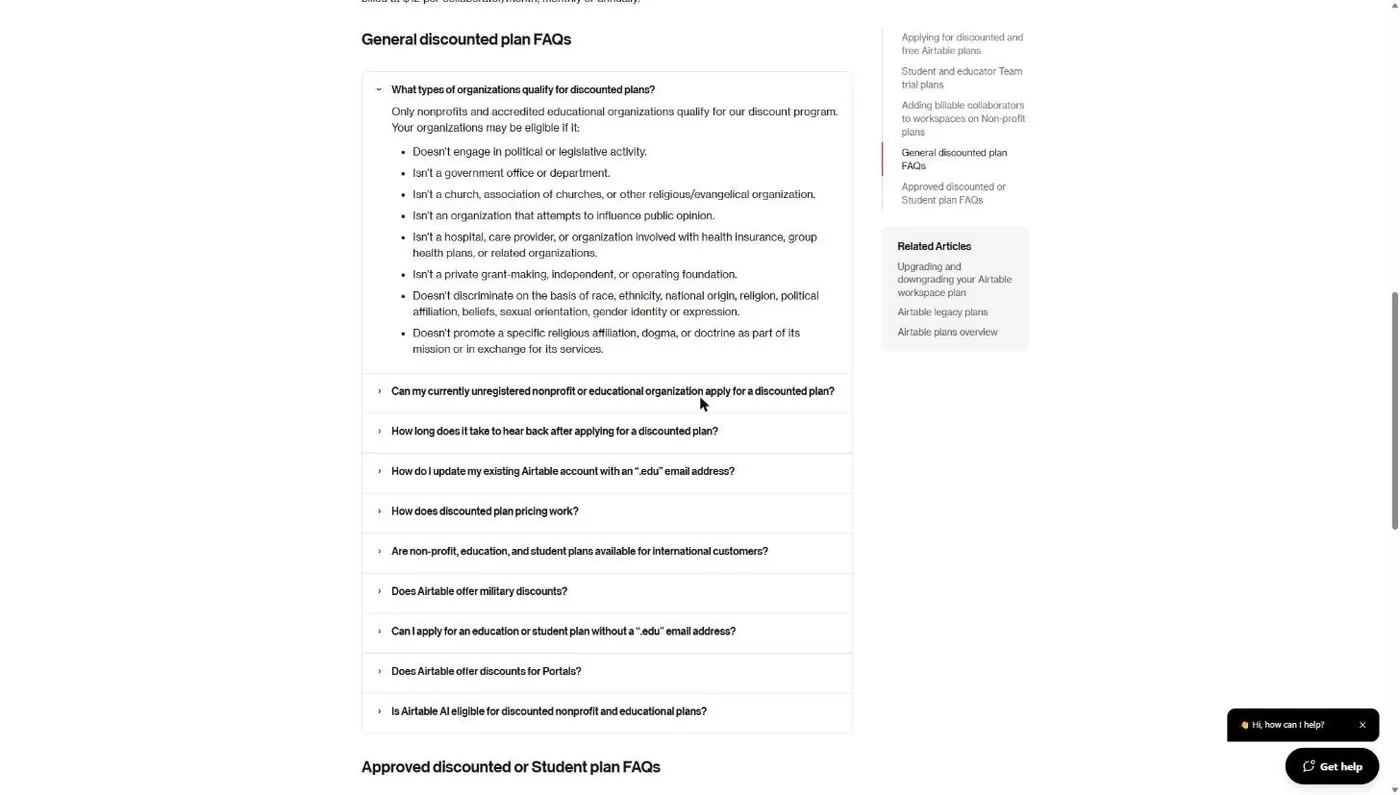
Airtable’s nonprofit FAQ says an eligible organization “isn’t a church, association of churches, or other religious/evangelical organization.” The discount it’s withholding is 50% off Team plans.
I’m not going to tell you to be angry about it. Slack and Airtable are private companies and they get to set their terms. The point is to save you the afternoon you’d spend applying. Here’s what to use instead.
| Program | Church status (Nov 5, 2026) | Use instead |
|---|---|---|
| Slack | Excludes churches | Slack's free plan, or the chat and video tools in the Google or Microsoft suite you get through their nonprofit programs. Full breakdown in our Slack for churches guide and our church team communication guide. |
| Airtable | Excludes churches | monday.com (first 10 seats free, page silent on churches) or Atlassian (page lists no religious exclusion). Google Sheets inside Workspace for Nonprofits covers simple tracking. |
| Atlassian | Accepts churches | Apply. Goodstack still verifies, and Atlassian keeps sole discretion. |
| monday.com | Conditional | Apply. The religious exclusion older guides cite is no longer on monday.com's site. |
| Square | No program | PayPal's 1.99% charity rate or Stripe's nonprofit discount. See our nonprofit payment processing rates guide and our online giving comparison. |
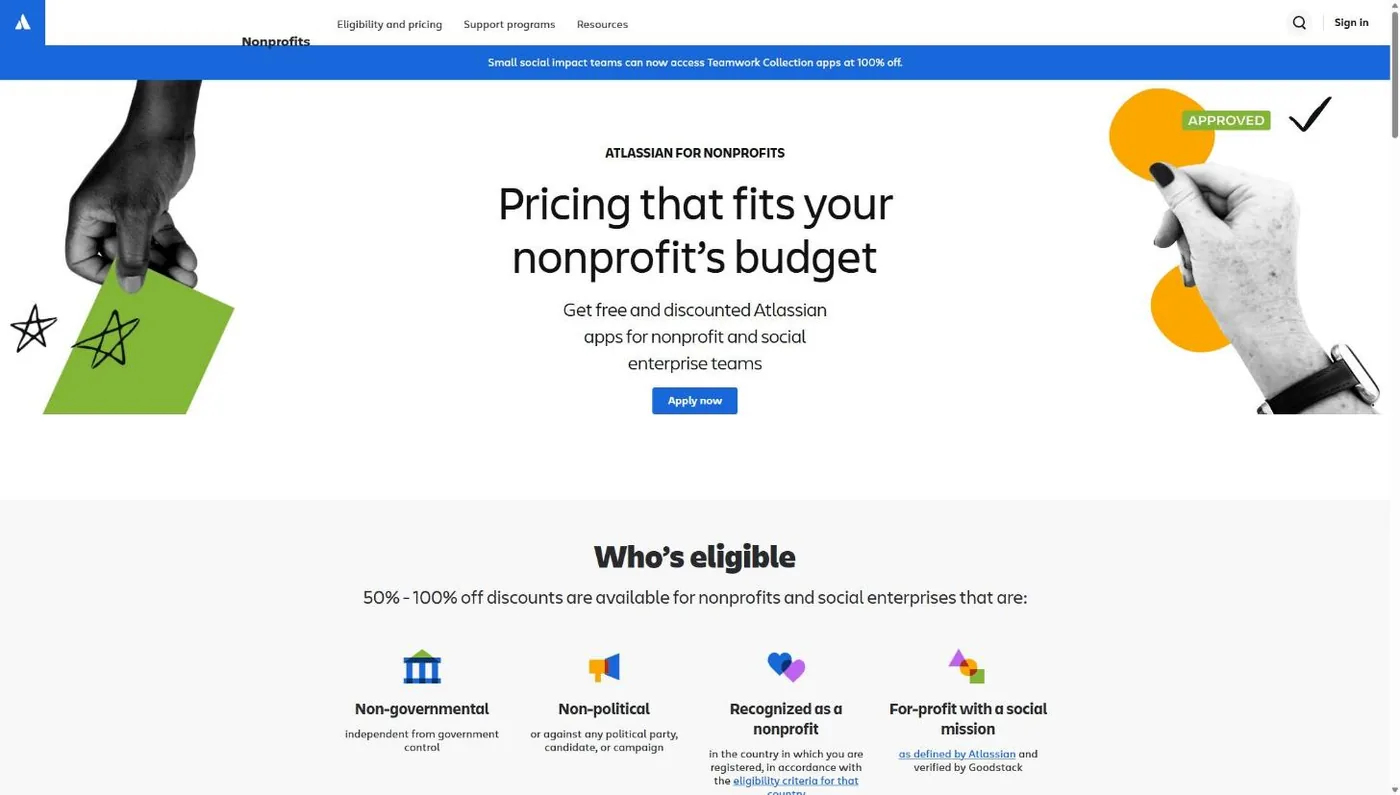
A word on Atlassian, because you’ll see it listed as a church excluder elsewhere. Our own earlier research said the same thing. On November 5, 2026, Atlassian’s “list of non-eligible organization types” covered associations, fraternities, hospitals, government, schools, pro sports and endowment funds. No place-of-worship or religious category appeared.
A few smaller caveats belong here. Hootsuite won’t serve organizations with a policy of discrimination in hiring based on religion, among other categories, so a church that hires only believers could get flagged. LinkedIn makes you attest to its anti-discrimination policy, with an exception for religious organizations that are exempt from the laws prohibiting that discrimination. HubSpot won’t discount an organization whose mission promotes opposition to protected groups, and Asana warns that groups outside its verifiers’ anti-discrimination policies “may not be eligible.” None of these is a church ban, but all are worth knowing before you apply.
Do churches qualify without a 501(c)(3) letter?
Usually not. Google for Nonprofits, TechSoup and Goodstack all need proof that the IRS recognizes your church, and an automatically exempt church with no letter can’t show that. A church under a denomination’s group exemption can still qualify by using the denomination’s group exemption letter plus proof that the church is covered.
Here is how each gatekeeper puts it, in its own words:
- Google: “organizations must obtain recognition of 501(c)(3) tax-exempt status from the IRS.” A group-exempt church “must supply their own EIN,” plus documents showing the group exemption number and its tie to the central organization.
- TechSoup: “Places of worship that are automatically tax-exempt, or self declare, are not eligible.” A group exemption letter must come from an officer of your national denomination, on its letterhead, and TechSoup uses the parent denomination’s EIN.
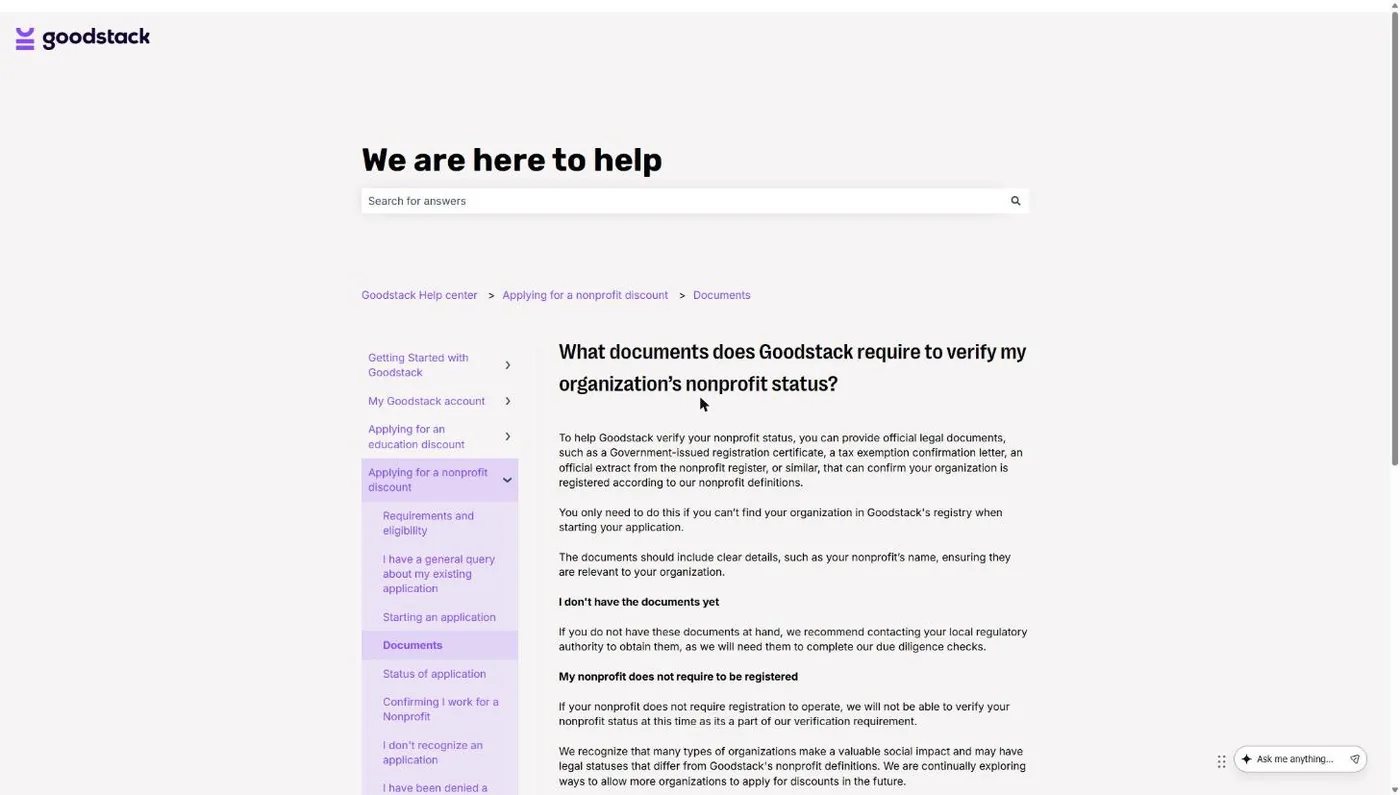
- Goodstack: if your nonprofit “does not require registration to operate,” Goodstack says it “will not be able to verify your nonprofit status.”
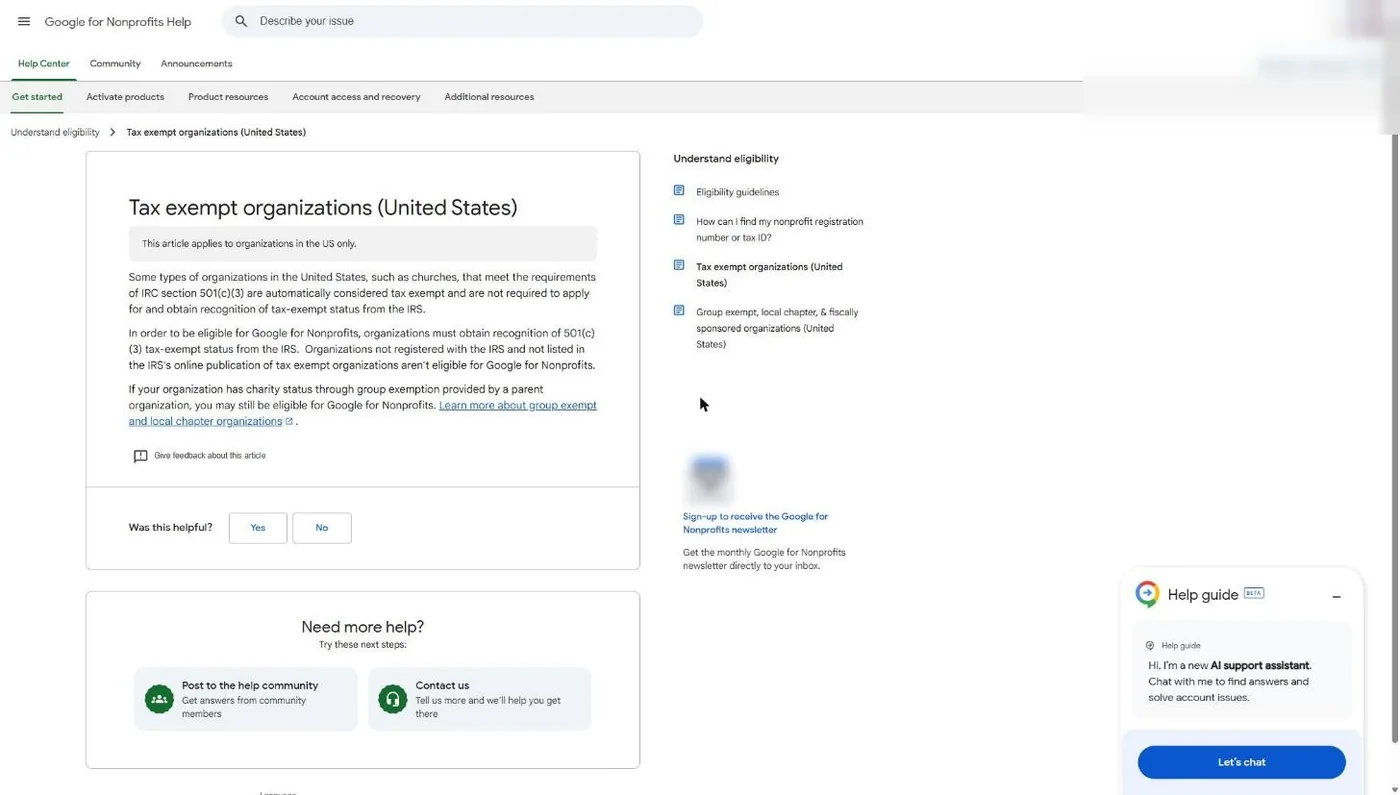
Notice the EIN split. Google wants your church’s own EIN with the group documents. TechSoup wants your denomination’s EIN. Mix those up and you’ll get a rejection that makes no sense until you see it.
So a church sits in one of three places. If you have your own IRS determination letter, you’re in the easy lane. If you’re covered by a denomination’s group exemption (Foursquare, Assemblies of God, many Baptist and Methodist bodies), you need the group letter plus a letter from the denomination naming your church. If you’re independent with no letter, the clean fix is filing Form 1023 with the IRS; churches can’t use the shorter 1023-EZ.
Our foundation guide, how to prove your church is a nonprofit, walks through all three paths with a document checklist. If your board is still deciding whether to pursue IRS recognition at all, start with our 501(c)(3) church guide.
What is the difference between TechSoup and Goodstack?
Goodstack (formerly Percent) is a verification service that software companies hire to check whether you’re a real nonprofit; it doesn’t sell anything. TechSoup is a nonprofit marketplace that verifies you and then sells donated or discounted products for an admin fee. Both apply stricter proof rules than the IRS applies to churches.
| Goodstack | TechSoup | |
|---|---|---|
| What it is | Verification partner, built into each vendor's sign-up | Membership marketplace with its own catalog |
| Programs in our matrix that use it | Google, Canva, Claude, ChatGPT, Zoom, Atlassian, Hootsuite, Asana, DocuSign | QuickBooks Online, Adobe Creative Cloud, Slack, Wix; a token option for Zoho |
| What a group-exempt church needs | Registry match or status documents; for Google, the church's own EIN plus group exemption documents | Group exemption letter on denominational letterhead, signed; uses the parent's EIN |
| Proof of your role | Original PDFs; an IRS EIN Verification Letter is "strongly recommended" in the US | Member account in a real person's name; work email recommended |
| Cost | Free to the church | Free to join; admin fee per product (QuickBooks Online Plus: $80/year) |
| Speed | Goodstack says it processes applications within 72 hours; partners add their own review (Google: typically 2 to 14 business days) | "Typically completed within two business days" |
Sources: Goodstack Help Center; TechSoup Help Center; Google for Nonprofits Help; Claude for Nonprofits page. Read November 5, 2026.
One more Goodstack rule worth knowing: the eligibility decision belongs to the vendor, not Goodstack. In Goodstack’s words, “Eligibility guidelines are set by the partner and are specific to their program.” Passing Goodstack for Google doesn’t guarantee a yes from Zoom.
Our guides to what Goodstack is and TechSoup for churches cover each process step by step, including the rejection reasons and fixes.
Where should a church start?
Start with your paperwork, then Google, then everything else. Google for Nonprofits is free, it runs on Goodstack, and it’s the gate to the two most valuable programs in the matrix: Google Workspace and the $10,000-a-month Google Ad Grant. Once your documents work there, they tend to work elsewhere.
- Prove your status. Find your IRS determination letter, or ask your denomination for its group exemption letter and a letter naming your church. Gather your IRS EIN letter and a bank statement in the church’s legal name (Goodstack wants documents dated more than 30 days before you apply). Use the checklist in how to prove your church is a nonprofit.
- Get through Goodstack once. You’ll meet it inside Google’s sign-up. Use a church email address, not a personal Gmail, and enter your legal name exactly as it appears on your IRS documents. Our Goodstack guide shows each screen.
- Apply for Google for Nonprofits. Follow our Google for Nonprofits guide, then activate Google Workspace for Nonprofits and the Ad Grant. If your church already runs on Microsoft, apply for Microsoft 365 nonprofit pricing instead.
- Add the design and AI tools. Canva Nonprofits, Adobe Express and Acrobat, and one AI tool: Claude for Nonprofits or ChatGPT for Nonprofits.
- Join TechSoup if you need QuickBooks or Creative Cloud. Our TechSoup guide and QuickBooks for Nonprofits guide cover the admin fees and the one-subscription-per-organization rule.
- Pick up the rest as you need them. Zoom Cares, email and social media discounts, and payment processing rates.
The Ad Grant deserves its own sentence. It’s $10,000 a month in search ads, and Google has its own rules for keeping it. Our Google Ad Grant guide covers them, and if you’d rather not run the account yourself, that’s what our Google Grant management service does.
How much can a 10-staff church save with nonprofit software programs?
A 10-staff church can save about $3,600 a year with five common programs, based on list prices and nonprofit prices published on the vendors’ own pages on November 5, 2026. That’s an estimate. Your number depends on seat counts, which tools you’d actually buy, and whether a vendor is running a promotion.
I priced like for like, tool by tool: the same plan at list price versus nonprofit price, with every list price read on the vendor’s own page on November 5, 2026.
| Tool and seats | List price per year | Nonprofit price per year | Saved |
|---|---|---|---|
| Google Workspace Business Standard, 10 users | $14 x 10 x 12 = $1,680 | $3.50 x 10 x 12 = $420 | $1,260 |
| QuickBooks Online Plus, 1 subscription (5 users) | $140 x 12 = $1,680 | $80 TechSoup admin fee | $1,600 |
| Claude Team, 3 users | $20 x 3 x 12 = $720 | $8 x 3 x 12 = $288 | $432 |
| Adobe Acrobat Pro, 1 user | $239.88 | $15 | $224.88 |
| Zoom Workplace Pro, 1 license | $14.16 x 12 = $169.92 | $7.08 x 12 = $84.96 | $84.96 |
| Estimated total | $4,489.80 | $887.96 | $3,601.84 |
Estimate. List prices: Google Workspace pricing page (Business Standard, $14 per user/month, not counting any introductory promo); Intuit's QuickBooks nonprofit page (Plus, $140/month, before its public 3-month promo); Claude pricing page (Team standard seat, $20 per user/month billed annually); Adobe Acrobat pricing page (Acrobat Pro individual, $239.88 annual prepaid); Zoom Cares page (Workplace Pro, $14.16 per user/month annual). Nonprofit prices: each vendor's nonprofit page and TechSoup. All read November 5, 2026.
A few things that number leaves out, on purpose:
- Canva Nonprofits and Adobe Express Premium are free for qualifying churches, but I couldn’t confirm either list price on the vendor’s own pricing page, so they add $0 to the total. Your real savings are higher.
- The $0 Google Workspace edition. Many churches can run on it. If yours can, you’d pay nothing for Google, but I compared Business Standard to Business Standard to keep the math honest.
- The Google Ad Grant. $10,000 a month in ads is worth far more than everything in this table, but it’s advertising, not a software bill you’d otherwise pay. I didn’t count it.
If your church already pays for any of these at list price, that’s money you can move back into ministry this year.
What if your church can’t qualify yet?
If your church has no IRS recognition and no group exemption, plenty of good software is free to everyone. You don’t need to prove anything to use a free plan. Slack and Figma both have free plans, and many church tools offer a free tier built for small congregations.
We keep a separate, regularly checked list of those in our free church software guide, with the real limits of each free plan. Use those while you work on your paperwork, then come back to this matrix when your letter arrives. For accounting specifically, our church accounting software comparison covers paid and free options side by side.
Frequently asked questions
Cheaper software won't bring a single new family through your doors
The tools on this page cut your costs. Reaching your neighbors is a different job. Get a free Church Marketing Review: we'll look at your website, your local search presence and how your church shows up when people nearby go looking, then give you a straight assessment and clear next steps.
Get My Free Church Marketing Review →
Going after the $10,000-a-month Google Ad Grant? Check whether your church is likely to qualify before you apply.
Every guide in this series
- How to Prove Your Church Is a Nonprofit - Step 0 for every program on this page.
- What Is Goodstack? - The verification service behind Google, Canva, Claude and Zoom.
- Google for Nonprofits - How a church applies, step by step.
- Google Workspace for Nonprofits - Tiers, prices and setup for church staff.
- TechSoup for Churches - Registration with a group exemption letter.
- Canva for Nonprofits - Canva Pro features free for up to 50 users.
- Microsoft 365 for Nonprofits - What’s free now that the Premium grant is gone.
- Adobe for Nonprofits - Express, Acrobat and Creative Cloud.
- QuickBooks for Nonprofits - The TechSoup route for churches.
- Claude for Nonprofits and ChatGPT for Nonprofits - The $8 AI plans.
- Zoom for Nonprofits - Zoom Cares after TechSoup.
- Slack for Churches - Why churches are excluded and what to use.
- Nonprofit Payment Processing Rates - PayPal, Stripe and Square.
- Email and Social Media Tool Discounts - Mailchimp, Constant Contact, Hootsuite, Buffer.
- Free Church Software - Tools that are free to everyone.