ChatGPT for nonprofits is real, it’s cheap, and churches can get it. That last part wasn’t true until July 2025.
Pastors keep asking me the same two questions. Will OpenAI take a church? And if so, why does every page on the internet quote a different price? The short version: yes, a church with 501(c)(3) proof qualifies, and the current price is $8 per user per month for ChatGPT Business Standard seats billed annually, straight from OpenAI’s own help center as of November 2026.
This post covers how a church gets that discount: who verifies you, what to submit, where people get stuck, and which plan your staff needs. If you want to know what to actually do with ChatGPT once you have it, that lives in our ChatGPT for churches guide. I’m not going to repeat it here.
Before you start: if your church has never received its own IRS determination letter (most haven’t, because churches are tax-exempt automatically), read how to prove your church is a nonprofit first. Goodstack will ask for paperwork, and a church that shows up without it gets stuck at step one.
Can churches get the ChatGPT nonprofit discount?
Yes. As of November 5, 2026, OpenAI’s OpenAI for Nonprofits help article lists no religious exclusion, and churches apply on the same terms as any other nonprofit. That’s a recent change. Until mid-2025, OpenAI’s program told religious organizations they weren’t eligible.
The story matters because a lot of older blog posts, forum threads and AI answers still say churches can’t get it. Here’s what happened.
In 2025, Holy Sexuality, a Christian ministry founded by Dr. Christopher Yuan, was denied OpenAI’s 20% nonprofit discount on its ChatGPT subscription. According to Alliance Defending Freedom, which represented the ministry, OpenAI’s policy stated that “religious … institutions are not eligible.” ADF filed a federal lawsuit in May 2025 (ADF press release, May 21, 2025).
Less than two months later, OpenAI settled. ADF announced in July 2025 that OpenAI agreed to “remove religious discrimination language from its policy and website” and to give the ministry the same discount other nonprofits get (ADF case page, Holy Sexuality v. OpenAI). The Washington Times reported the settlement on July 16, 2025.
I don’t share that history to stir up outrage. OpenAI fixed the policy, and the current page is clean. I share it so you know why your church administrator might remember a “no” from 2024, and why that answer is out of date.
What does OpenAI for Nonprofits actually cover?
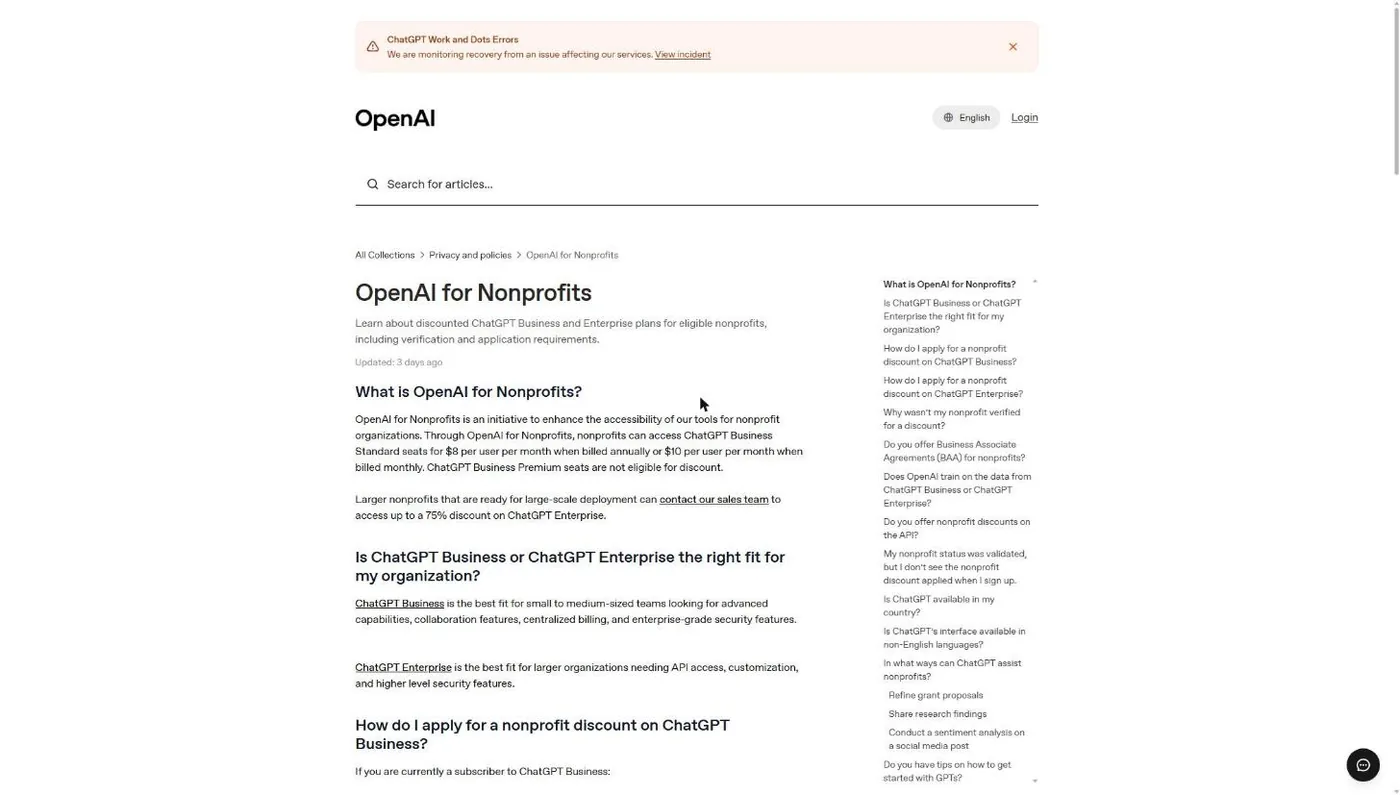
OpenAI for Nonprofits discounts exactly two things: ChatGPT Business Standard seats (self-serve, $8 per user per month billed annually or $10 billed monthly) and ChatGPT Enterprise (up to 75% off, through OpenAI’s sales team). OpenAI’s help center, updated in early November 2026, says nonprofit discounts are “only available for ChatGPT Business Standard seats and ChatGPT Enterprise.”
That leaves several things out, and church staff trip over them.
| ChatGPT product | Nonprofit discount? | What a church should know |
|---|---|---|
| Business, Standard seats | Yes: $8/user/mo annual, $10 monthly | The plan most church staffs want. Lists at $20 annual or $25 monthly, so the nonprofit rate is 60% off. Starts at 2 users. |
| Business, Premium seats | No | More usage than Standard, with no 5-hour limit. Full price ($100 annual, $125 monthly) even in a nonprofit workspace. |
| Enterprise | Up to 75% off | Through sales only. Built for large organizations that need API access and heavier security controls. |
| Free, Go, Plus, Pro | No | Individual plans. The nonprofit program doesn't touch them. |
| API (developer platform) | No | OpenAI says nonprofit discounts don't apply to the API "at this time." |
Source: OpenAI Help Center, "OpenAI for Nonprofits," chatgpt.com/pricing and openai.com/business/pricing, all read November 5, 2026.
Why one OpenAI page says 75% and another says $8
OpenAI’s two pages don’t contradict each other once you do the math. The pricing page FAQ promises “up to a 75% discount on ChatGPT Business or ChatGPT Enterprise” and sends you to sales. The help center article gives the self-serve number: $8 annual or $10 monthly for Standard seats, against a list price of $20 annual or $25 monthly (OpenAI Business pricing page, November 5, 2026). That’s 60% off. The help article ties “up to a 75% discount” to Enterprise only.
So for a church buying seats online, budget $8 annual or $10 monthly. The deeper discount is a sales conversation for large organizations.
How do I apply for ChatGPT for Nonprofits?
You apply through a short OpenAI form, Goodstack checks your nonprofit status, and once you’re approved the discount appears at checkout. The order matters. OpenAI’s help center says new customers fill out the form first, then create the account and buy Business. Existing Business customers fill out the same form with the email already on their account.
Step 1: Gather your church’s proof before you touch the form
Goodstack (the verification company formerly called Percent) checks your status for OpenAI. Goodstack’s help center asks for documents only when it can’t find your organization in its registry, and when it does, it wants “a Government-issued registration certificate, a tax exemption confirmation letter, an official extract from the nonprofit register, or similar.”
For a church, that means one of two things: your own IRS determination letter, or your denomination’s group exemption letter plus proof you’re on its roster. Goodstack also says that for US organizations “an EIN Verification Letter is strongly recommended” when it confirms you’re connected to the organization. Have PDFs ready. What is Goodstack? walks through the whole verification flow.
Common snag: the church’s legal name on the IRS paperwork doesn’t match the name you type. Use the legal name exactly as it appears on the letter.
Step 2: Decide which email will own the workspace
The email you enter on the form becomes the link between your approval and your ChatGPT Business account. OpenAI’s instructions say to use “the email address you’d like to associate with your ChatGPT Business account.”
Use a church domain address that belongs to a role, not a person. Something like admin@ or office@ on your church domain. When your communications director leaves in two years, you don’t want the church’s AI workspace tied to their personal Gmail.
Common snag: someone applies with a personal address, then signs up for Business with the church address. The discount doesn’t follow. Use the same email in both places.
Step 3: Fill out OpenAI’s short nonprofit form
The form link sits in the “How do I apply” section of OpenAI’s help article at help.openai.com/en/articles/9359041. There are two versions of the instructions on that page: one for current ChatGPT Business subscribers and one for churches that haven’t subscribed yet. Follow the one that fits.
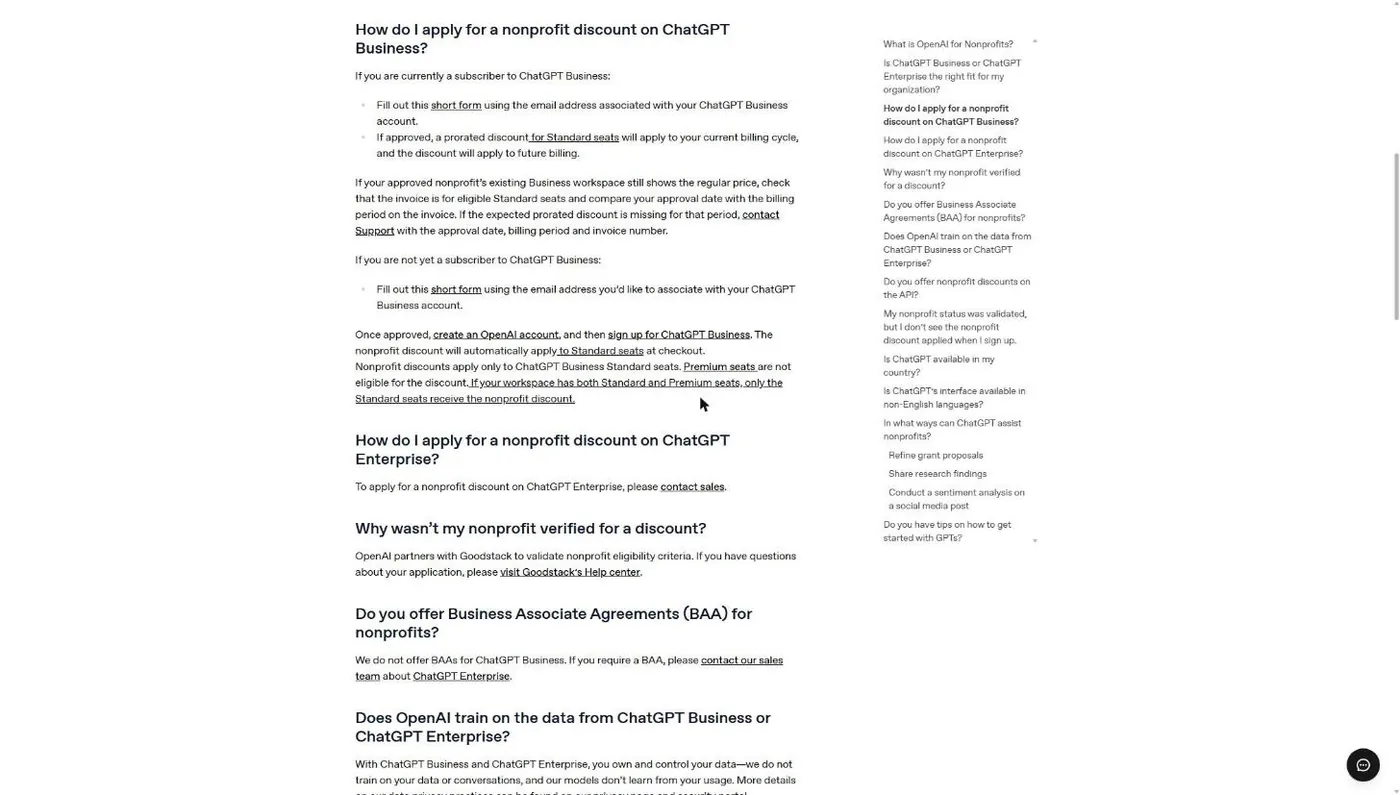
Common snag: don’t go looking for an openai.com marketing page for nonprofits. The old URL (openai.com/chatgpt/nonprofits) returned a 404 when we checked on November 5, 2026. The help center article is the live entry point.
Step 4: Wait for Goodstack’s decision
Goodstack reviews your application against OpenAI’s criteria. OpenAI doesn’t publish a turnaround time. If Goodstack needs documents, it will ask, and fast replies speed things up.
If you’re turned down, OpenAI’s help center sends you to Goodstack’s help center rather than handling it themselves. Skip ahead to the rejection section below.
Step 5: Create the account and buy Standard seats
Once approved, create your OpenAI account with the same email, then sign up for ChatGPT Business. OpenAI says the discount “will automatically apply to Standard seats at checkout.” Pick your seat count, choose Standard (not Premium), and select “continue to billing.” That billing page is where the discounted price shows up.
Common snag: the price looks wrong on the plan page. OpenAI notes the discount appears after “continue to billing,” not before. If you picked Premium seats, it won’t appear at all.
Step 6 (already on Business): check your next invoice
Churches already paying for ChatGPT Business use the same form with the account’s email. If approved, OpenAI applies a prorated discount to the current billing cycle and the discount carries forward. If the invoice still shows the regular price, OpenAI says to confirm the seats are Standard, compare your approval date to the billing period, and contact Support with the approval date, billing period and invoice number.
What if Goodstack rejects my church?
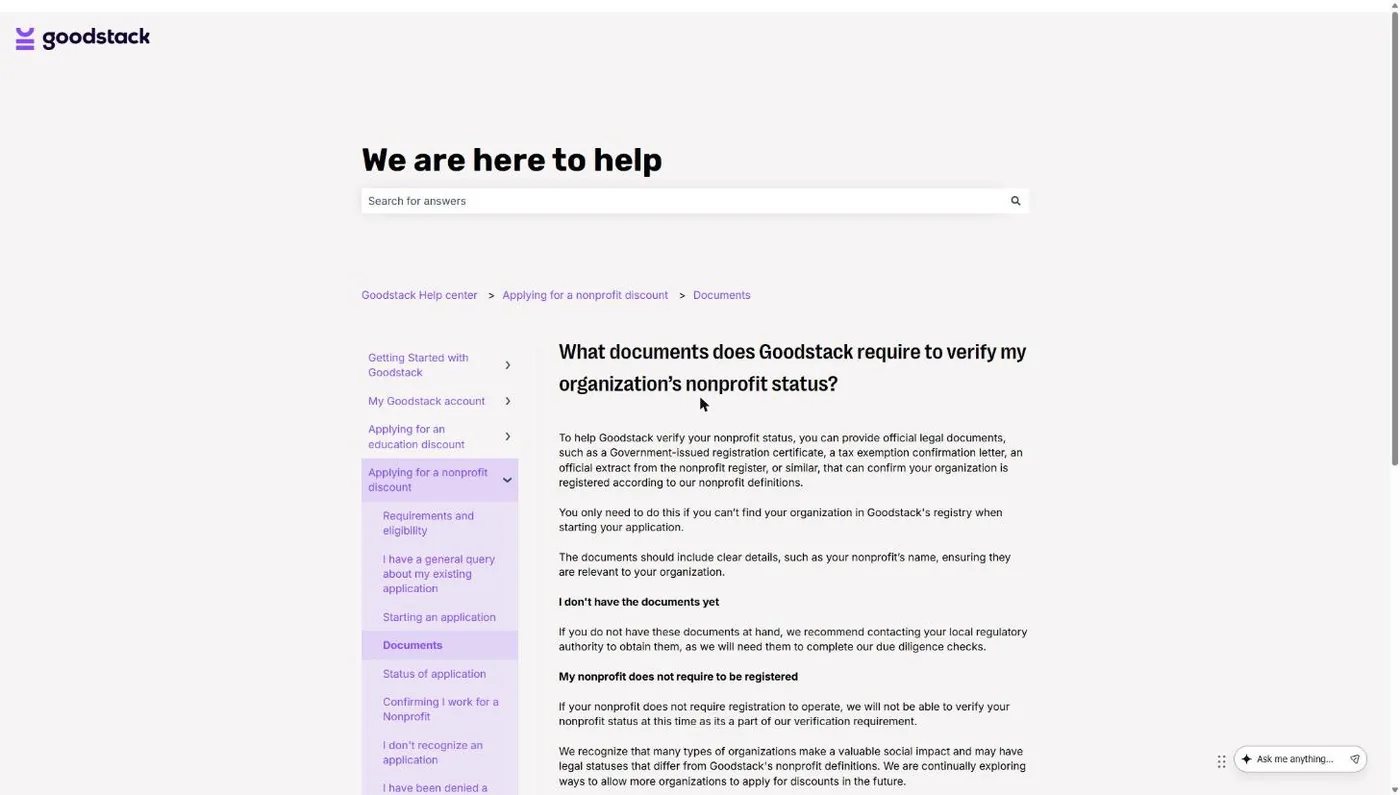
Most church rejections come down to paperwork, not policy. Goodstack’s help center states the core problem plainly: “If your nonprofit does not require registration to operate, we will not be able to verify your nonprofit status at this time.” Churches are tax-exempt automatically and aren’t required to register with the IRS, so a church with no letter of any kind looks unverifiable.
| Why it failed | The fix |
|---|---|
| No IRS letter of any kind | Ask your denomination for its group exemption letter and a letter confirming your church is covered. Independent churches may need to file Form 1023 for their own letter. |
| Name mismatch | Resubmit with the legal name exactly as the IRS or denomination letter shows it, not your "doing business as" name. |
| Can't prove you're connected to the church | Send an EIN Verification Letter (Goodstack strongly recommends it for US groups) plus one church-issued and one bank-issued document, as unredacted PDFs. |
| Approved, but price didn't change | Check that the signup email matches the form email and that you chose Standard seats. Then contact OpenAI Support with your approval date. |
| Approved, but invoice shows full price | Compare the approval date to the billing period. Send OpenAI Support the approval date, billing period and invoice number. |
Sources: Goodstack Help Center document and verification articles; OpenAI Help Center, "OpenAI for Nonprofits." Read November 5, 2026.
The group exemption route is the one most denominational churches will use. New Hope Hawaii Kai, where I serve as Executive Pastor, is a Foursquare church covered by the denomination’s group exemption, which is the normal setup for churches in a denomination. The full walkthrough of which letter to request and from whom is in how to prove your church is a nonprofit.
Which ChatGPT plan does a church staff need?
Most churches with two or more staff using AI should buy ChatGPT Business Standard seats at the nonprofit rate and stop there. Business starts at 2 users (OpenAI pricing page, November 2026), the seats are discounted, and OpenAI says it does not train on ChatGPT Business data or conversations. The individual plans don’t carry that business-data promise by default: OpenAI’s pricing page lists model training on Free, Go, Plus and Pro as “Opt-out available.”
Here’s how I’d sort it for a church:
- One pastor testing the waters: stay on a personal plan for now. The nonprofit program doesn’t apply, and you don’t need a workspace to find out whether ChatGPT helps you.
- Two to about a dozen staff: Business Standard at $8 per seat billed annually. Five seats come to $480 a year at the annual nonprofit rate, or $600 a year paying $10 monthly.
- One heavy user on a team: a Business workspace can hold both seat types, and only the Standard seats get the discount. Buy Premium for that one person only if Standard limits actually get in their way.
- Large multisite church with compliance needs: talk to OpenAI sales about Enterprise and the up-to-75% nonprofit discount. That’s also the only route if you need a Business Associate Agreement, which OpenAI doesn’t offer on Business.
Pay annually if you’re confident. Annual billing saves $2 per seat per month, which is $24 per seat per year. Pay monthly for the first few months if your staff hasn’t proven they’ll use it.
One more rule before you hand out seats: put a written AI policy in front of your staff. Business-tier privacy protects your data from training. It does nothing about a staff member pasting a counseling situation into a chat. Our church AI rules are a one-page starting point.
ChatGPT vs. Claude nonprofit discount: which is better for a church?
On price, the two programs land in the same place: ChatGPT Business Standard and Claude’s Team plan both list a nonprofit rate of $8 per user per month, and both use Goodstack to verify you. The differences are in the details: billing options, seat minimums and what each program leaves out.
| ChatGPT for Nonprofits | Claude for Nonprofits | |
|---|---|---|
| Discounted plan | ChatGPT Business, Standard seats | Claude Team |
| Nonprofit price | $8/user/mo annual, $10 monthly | $8/user/mo ("Nonprofit standard") |
| Minimum seats | 2 (Business starts at 2 users) | 2 |
| Who verifies | Goodstack | Goodstack (Anthropic says about 2-3 minutes) |
| Eligibility wording | "Eligible nonprofits"; no religious language | "Registered 501(c)(3) organizations"; religion not mentioned |
| Large-church option | Enterprise, up to 75% off via sales | Enterprise via Anthropic's sales team |
| Self-serve team size | Business is for teams of 2 to 200 | Team is for 2 to 150 seats |
Sources: OpenAI Help Center, chatgpt.com/pricing and openai.com/business/pricing; claude.com/solutions/nonprofits and claude.com/pricing. All read November 5, 2026.
Since price is a wash, pick on fit. Familiarity favors ChatGPT: most of your staff have already used it. If someone on your team wants an AI that works through real documents and files, Claude has the edge. The full Claude application walkthrough is in Claude for nonprofits, and the feature-by-feature comparison is in ChatGPT vs. Claude vs. Gemini for churches. If your church already runs on Google, check what’s included in Google Workspace for churches before buying anything.
What changed between 2024 and 2026?
Three changes explain why the internet disagrees about this program. Churches went from excluded to eligible in July 2025. The discount went from 20% off (the figure in the Holy Sexuality case) to a flat $8 or $10 per seat. And Business now comes in Standard and Premium seats, with only Standard discounted.
Goodstack’s OpenAI listing still says “20% off monthly or annual plans of ChatGPT Team.” When sources conflict, trust OpenAI’s help article and check its “Updated” date before you budget. On November 5, 2026 it read “3 days ago.”
OpenAI isn’t the only company where the old “no” still circulates. Our nonprofit software discounts guide tracks which programs accept churches today and which still don’t.
Frequently Asked Questions
Get the Discount, Then Get the Basics Right
Verifying your church takes an afternoon of paperwork at most, and after that you’re paying $8 a seat instead of full price. Do it before anyone on staff puts a ChatGPT subscription on the church card.
Then keep perspective. A cheaper AI tool doesn’t help a family find your church. If you want a straight look at how your church shows up online when people nearby go looking, that’s what our free review is for.
Free Church Marketing Review for Your Church
We'll look at your website, your local search presence, and how your church shows up when people nearby go looking. You get a straight assessment and clear next steps, whether or not you ever become a client.
Related Guides
- Nonprofit Software Discounts for Churches: every program, which ones accept churches, and which don’t.
- How to Prove Your Church Is a Nonprofit: the paperwork Goodstack and TechSoup actually accept.
- What Is Goodstack?: the verification step behind OpenAI, Claude, Google and more.
- Claude for Nonprofits: how a church gets Claude Team at the nonprofit rate.
- ChatGPT for Churches: what to use it for, and where the line is.
- AI for Churches: the complete guide to AI in church ministry.