Goodstack is the company that checks whether your organization is a real nonprofit before software companies give you their nonprofit discount. If you clicked “apply” on Google for Nonprofits, Zoom, Canva or Claude and landed on a page asking “Where is your organization registered?”, you met Goodstack.
Most church admins meet it by accident. A company you’ve never heard of wants your EIN, a bank statement and proof you work at the church. That feels like a scam. It isn’t. It’s the gate most big tech nonprofit programs now share.
So will Goodstack take a church? Yes, as long as your church is registered somewhere it can check. A church with its own IRS determination letter usually sails through. A church under a denomination’s group exemption can pass with the right paperwork. A church that has never registered anywhere will get stopped, and Goodstack says so in writing.
Before you start: if your church has no IRS determination letter and you’re not sure whether your denomination’s group exemption covers you, stop here and read how to prove your church is a nonprofit. It walks through the three paths and the exact documents for each. Ten minutes there saves you a rejected application here.
What is Goodstack?
Goodstack is a London-based company that verifies nonprofits for corporate discount and giving programs. It used to be called Percent. Goodstack’s own developer changelog, dated October 15, 2024, says it plainly: “Percent is rebranding as Goodstack.” The legal entity on its privacy policy is still “We Are Percent Limited t/a Goodstack” (Goodstack privacy policy, November 2026).
The old name hasn’t fully disappeared. Anthropic’s Claude nonprofit verification link still starts at validate.poweredbypercent.com, and several Goodstack help article addresses still say “percent” (checked November 5, 2026). So if you see Percent in a URL, you’re in the right place.
Goodstack’s published validation guidelines describe the checks. Your church must be recognized as a nonprofit “by the local regulator,” operate on a not-for-profit basis and operate for the public benefit. Goodstack then confirms you’re associated with the church. The partner’s discount rules come last: “Eligibility guidelines are set by the partner and are specific to their program.”
Why do so many nonprofit programs send churches to Goodstack?
Software companies send churches to Goodstack because checking thousands of nonprofits by hand is slow and expensive, and one shared verifier automates most of it. Goodstack’s case study on Atlassian says manual review of each applicant “could take weeks” before Atlassian switched to Goodstack in 2021. For a church, the practical result is that one company now stands between you and most of the big-name nonprofit offers.
Here are the programs where the vendor’s own page names Goodstack as its verifier, checked live on November 5, 2026.
| Program | What the vendor says | Church note |
|---|---|---|
| Google for Nonprofits | Verified "by Google for Nonprofits' validation partner Goodstack" | Google's help article names churches. Group-exempt churches use their own EIN. |
| Zoom Cares | 501(c)(3) "as verified by Goodstack"; 50% off | Operating budget must be $10 million or less |
| Canva Nonprofits | "partnered with Goodstack to verify eligibility"; free Canva Pro features for up to 50 users | No religious wording on the eligibility page |
| Claude for Nonprofits (Anthropic) | "~2-3 minute" verification "through our partner Goodstack"; Team $8 per user | No religious exclusion on the page |
| ChatGPT for Nonprofits (OpenAI) | "OpenAI partners with Goodstack"; Business Standard $8 per user billed annually | No religious language on the help article |
| Atlassian | Verifies "in partnership with Goodstack"; 50% to 100% off | Current list of ineligible types has no religious category; Atlassian keeps sole discretion |
| Asana | "We work with Goodstack to verify your eligibility"; 50% off | 501(c)(3) required |
| Hootsuite | Apply through Goodstack; "up to a 60% discount" | Nondiscrimination clause names religion in hiring, which could flag a church |
| monday.com | Uses Goodstack's nonprofit definitions | Church eligibility unclear; no religious exclusion on the current page |
Goodstack’s own help center adds Eventbrite, LinkedIn, Sage and Twilio to its partner list. Of everything above, Canva matters most for most churches, and I cover it in Canva for Nonprofits.
One caution. Goodstack’s public discount directory also lists Microsoft and Adobe offers, but neither company’s eligibility page named Goodstack when I read them on November 5, 2026. Follow the vendor’s own apply button, and trust the vendor’s page over Goodstack’s directory for prices: Goodstack’s OpenAI listing still describes an old “ChatGPT Team” offer.
How does Goodstack verification work, step by step?
Goodstack verification starts on the software company’s nonprofit page, not on Goodstack’s site. You pick your country, find your church in Goodstack’s registry (or upload proof if it isn’t there), confirm you work there, and wait for an email. Goodstack says most applications are processed “within 72 hours, though often it is much quicker” (Goodstack help center, November 2026).
Step 1: Start from the vendor’s nonprofit page
Open the nonprofit page for the program you want, read that vendor’s eligibility rules, and click its apply or verify button. Goodstack’s help center lists this order itself: confirm you meet Goodstack’s country requirements, then go to “our partner’s website and search for their nonprofit program.”
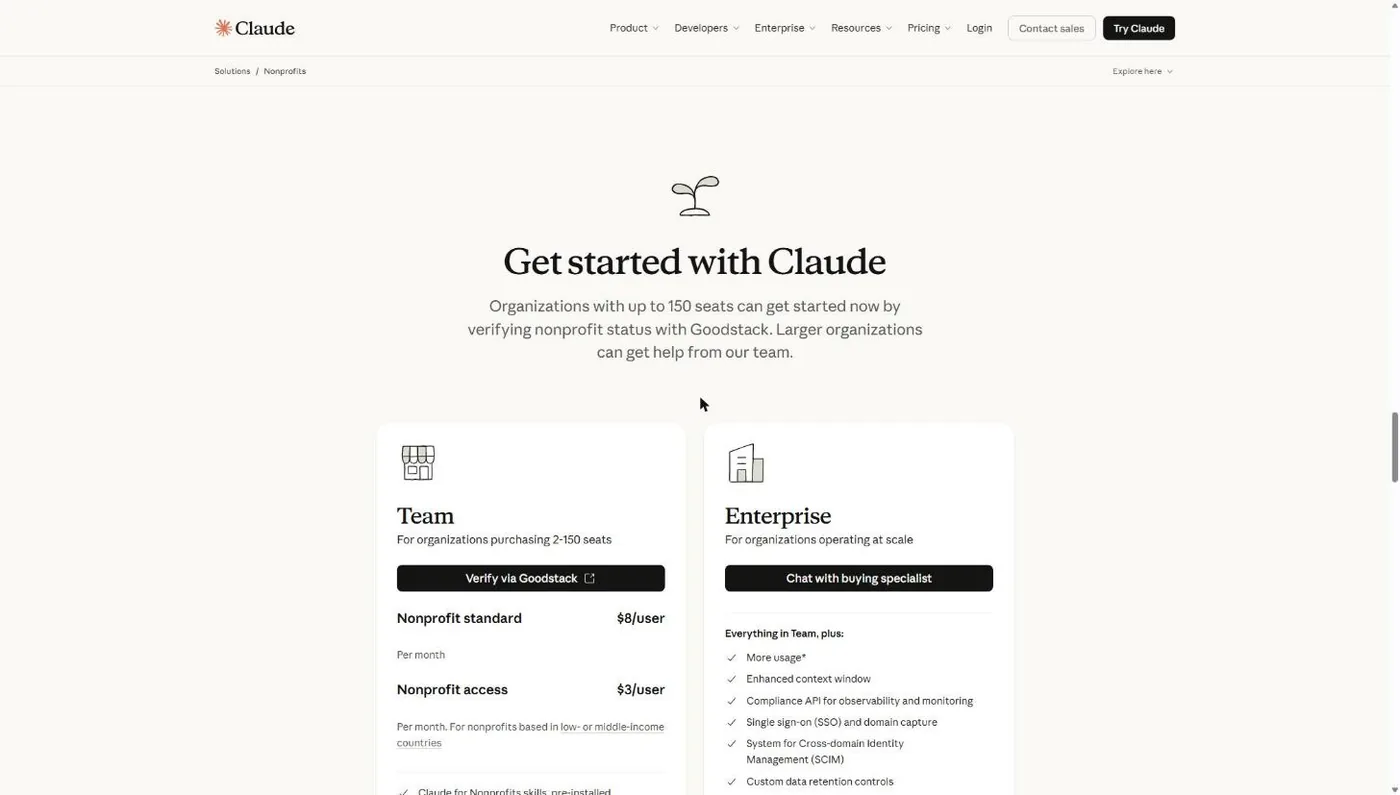
Common snag: you’re signed into the wrong account. Google, for example, makes the signed-in Google account the administrator of your nonprofit account. Sign in with a church account you control, not a volunteer’s personal Gmail. The Google for Nonprofits guide covers that screen.
Step 2: Tell Goodstack where your church is registered
The first Goodstack screen asks one question: “Where is your organization registered?” A US church picks the United States.
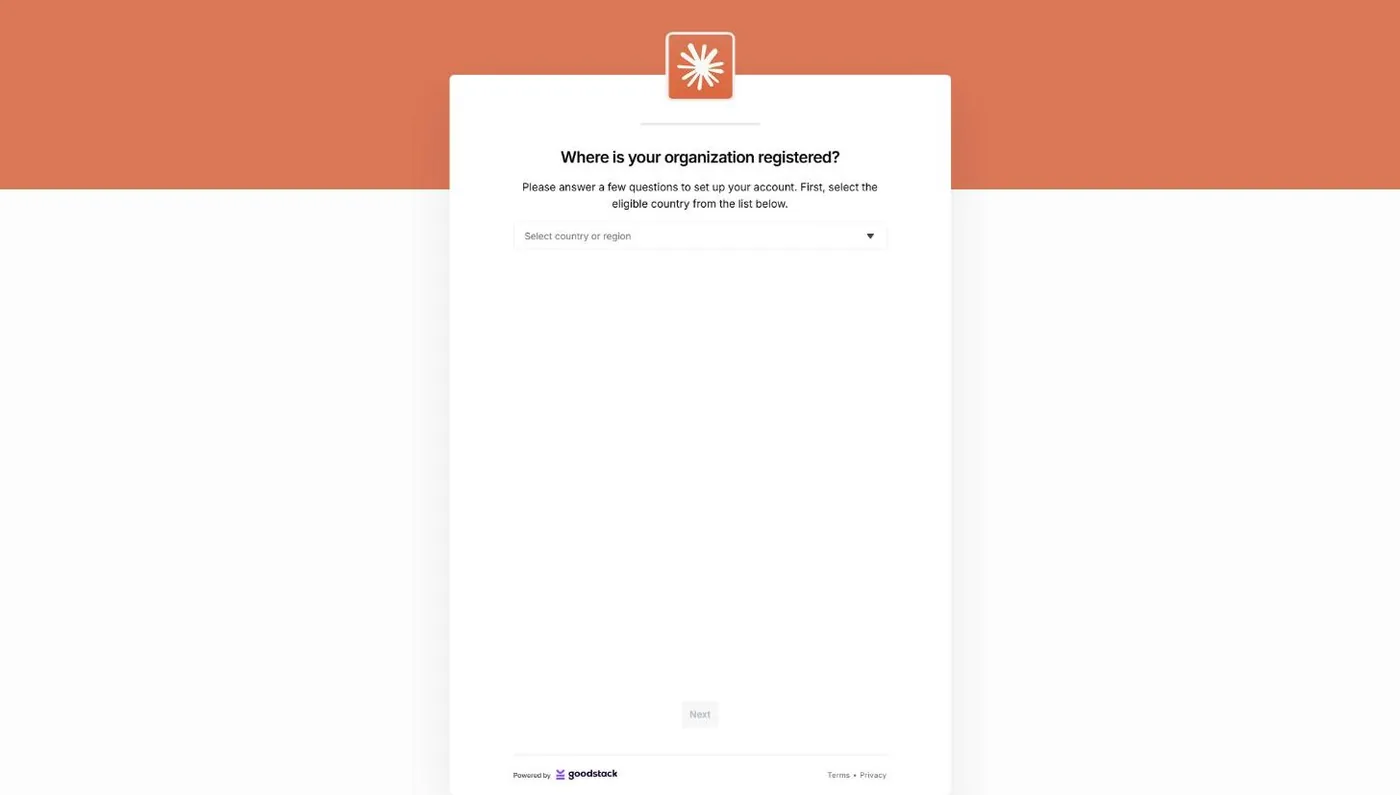
My screenshots stop here, because the next screen needs real church data. The rest of this walkthrough comes from Goodstack’s and Google’s help articles.
Step 3: Search for your church in Goodstack’s registry
Next you search for your church by name. Google’s version of the flow asks for your registered name, address, and registration or tax ID, then Goodstack checks it “against official local government registries” (Google Help, November 2026).
If your church shows up, Goodstack says it has “already determined its nonprofit status” with the local regulator, so you skip the document upload. If it doesn’t show up (common for group-exempt churches, which the IRS doesn’t list separately), you upload status documents. Step 4 covers which ones.
Common snag: searching the name on your sign instead of your legal name. Use the exact name on your IRS or state paperwork, “Inc.” and all.
Step 4: Upload status documents if Goodstack can’t find you
Goodstack accepts official documents such as “a Government-issued registration certificate,” “a tax exemption confirmation letter,” or an official extract from a nonprofit register. You only upload these if the registry search comes up empty.
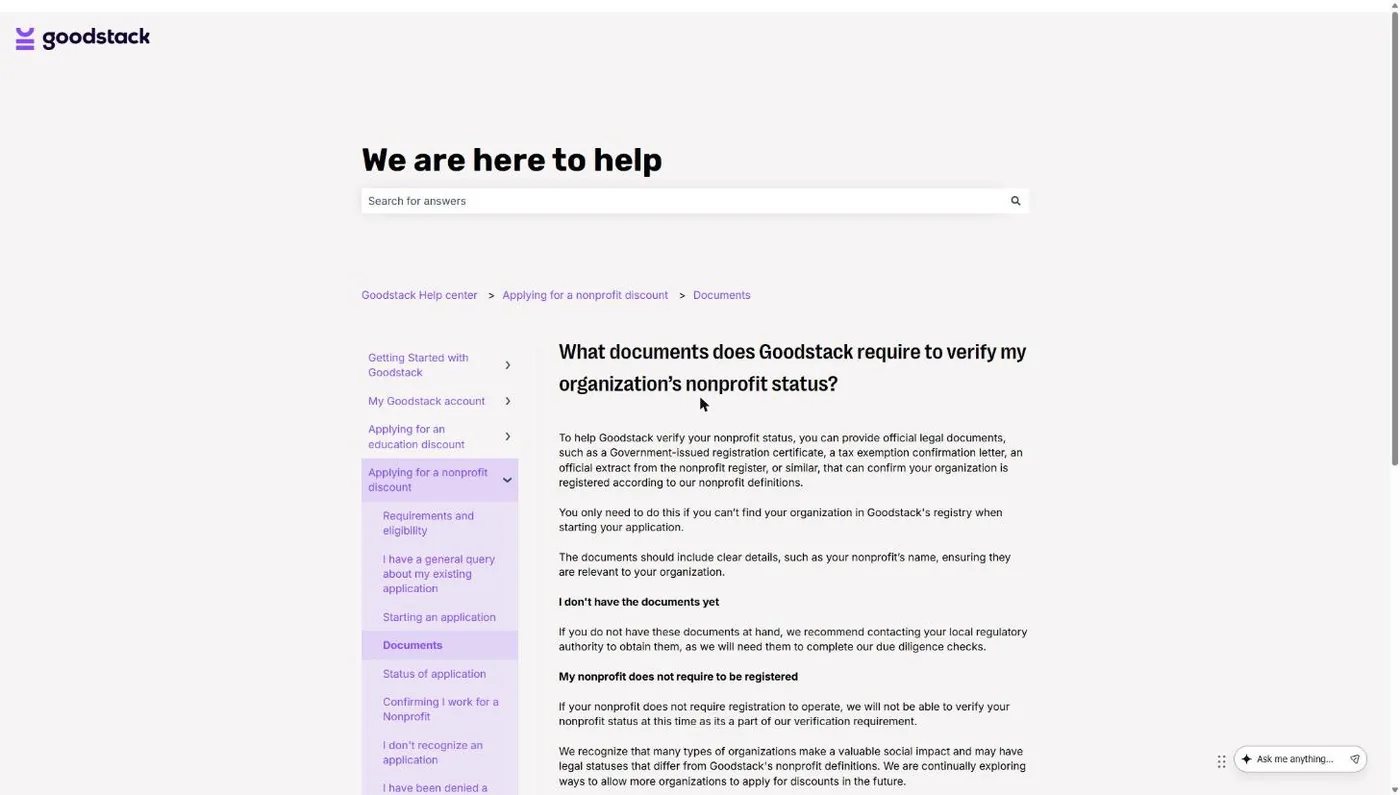
That last line on the help page is the one that catches independent churches: if a nonprofit “does not require registration to operate,” Goodstack says it “will not be able to verify” its status. US churches are exempt without applying, so a church that never applied and isn’t under a group ruling has nothing for Goodstack to check.
Step 5: Confirm you work at the church
Goodstack then confirms you’re actually associated with the church. Its developer docs say it compares “the users email domain against the nonprofit’s website domain.” If you apply from office@yourchurch.org and your site is yourchurch.org, that check can pass on its own. If not, Goodstack emails the church and uses the reply.
Goodstack will take a personal email, but a work email “speeds up” this step. With a personal email, Google warns, Goodstack may ask for a letter signed by a board member, director or executive officer confirming your role. Goodstack’s help center also asks nonprofits to fix any “inactive or incorrect email addresses” showing on their website, because its confirmation request can go to a published church address. Make sure somebody reads that inbox.
Step 6: Watch your inbox, including spam
Goodstack does everything by email. Google tells applicants to watch for messages from verifications@mail.goodstack.org and to check spam and junk folders. If Goodstack asks for documents, reply with PDFs.
Common snag: the clock. Goodstack applications expire if you don’t confirm your email, upload requested documents, or get the church’s confirmation within 30 days. An expired application shows as rejected. You can reapply, but you start over.
Step 7: Activate the actual product
Goodstack’s approval goes back to the vendor, and the vendor grants the discount. With Google, approval doesn’t switch anything on: you activate Workspace, the Ad Grant and YouTube’s nonprofit program one at a time. The Ad Grant is the big one, and our Google Grant management service exists because activation is where most churches stall.
What documents does a US church submit to Goodstack?
A US church submits two kinds of proof to Goodstack: proof the church is a recognized nonprofit (only if it’s missing from the registry), and proof that you work there. Which status documents you need depends on how your church holds its tax exemption. My church, New Hope Hawaii Kai, is a Foursquare church under the denomination’s group exemption, so I know which bucket causes the most confusion.
Church with its own IRS determination letter
Send the determination letter. It’s a “tax exemption confirmation letter” in Goodstack’s terms, and churches with one appear in the IRS Tax Exempt Organization Search. This is the easiest path.
Church under a denomination’s group exemption
Goodstack’s US nonprofit definitions say “Group exempt organisations must supply their own EIN.” Google’s group exemption article adds “documentation showing their group exemption number” and proof of affiliation with a central 501(c)(3) organization. In practice that means:
- The denomination’s IRS group exemption letter (it shows the group exemption number).
- A letter on denominational letterhead, signed by an officer, naming your church as a subordinate.
- Your church’s own EIN on the application.
Watch the EIN. Google wants your church’s EIN. TechSoup wants the parent denomination’s EIN. Using the wrong one is a classic mismatch rejection.
Church that never applied and has no group ruling
Goodstack can’t verify you today. The fix is to get registered: join your denomination’s group exemption if one covers you, or file IRS Form 1023 for your own letter (the IRS lists a $600 user fee as of November 2026; churches can’t use the shorter 1023-EZ). The foundation guide and our 501(c)(3) church guide cover that decision.
Association documents (proving you work there)
Goodstack’s rules here are strict and specific. Everything must be an original, unredacted PDF. For US organizations, “providing an EIN Verification Letter is strongly recommended.” In IRS terms that’s usually a 147C letter or the CP 575 notice, and Goodstack notes it is “not to be confused with Determination Letter”: it proves your EIN, not your exemption.
Beyond the EIN letter, Goodstack recommends at least one organization-produced document and one bank-issued document:
- Organization-produced: signed, showing the church’s legal name, dated more than 30 days before you apply. Accepted types include bylaws, conflict of interest policy, board meeting minutes, a financial planning document, and employment or volunteer confirmation letters.
- Bank-issued: a bank statement in its original electronic PDF form (no scans), dated more than 30 days before you apply, showing the legal name.
Pick your board minutes with care. Choose a meeting that dealt with budgets and facilities, not pastoral care or church discipline. You can’t redact them, so don’t send anything you wouldn’t want a stranger reading.
Does one Goodstack verification carry across programs?
Partly. Goodstack’s help center says “being granted one discount doesn’t automatically grant the next,” because each partner runs its own eligibility check on top of Goodstack’s. What does carry over is speed: Goodstack says applications after your first approval “will be a quicker process,” and a church whose status it has already determined skips the document upload.
Even then, Goodstack says it “still might need to confirm your association.” So plan on a short second pass for each new program, not a full re-verification. Two habits make the second and third applications faster:
- Use the same church-domain email and the exact same legal name every time.
- Keep your PDF packet (EIN letter, bylaws, a bank statement, group exemption papers) in one shared folder so the next staff member doesn’t rebuild it.
Goodstack also offers an optional account whose Causes Portal lists partner offers you can start from. You don’t need one: signing up “is not a requirement to apply for a Partner Discount Program.”
Is Goodstack safe? What data does it collect?
Goodstack is a legitimate verifier used by Google, Canva, OpenAI, Anthropic and Zoom, and it collects real personal and church data to do the job. Its privacy policy (effective date July 26, 2026 when I checked) lists identity, contact, financial, biometric, transaction, profile, marketing and communications, and scheduling data, plus device and usage information collected automatically.
The policy says Goodstack uses applicant data for “validation of Applicants” and to “Add data to our Organisation Database.” It may share information with “brand providers, charities and other Nonprofits, and partners,” which includes the software company you applied to. It keeps personal data “no longer than is necessary” and gives no fixed retention period. Questions go to its data protection officer at dpo@goodstack.io.
For a church, the real exposure is the documents: an unredacted bank statement and signed minutes go to a third party. Send only what Goodstack asks for, and let the treasurer or executive pastor own the application, not a volunteer.
Goodstack vs TechSoup: what’s the difference for a church?
Goodstack is a verification step built into each vendor’s own application, while TechSoup is a marketplace you join and request products from. They accept different paperwork and even different EINs, so a church can pass one and fail the other. Full details are in our TechSoup guide for churches.
| Goodstack | TechSoup | |
|---|---|---|
| What it is | Verifier inside each vendor's apply flow | Membership marketplace for donated and discounted products |
| Who uses it | Google, Canva, Zoom, Anthropic, OpenAI, Atlassian, Asana, Hootsuite | QuickBooks Online, Adobe Creative Cloud, Slack; home page names Microsoft, Adobe, Dell, Intuit |
| Cost to the church | No fee on the pages I read; account optional | Admin fee per product (QuickBooks Online Plus $80 a year); optional TechSoup Plus $200 a year |
| Group-exempt church | Church's own EIN per Goodstack's US rules; Google adds group exemption number plus proof of affiliation | Group Exemption Letter on denominational letterhead, signed, usually with a directory |
| Which EIN | The church's own EIN (Goodstack and Google) | The parent denomination's EIN |
| Never-registered church | Cannot verify | Not eligible ("automatically tax-exempt, or self declare") |
| Typical review time | Within 72 hours (Goodstack); Google's full review typically 2 to 14 business days | "Typically completed within two business days" |
Sources: Goodstack, Google, TechSoup and vendor pages, verified November 5, 2026.
If you get rejected by Goodstack
A Goodstack rejection almost always comes down to one of four things: the application expired, Goodstack couldn’t confirm your church’s status, it couldn’t confirm you work there, or the partner’s own rules exclude you. Goodstack’s rejection article lists those four. The church-specific versions and their fixes look like this.
| What happened | Why churches hit it | Fix |
|---|---|---|
| Application expired | Email confirmation or document request sat unanswered for 30 days | Reapply and finish every step within 30 days. Check spam for verifications@mail.goodstack.org. |
| Nonprofit status not verified | Church never applied to the IRS and isn't in a group ruling, or sent only the denomination's letter | Add a signed letter on denominational letterhead naming your church, or get your own IRS letter |
| Association not confirmed | Applied from a personal Gmail; nobody answered Goodstack's email to the church | Reapply from a church-domain email. Warn whoever reads the inbox listed on your website. |
| Name mismatch | Application says the sign name; documents say the legal name | Use the exact legal name from your IRS or state record everywhere |
| Documents refused | Scans, phone photos, redacted pages, or minutes dated in the last 30 days | Original unredacted PDFs, signed and dated more than 30 days back |
| EIN letter sent as proof of exemption | 147C and CP 575 look official but only prove the EIN | Pair the EIN letter with a determination or group exemption letter |
| Partner says not eligible | Partner rule, such as Zoom's $10 million budget cap or Hootsuite's hiring clause | Read that vendor's guidelines; request a review or choose another tool |
If you believe the rejection is wrong, request a review through the form on Goodstack’s help center. Send as much as you can: “A copy of a voided deposit slip or bank letter confirming the nonprofit’s name,” governing documents signed or stamped by an official authority, and proof of your employment at the church. Google applicants also get an appeal form link in Google’s help article.
Frequently Asked Questions
Passed Goodstack? Check your church for the $10,000 Google Ad Grant
Goodstack verification is the gate to Google for Nonprofits, and the Ad Grant is the biggest thing behind it. Our free checker walks through Google's requirements in a couple of minutes so you know where your church stands before you apply.
Related Guides
- Nonprofit Software Discounts for Churches: every program that accepts, limits or excludes churches.
- How to Prove Your Church Is a Nonprofit: the paperwork for churches without their own IRS letter.
- Google for Nonprofits: the Goodstack flow that ends at the Ad Grant.
- TechSoup for Churches: the other verifier, and what it still offers.
- Canva for Nonprofits: Canva’s nonprofit program for up to 50 users.
- Claude for Nonprofits: the $8 Team plan and its Goodstack check.
- Zoom for Nonprofits: Zoom Cares, the 50% discount and the $10 million cap.