Claude for Nonprofits is Anthropic’s discounted Claude Team plan for registered 501(c)(3) organizations, and yes, your church can get it. The question I hear from pastors is always the same one: “Will they actually take a church, or am I going to fill out a form and get rejected for being religious?”
Here’s the straight answer. As of November 5, 2026, Anthropic’s nonprofit page lists Claude Team at $8 per user per month for verified nonprofits, and its eligibility wording never mentions religion. Verification runs through Goodstack, and the form takes a few minutes if your church is already in Goodstack’s registry.
The catch is paperwork, not theology. A church that can prove its 501(c)(3) status gets through. A church that has never had any IRS recognition, its own or a denomination’s, will stall at the verification step. This guide walks you through both situations.
Before you start: if your church has never received an IRS determination letter and you aren’t sure whether your denomination’s group exemption covers you, read how to prove your church’s nonprofit status first. Goodstack’s own help center says it cannot verify an organization that “does not require registration to operate,” and that is exactly how many churches are set up. Fix the document problem once and it unlocks Claude, Google, Canva and most of the other programs in our nonprofit software discounts guide.
What Is Claude for Nonprofits?
Claude for Nonprofits is a discount program from Anthropic, the AI company that builds Claude, that sells its Team and Enterprise plans to eligible nonprofits at reduced prices. Anthropic launched the program on December 2, 2025, with GivingTuesday, and announced discounts of “up to 75%” on Team and Enterprise plans (Anthropic news post, December 2025).
The program bundles more than a lower price. Anthropic’s nonprofit page lists pre-installed Claude for Nonprofits skills, nonprofit connectors, and a free course called AI Fluency for Nonprofits (claude.com/solutions/nonprofits, checked November 5, 2026). The skills plugin holds 14 skills across four areas: knowing your organization, marketing, your team, and fundraising. Anthropic says it built them with about 30 nonprofits in a design partner circle.
The connectors Anthropic names for nonprofits are Blackbaud (Raiser’s Edge NXT donor records), Candid (foundation and grant data) and Benevity (a database of validated nonprofits), alongside Microsoft 365, Gmail, Google Drive, Asana, Slack and HubSpot (Anthropic Academy tutorial, November 2026). Most churches won’t touch Blackbaud. The Google and Microsoft connectors are the ones your office will use.
How Much Does Claude for Nonprofits Cost?
Claude for Nonprofits costs $8 per user per month on the Team plan, with a minimum of 2 seats, as of November 5, 2026 (Anthropic nonprofit page). Nonprofits in World Bank low- or middle-income countries pay $3 per user per month. Anthropic doesn’t publish a nonprofit Enterprise price; it routes Enterprise to a buying specialist.
Compare that to the public pricing page the same day: a standard Team seat lists at $20 per seat per month billed annually, or $25 billed monthly, for 2 to 150 seats (claude.com/pricing, November 5, 2026). Plenty of articles still quote older Team prices. Trust the live page.
| Claude plan (November 2026) | List price | Nonprofit price | 5 staff, per year |
|---|---|---|---|
| Team, standard seat | $20/seat/mo annual, $25 monthly | $8/user/mo, 2-seat minimum | $480 vs. $1,200 at the annual list price |
| Team, low- or middle-income country | Same list | $3/user/mo | $180 |
| Team, premium seat | $100/seat/mo annual, $125 monthly | Not listed on the nonprofit page | Ask before you buy |
| Enterprise | $20/seat/mo annual plus usage at API rates, 20-seat minimum | Via buying specialist | Not published |
| Pro (individual) | $17/mo annual, $20 monthly | No nonprofit price | n/a |
Do the math on that first row. At today’s list prices, $8 is 60% off the annual Team rate and 68% off the monthly rate. The launch announcement said “up to 75%”; the $3 rate for low- and middle-income countries goes deeper than that. Anthropic’s nonprofit page doesn’t say whether the $8 requires annual billing, so check the billing term at checkout.
One more line worth knowing: Anthropic’s tutorial says “the nonprofit discount remains active as long as your organization maintains its nonprofit status.” You don’t reapply every year the way Adobe’s Acrobat discount requires.
Can Churches Get Claude for Nonprofits?
Yes. Churches qualify for Claude for Nonprofits as long as they can prove 501(c)(3) status. Anthropic’s eligibility line reads: “Nonprofit pricing is open to registered 501(c)(3) organizations and their international equivalents, as well as K-12 public and private schools” (claude.com/solutions/nonprofits, verified November 5, 2026). The page also admits certain mission-based healthcare providers.
Anthropic’s tutorial lists who is not eligible: “Government agencies, political campaigns, higher education institutions, and healthcare systems.” Churches, ministries and religious organizations appear on neither list. We read the page line by line on November 5 and found no religious exclusion. That puts Anthropic in the same camp as OpenAI and Canva, and in a different camp from Slack and Airtable, whose nonprofit programs name churches as ineligible.
The word that matters is “registered.” A church is tax-exempt automatically under federal law, so plenty of churches never applied for an IRS letter. Goodstack checks registration, not theology. Here is how the common church setups land:
| Your church's situation | Likely result with Goodstack | What to have ready |
|---|---|---|
| Own IRS determination letter | Straightforward | Legal name exactly as on the letter, EIN, the letter as a PDF |
| Covered by a denomination's group exemption | Usually works, needs documents | Group exemption letter plus a letter on denomination letterhead naming your church |
| Independent church, never applied to the IRS | Likely stalls | File IRS Form 1023 for your own letter, then apply |
At New Hope Hawaii Kai, where I serve as Executive Pastor, we’re a Foursquare church covered by our denomination’s group exemption. That’s the most common setup I see across evangelical churches, and it’s the middle row: doable, with the denomination paperwork in hand before you start. If the 501(c)(3) question itself is new to you, start with what 501(c)(3) status means for a church.
Which Claude Plan Does a Church Staff Need?
A church staff needs Claude Team, because it’s the only Claude plan with self-serve nonprofit pricing. Anthropic’s nonprofit page covers Team (2 to 150 seats) and Enterprise; the individual Pro, Max and Ultra plans have no nonprofit price on claude.com/pricing as of November 5, 2026.
That creates a quirk that works in a small church’s favor. Even a solo pastor pays less on nonprofit Team than on Pro: two Team seats at $8 come to $16 a month, against $20 a month for one Pro subscription billed monthly. You also get a second seat for your admin and central billing the church controls, not a personal card.
Here’s how I’d size it:
- Under 150 staff: Team at $8 a seat. Buy seats for paid staff and key ministry leaders who write every week.
- Over 150 seats, or you need compliance tools: talk to Anthropic’s Enterprise team. Enterprise adds more usage, a larger context window, the Compliance API, SCIM and custom data retention (Anthropic nonprofit page).
- Premium seats: the list price is $100 a month annually. The nonprofit page doesn’t list a nonprofit rate for premium seats, so confirm before you assign one.
The Team plan includes Claude and Claude Code, plus file creation for documents, slides, spreadsheets and PDFs (Anthropic nonprofit page, November 2026).
How Do I Apply for Claude for Nonprofits?
You apply for Claude for Nonprofits by starting at Anthropic’s nonprofit page, choosing the Team plan, and completing Goodstack’s verification form. Anthropic says the Goodstack form takes about 2 to 3 minutes, and after approval you get an email to finish setup “with the discount applied” (claude.com/solutions/nonprofits, November 5, 2026). Below is every step, with screenshots up to the point where the form needs your church’s details.
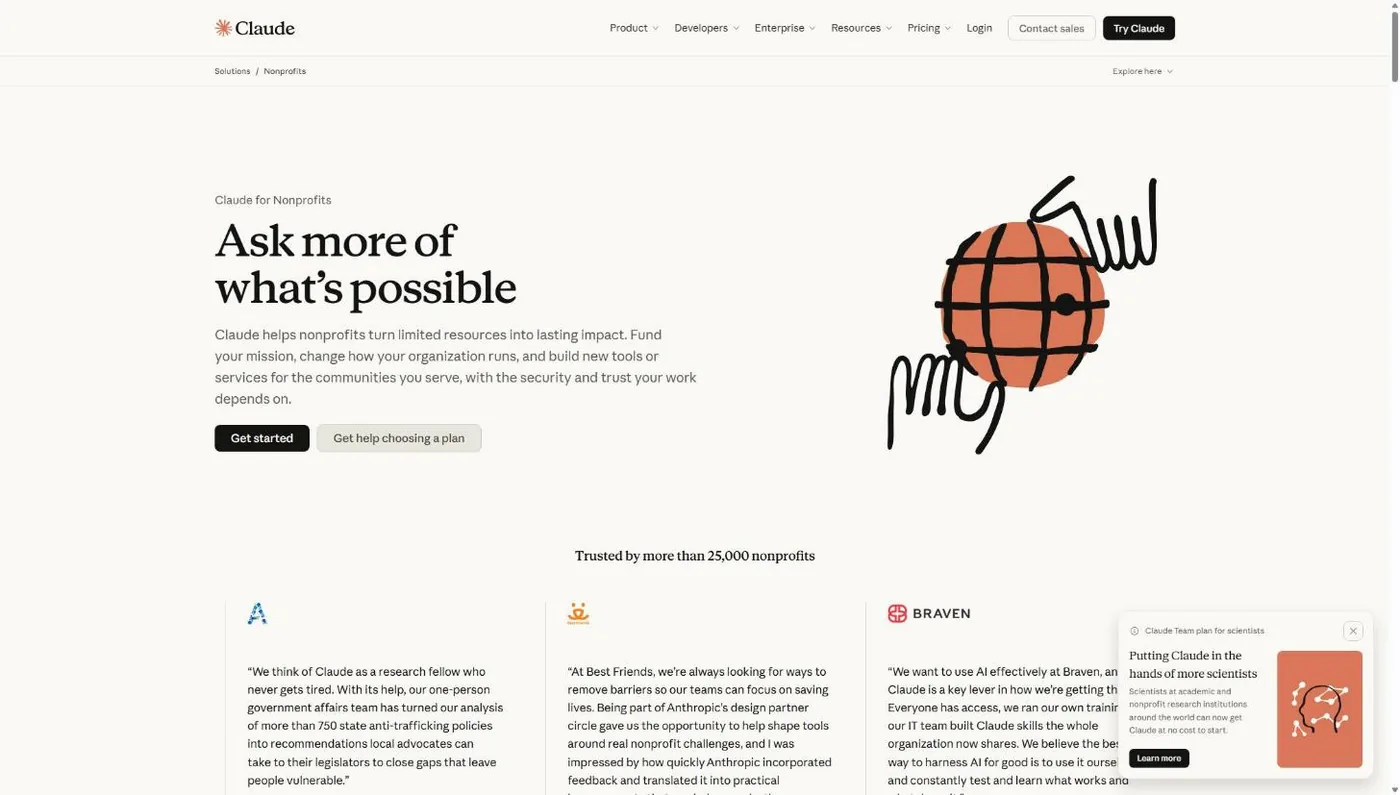
Step 1: Open the Claude for Nonprofits page
Go to claude.com/solutions/nonprofits. Don’t start from the regular pricing page: claude.com/pricing doesn’t mention a nonprofit rate at all, and you’ll end up buying a full-price Team plan.
Common snag: signing up with a pastor’s personal Gmail. Use a church-domain email address for the account owner. The account belongs to the church, and Goodstack has an easier time tying a church email to the church (more on that in Step 5).
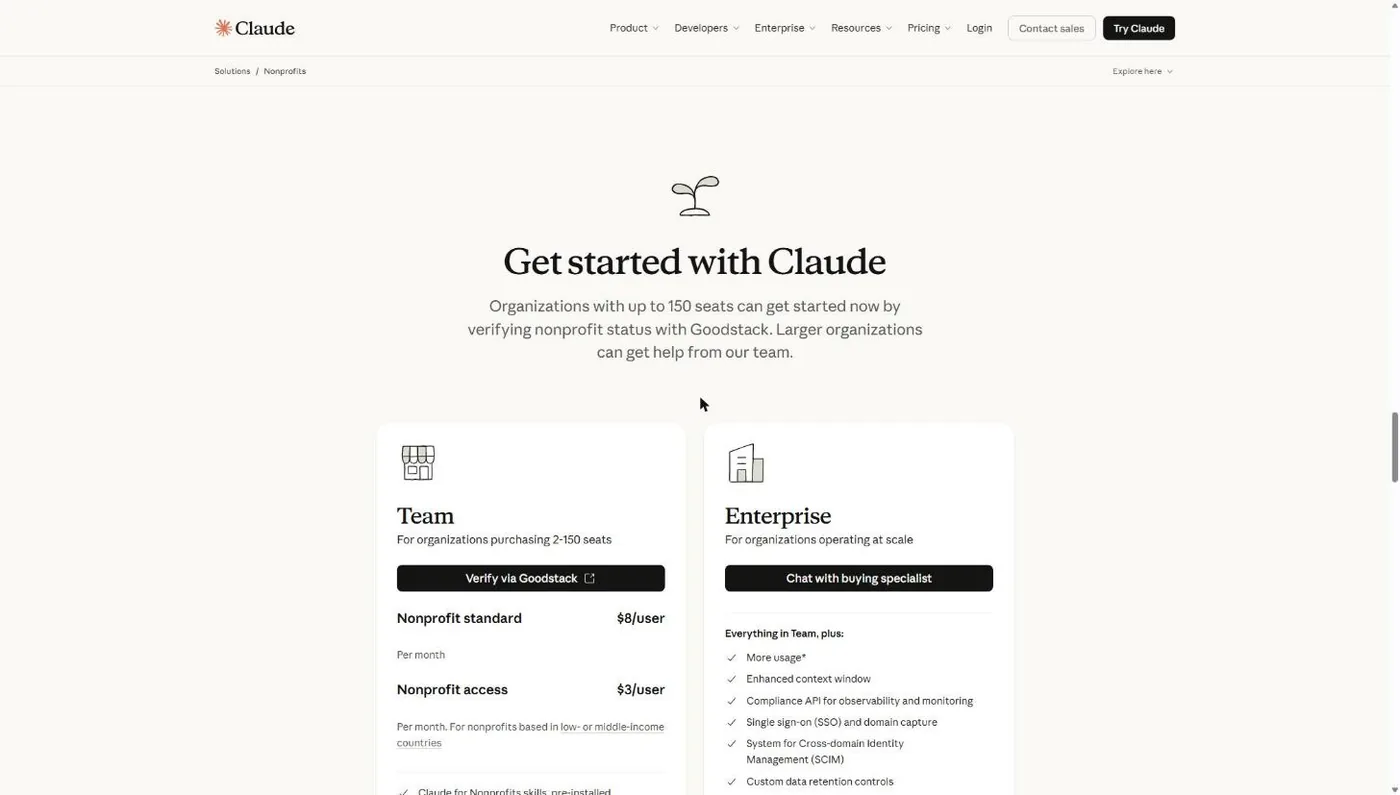
Step 2: Choose the Team plan and click to verify via Goodstack
Scroll to the plan cards. The Team card shows the $8 per user nonprofit price, the 2-seat minimum, and a button to verify through Goodstack. Enterprise sends you to a sales conversation instead.
Step 3: Tell Goodstack where your church is registered
The verification form opens on a Goodstack page branded for Anthropic. The first question is “Where is your organization registered?” Pick United States.
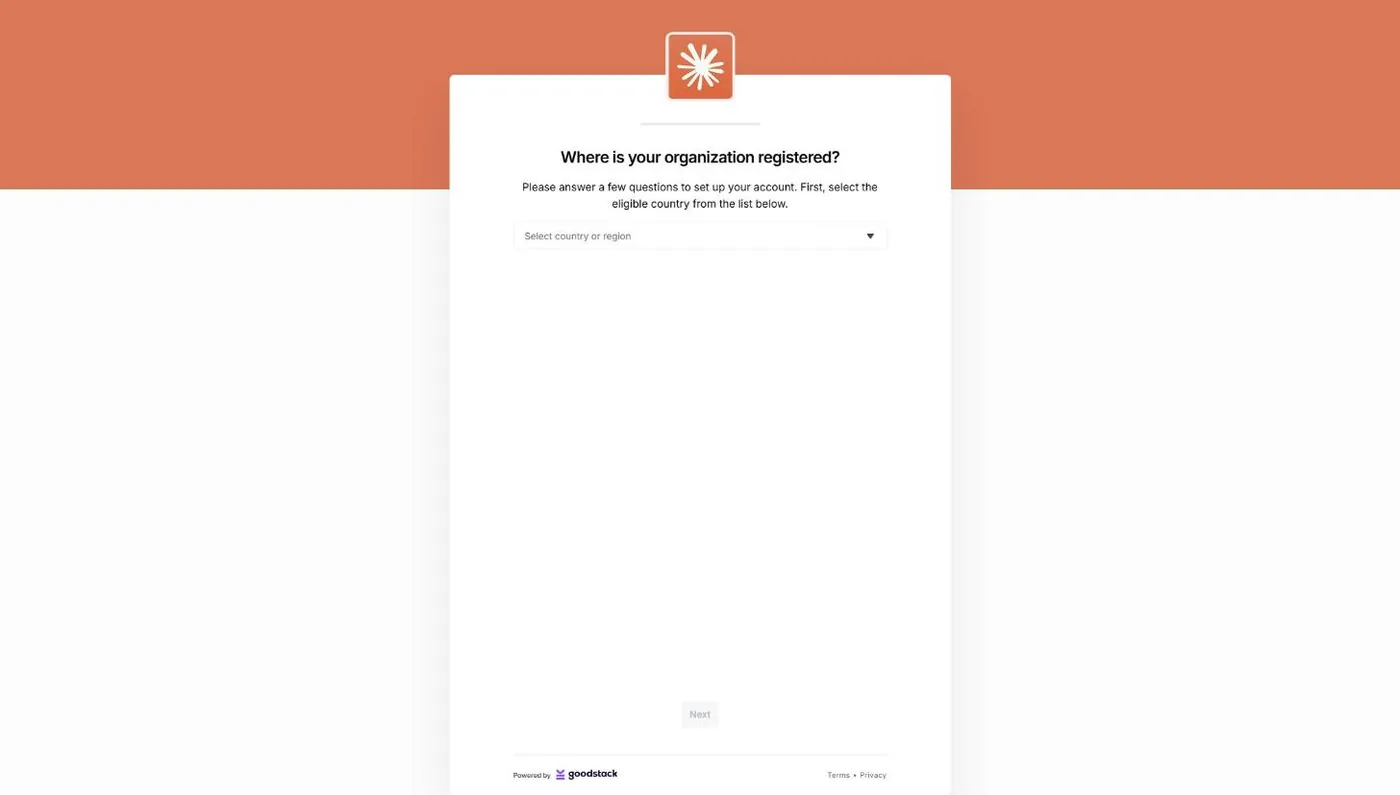
Our walkthrough stops here, because the next screen asks for real church data. The remaining steps come from Goodstack’s and Anthropic’s help documentation.
Step 4: Find your church in Goodstack’s registry
Goodstack searches for your organization by name and registration number. Search by EIN if the name search comes up empty. If your church holds its own IRS letter, it should appear. If it doesn’t, Goodstack asks for status documents: “a Government-issued registration certificate, a tax exemption confirmation letter, an official extract from the nonprofit register, or similar” (Goodstack help center, November 2026).
Common snag: a name mismatch. Enter the legal name exactly as it appears on your IRS paperwork, not the name on your sign out front.
Step 5: Prove you work for the church
Goodstack confirms that the person applying is associated with the organization. It may email a verification link to a staff address it finds on your church website, so tell your office it’s coming and check spam. If it asks for documents, its help center wants original, unredacted PDFs, ideally one issued by the church (signed, dated more than 30 days ago, such as board minutes or an employment letter) and one issued by your bank. For US organizations, “providing an EIN Verification Letter is strongly recommended” (Goodstack help center, November 2026).
Step 6: Finish setup from Anthropic’s email
Once Goodstack approves you, Anthropic emails a link to finish creating the Team plan with the nonprofit price applied. Add your seats, invite staff, and connect Google Drive or Microsoft 365 if your church runs on either.
Already paying full price? Anthropic’s getting-started tutorial says an account already on full pricing should go to Admin settings, then Billing, to update the plan, or contact support. If your church is also exempt from sales tax, Anthropic says to submit your tax exemption certificate through support “to receive a refund and apply the exemption to future invoices.”
For a deeper look at the verification partner itself, including which other programs reuse the same Goodstack approval, read what Goodstack is and how churches get verified.
What If Goodstack Rejects Your Church?
Most Goodstack rejections for churches come down to documents, not denial of churches as a category. Goodstack’s help center says eligibility rules “are set by the partner,” and Anthropic’s rules don’t exclude churches, so a rejection usually means Goodstack couldn’t confirm your status or your role. Each cause below has a fix.
| Rejection reason | What it usually means at a church | The fix |
|---|---|---|
| Couldn't verify nonprofit status | No IRS letter and no group exemption paperwork | Get your denomination's group exemption letter, or file Form 1023, then request manual review |
| Association not confirmed | The verify email went to an old address on your website, or to spam | Clean old emails off the site, watch spam, upload an employment letter signed by someone with authority |
| Applied with a personal email | Pastor used Gmail or Yahoo | Reapply from a church-domain address, or add a signed letter from a board member confirming your role |
| Name mismatch | "Grace Church" on the form, "Grace Community Church of Smithville, Inc." on the IRS letter | Use the exact legal name on every field and document |
| Wrong document type | Phone photos, screenshots, redacted files, or minutes signed last week | Original unredacted PDFs; church documents signed and dated 30+ days before you apply |
| EIN letter sent as proof of exemption | The IRS EIN letter proves your number exists, not your tax-exempt status | Pair it with your determination letter or group exemption documents |
Anthropic’s tutorial says that if you have issues with verification, “contact Goodstack.” Reply to Goodstack’s original email thread with your documents rather than opening a fresh application. The full document checklist for group-exempt and independent churches lives in our church nonprofit status guide.
Is Your Church’s Data Private on Claude Team?
Yes, by default. Anthropic’s privacy center says that for commercial products, including Claude for Work Team and Enterprise plans, “We will not use your chats or coding sessions to train our models” (privacy.claude.com, checked November 5, 2026). The exceptions: content you explicitly report, such as thumbs up or down feedback, and organizations that join Anthropic’s Development Partner Program.
Default privacy settings don’t make every use wise. Counseling notes, giving records and anything about minors still don’t belong in a chat window, on any AI tool. Write a one-page policy before you hand out seats; our church AI rules give you the template. Anthropic also says its plans can be configured to meet SOC 2 Type II, ISO 27001 and ISO 42001 requirements, which matters if your finance team asks.
Claude for Nonprofits vs. ChatGPT for Nonprofits
Claude and ChatGPT list the same nonprofit seat price for a verified church: $8 per user per month (OpenAI’s on annual billing). The differences are in seat rules, billing and what each plan bundles, as verified on both vendors’ own pages on November 5, 2026.
| Claude for Nonprofits | ChatGPT for Nonprofits | |
|---|---|---|
| Discounted plan | Claude Team, 2 to 150 seats | ChatGPT Business, Standard seats only |
| Price | $8/user/mo; $3 in low- or middle-income countries | $8/user/mo annual, $10 monthly |
| Premium seats | No nonprofit rate listed | "Not eligible for discount" |
| Verifier | Goodstack | Goodstack |
| Churches excluded? | No religious language on the page | No religious language on the page |
| Built-in extras | 14 nonprofit skills, Claude Code, Blackbaud and Candid connectors, free AI Fluency course | Enterprise up to 75% off through sales |
Sources: claude.com/solutions/nonprofits and OpenAI’s “OpenAI for Nonprofits” help article, both read November 5, 2026. The step-by-step for OpenAI’s program is in ChatGPT for nonprofits. Which one your staff should actually use day to day is a different question, and we answer it head to head in Claude vs. ChatGPT vs. Gemini for churches.
What Do Churches Use Claude For?
Churches use Claude mostly for writing and admin work that eats staff hours: email drafts, volunteer communication, meeting notes, policy documents, and pulling a sermon into small group questions. I’m not going to repeat our usage guides here. Pick the one that fits the person who’ll use the seat:
- New to AI and want the whole picture? Our complete guide to AI for churches covers tools, policy and where to start.
- Office manager or communications staff? Claude Cowork for churches is the desktop agent that works on real files without a terminal.
- Your most technical staff member? Claude Code for churches shows the workflows I run every week.
- Still choosing a tool? Claude vs. ChatGPT vs. Gemini for churches compares them on church work.
Claude is a tool, not a shepherd. It drafts the email; it doesn’t carry the people.
Frequently Asked Questions
Free Church Marketing Review for Your Church
AI tools save your staff hours. Visitors still find you through your website and local search. We'll look at both and show you how your church shows up when people nearby go looking, with clear next steps whether or not you ever work with us.
Related Guides
- Nonprofit Software Discounts for Churches: every program, and which ones accept, condition or exclude churches.
- How to Prove Your Church’s Nonprofit Status: the documents Goodstack and TechSoup accept.
- What Is Goodstack?: the verifier behind Claude, Google, Zoom and more.
- ChatGPT for Nonprofits: OpenAI’s $8 seat and how a church applies.
- Google for Nonprofits: the same Goodstack approval opens Workspace and Ad Grants.
- Canva for Nonprofits: how a verified church gets Canva’s nonprofit plan.
- AI for Churches: the complete guide to AI in ministry.