Mailchimp gives verified nonprofits 15% off. Constant Contact gives 20% or 30% if you prepay, Hootsuite advertises up to 60%, and Buffer offers 50%. Those are the four email and social media discounts I could confirm on each vendor’s own page on November 5, 2026.
The question pastors and church admins actually ask is shorter: will they take a church? On paper, yes. None of the four lists churches as ineligible. Only Hootsuite uses the word “church” at all, and only to say that church members can’t claim the deal for themselves.
The real gate is paperwork. Constant Contact accepts only a federal Letter of Determination. Hootsuite sends you through Goodstack. Mailchimp and Buffer review your documents by hand. If your church has never received its own IRS letter, you need to know which of these doors is open before you spend an afternoon on forms.
Before you apply anywhere: if your church doesn’t have an IRS determination letter, read how to prove your church is a nonprofit first. Google’s nonprofit help center puts it plainly: churches “are automatically considered tax exempt and are not required to apply.” Plenty of churches never did, which is why the letter these vendors ask for often doesn’t exist.
Email and social media nonprofit discounts compared
Hootsuite offers the deepest discount on paper (up to 60%) and Constant Contact has the strictest proof rule. The table below lines up all four as of November 2026, using only what each vendor’s own help page says.
| Tool | Discount | Who verifies | Proof they ask for | The church catch |
|---|---|---|---|---|
| Mailchimp | 15% off marketing plans. Request before you buy: no retroactive discounts. | Mailchimp billing team | EIN on the account. May ask for your 501(c)(3) letter. | Group exemption letters aren't mentioned |
| Constant Contact | 20% on a 6-month prepay, 30% on a 12-month prepay. Nothing for monthly billing. | Constant Contact billing team | Federal Letter of Determination only. EIN paperwork doesn't count. | Many churches have no letter of their own |
| Hootsuite | Up to 60%. Page doesn't say which plan gets what. | Goodstack | Registry ID plus an uploaded proof of status, if you're not already in Goodstack's registry | Nondiscrimination clause that lists religion in hiring |
| Buffer | 50%. Page doesn't say which plans. | Buffer's team, by hand | "Documentation," type not specified | No criteria published beyond "nonprofit charity organizations" |
Sources: Mailchimp, Constant Contact (article updated August 21, 2026), Hootsuite and Buffer help and application pages, all read November 5, 2026. I left out other email and social tools because I couldn’t confirm their nonprofit terms on the vendor’s own page this week. When I can, they’ll go in this table.
Does Mailchimp give churches a nonprofit discount?
Conditional Yes, if Mailchimp’s billing team accepts your proof. Mailchimp says it “offers a 15% discount to verified nonprofit organizations and charities,” and its help article never mentions religion or churches (Mailchimp help center, November 2026).
For a US church, the stated requirement is an EIN on the account. Mailchimp adds that it may ask for “a digital copy of your organization’s 501c3 letter.” The discount covers a marketing plan, and it only applies going forward. Mailchimp’s wording: “We can’t provide retroactive discounts or refunds on past purchases.” If your church admin already put the newsletter on a paid plan last year, that money is gone. Ask before the next purchase.
One more number worth knowing. Mailchimp’s Free plan covers up to 250 contacts and 500 sends a month (Mailchimp pricing page, verified November 5, 2026). If your list is that small, there’s nothing to discount yet. For the full walkthrough and the cost math at 500 and 2,500 contacts, see our Mailchimp for nonprofits guide.
Step 1: Create the account, but don’t buy a plan
Sign up with a church email address the office controls, not a volunteer’s personal Gmail. Stay on the free plan for now. Buying first is the most common way to lose this discount, because Mailchimp won’t apply it after the fact.
Step 2: Add your church’s EIN to the account
Mailchimp’s article tells US organizations to add the EIN before they request anything. Use the EIN your church banks under, and make sure the organization name on the account matches the name on your IRS paperwork.
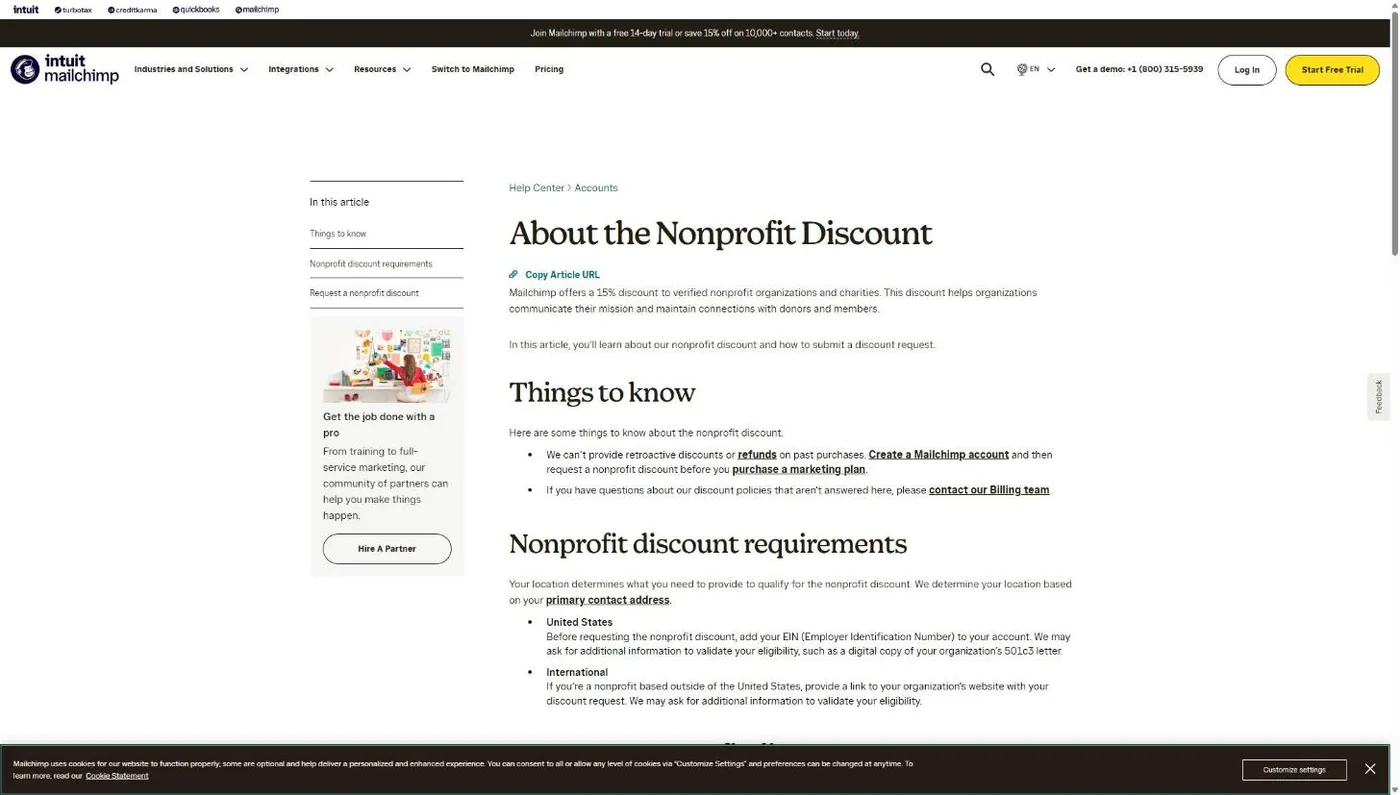
Step 3: Send the request through the billing contact form
Go to Mailchimp’s Contact page. Under Topic, choose Billing. Under “What kind of billing question do you have?”, choose Non-profit Discount Requests (US). Then click Access our contact form and submit.
Step 4: Answer billing if they ask for your letter
A billing team member contacts you if they need more. If they ask for your 501(c)(3) letter and your church sits under a denominational group exemption, ask this exact question: “We’re a church covered by our denomination’s group exemption, so we don’t have a 501(c)(3) letter in our own name. Will you accept our denomination’s group exemption letter plus a letter confirming we’re a member church?”
Once billing confirms the discount, buy the plan. For what to actually send on it, see my guide to email marketing for churches.
Does Constant Contact give churches a nonprofit discount?
Conditional Yes, if your church holds a federal Letter of Determination and pays ahead. Constant Contact gives “a 20% discount off our standard pricing when prepaying for 6 months, or a 30% discount when prepaying for 12 months,” and says plainly: “There is no discount when you pay monthly” (Constant Contact knowledge base article 5374, updated August 21, 2026).
The proof rule is the strictest in this roundup. US organizations “must send us your Federal government Letter of Determination, 501 (c)3 or (c)6,” and Constant Contact adds that “Your Tax Pay ID paperwork does not count.” The EIN confirmation letter your treasurer filed years ago won’t get you in.
That’s the church-specific catch. Because churches are tax-exempt automatically, many never applied for a determination letter. New Hope Hawaii Kai, where I serve as Executive Pastor, is covered by the Foursquare group exemption, and that’s a common setup. Constant Contact’s article says nothing about group exemption letters either way. Ask before you assume.
Step 1: Find your Letter of Determination
Look for an IRS letter with your church’s own name on it recognizing 501(c)(3) status. If all you have is a denominational group exemption letter, make the call in Step 2 anyway and ask this exact question: “We’re a church covered by our denomination’s group exemption. We don’t have a Letter of Determination in our own name. Will you accept our denomination’s group ruling letter plus written confirmation that we’re a subordinate member, for the nonprofit prepay discount?” If you have neither, start with proving your church’s nonprofit status.
Step 2: Call before you buy a prepay plan
Constant Contact’s instruction is direct: “don’t purchase a prepay plan before we’ve confirmed your nonprofit pricing.” New customers call 866-511-1966. Churches already paying monthly call billing at 855-285-0211, or email the paperwork to billingadjustment@constantcontact.com with the subject line ATTN: Nonprofit Paperwork. The article warns that without that subject line, “your request may not be received.”
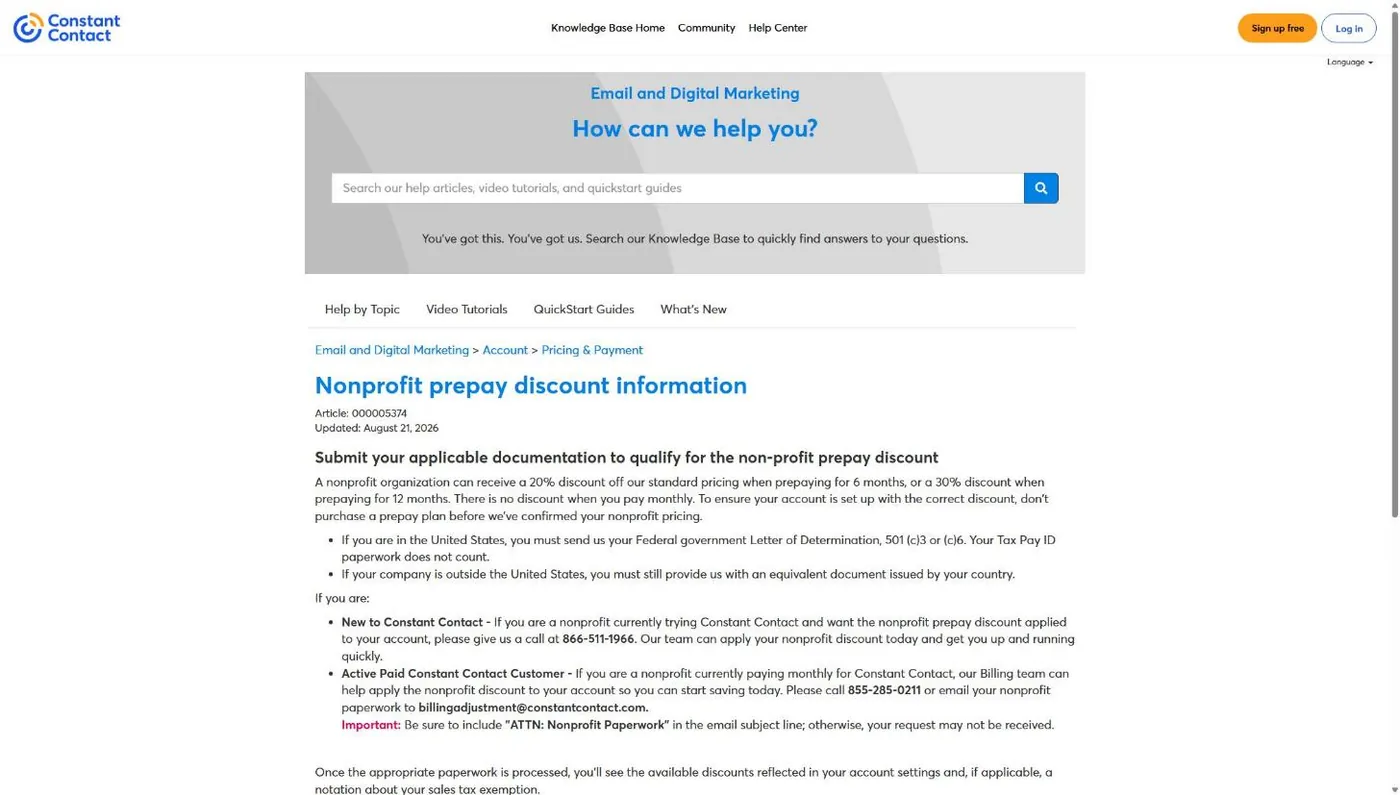
Step 3: Pick 6 or 12 months and check your account
Once the paperwork is processed, the article says the discount shows up in your account settings. Then choose the prepay term. One side note for your treasurer: Constant Contact states that nonprofit status “does not automatically designate your organization as tax-exempt” for sales tax. That’s a separate step with their billing team.
Does Hootsuite give churches a nonprofit discount?
Conditional Yes for registered charities, with two church-specific flags. Hootsuite’s HootGiving program offers “up to a 60% discount for registered nonprofit organizations,” verified through Goodstack, and verification takes 2 to 3 working days (Hootsuite nonprofit application page, November 2026).
The first flag is hiring. Hootsuite’s guidelines exclude organizations with “a policy or mission of discrimination in hiring,” and the protected list includes religion. If your church requires staff to affirm its statement of faith, ask Hootsuite how that rule applies to you before you apply. The second flag is smaller: the page says members of a church can’t claim nonprofit offers personally. The church applies, not individual members.
The Goodstack step has its own catch. Goodstack’s help center says that if your nonprofit doesn’t have to register to operate, it “will not be able to verify your nonprofit status.” Churches don’t have to register. You get through with an IRS letter or group exemption documents. My Goodstack guide walks through what it accepts from a church.
Step 1: Ask the hiring question first
Use Hootsuite’s chat or sales contact and ask this exact question: “Our church requires staff to share our statement of faith. Does that make us ineligible for HootGiving under your nondiscrimination guideline? And which plan gets the full 60%?” Get the answer in writing. “Up to 60%” means the percentage varies, and the page doesn’t say how.
Step 2: Start the Goodstack application
On the HootGiving page, the Apply using Goodstack box asks “Where is your organization registered?” Pick the United States and click Next step.
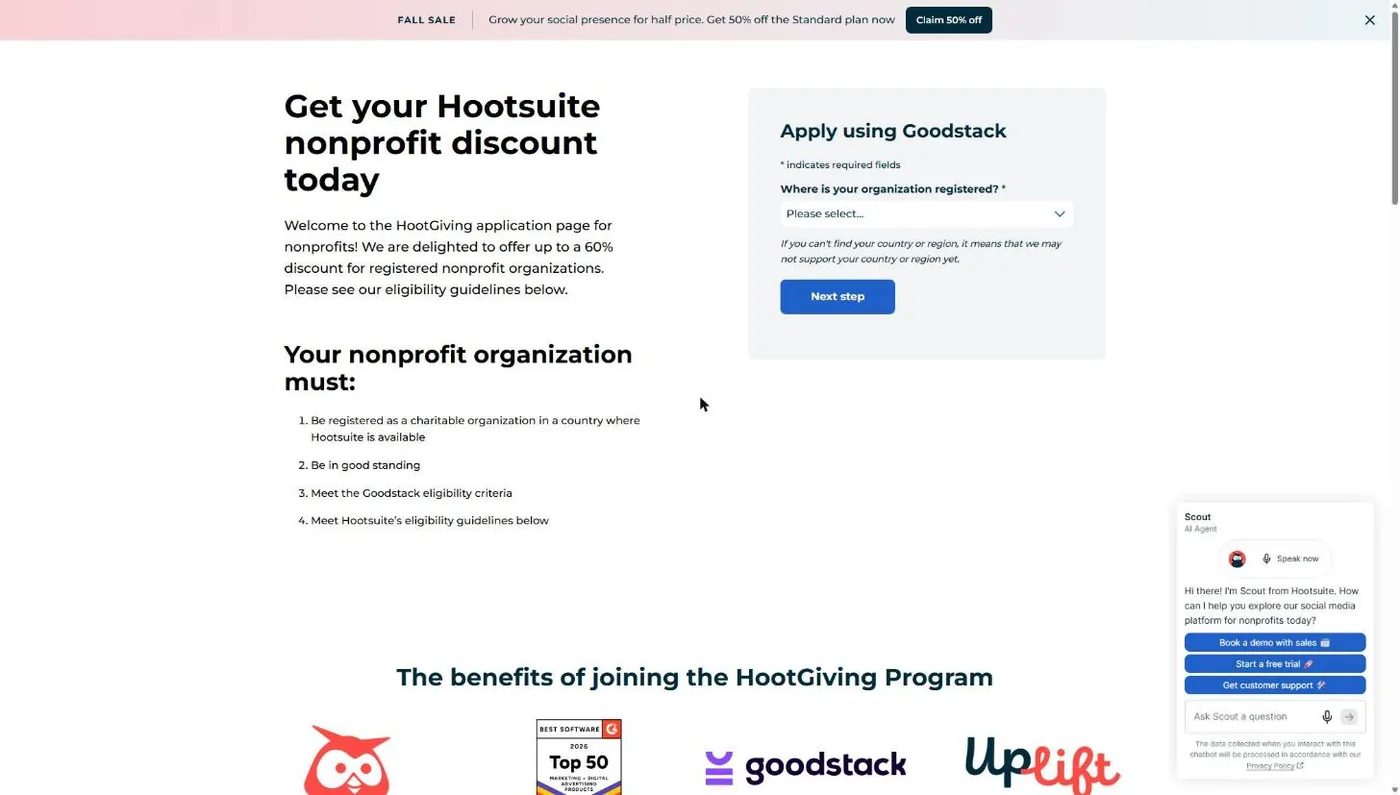
Step 3: Add your church if Goodstack doesn’t find it
If your church isn’t already in Goodstack’s registry, Hootsuite’s page lists what you’ll enter: organization name, country, registry name, organization registration ID, and an uploaded file proving official nonprofit status. Use your legal name exactly as it appears on your IRS paperwork. Goodstack’s help center also strongly recommends an EIN Verification Letter for US organizations, which helps prove you’re connected to the record.
Step 4: Watch for Goodstack’s email
Goodstack follows up with next steps and an outcome in 2 to 3 working days, per Hootsuite’s page. Check the spam folder of whatever address you used.
Does Buffer give churches a nonprofit discount?
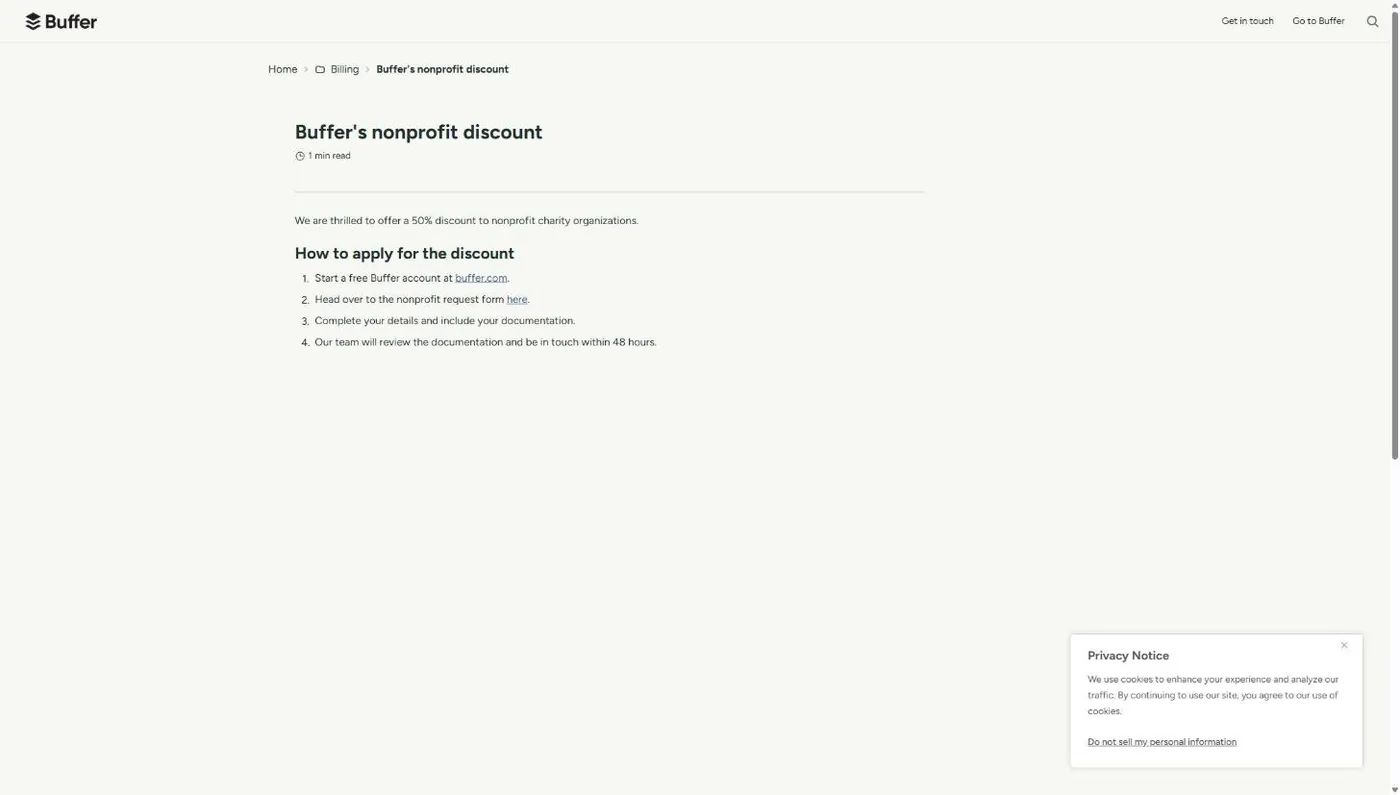
Unclear: ask first Possibly. Buffer says it offers “a 50% discount to nonprofit charity organizations,” and that’s the only eligibility language on the page (Buffer help center, November 2026). Buffer doesn’t name churches, doesn’t exclude them, and doesn’t say which plans or which documents qualify.
That makes Buffer the simplest application in this roundup and the hardest to predict. A person on Buffer’s team reviews your documentation and replies “within 48 hours.” Write a request that answers their likely questions up front.
Step 1: Create a free Buffer account
Buffer’s article starts with a no-cost account. Set it up under a church email the office controls.
Step 2: Fill out the nonprofit request form
Buffer’s form lives at buffer.com/nonprofits. Fill in your church’s details and attach your documentation.
Step 3: Ask the church question in the form itself
Put this in the notes: “We’re a church recognized under IRC 501(c)(3). Our proof is [our IRS determination letter / our denomination’s group exemption letter]. Does that qualify for your 50% nonprofit discount, and which plans does it cover?” Attach whichever document you named. You’ll know in two days instead of guessing.
Which of these discounts can your church actually get?
Your paperwork decides it more than the vendor does. A church holding its own IRS determination letter can apply to all four. A church with only an EIN can’t get Constant Contact’s discount at all, by Constant Contact’s own rule.
| Your church has | Mailchimp | Constant Contact | Hootsuite | Buffer |
|---|---|---|---|---|
| Its own IRS determination letter | Yes | Yes | Yes, unless the hiring clause flags you | Likely. Confirm in the form |
| A denominational group exemption letter | EIN is the stated bar. Ask if billing wants the letter | Not mentioned. Call and ask before buying | Goodstack review of your group exemption documents | Ask in the form |
| Only an EIN | Possible, unless billing asks for the 501(c)(3) letter | No: EIN paperwork "does not count" | Unlikely: Goodstack can't verify orgs that don't register | Ask in the form |
The rule I'd give any church office
A church's discount on email and social media tools depends on its paperwork, not its mission: a church with its own IRS determination letter can apply at Mailchimp, Constant Contact, Hootsuite and Buffer, while a church with only an EIN is shut out of Constant Contact's discount and will struggle at Goodstack.
If you want the full picture across Google, Microsoft, Canva and the rest, the nonprofit software discounts guide has every program side by side.
What to do if your church gets rejected
Five problems cause most of the stalls these four vendors’ own rules predict, and each one is fixable. The table maps each problem to the tool where it bites and the fix to try.
| Problem | Where it bites | Fix |
|---|---|---|
| You sent EIN paperwork instead of a determination letter | Constant Contact | Send a Letter of Determination. No letter? Ask about your group exemption letter, or see the proof guide for filing Form 1023. |
| Goodstack can't verify your church | Hootsuite | Upload your IRS letter, or your group exemption letter plus an EIN Verification Letter. See the Goodstack guide. |
| You bought the plan before asking | Mailchimp, Constant Contact | Mailchimp won't apply it retroactively. Request now so the discount covers your next purchase. |
| Name on the account doesn't match your IRS record | All four | Change the account's organization name to your legal name, then resubmit. |
| Faith-based hiring flagged | Hootsuite | Ask Hootsuite to explain the decision in writing. If it stands, apply at Buffer instead. |
Is a nonprofit discount on email and social tools worth chasing?
Yes, but only as the last step of a decision you’ve already made. A 15% to 60% discount on a tool your church doesn’t use well is still money spent on a tool your church doesn’t use well.
Pick the tool on fit first. If your list is small, Mailchimp’s free plan may carry you for a while. If you want to schedule a week of posts on Monday and stop thinking about it, compare Hootsuite and Buffer on the plan you’d actually buy, since a percentage off tells you nothing without the list price under it. My church newsletter platforms comparison and church social media strategy guide cover the fit question. If you’re weighing whether to hand social off entirely, here’s what social media management costs for churches.
Then apply for the discount before you pay a dollar. Mailchimp refuses retroactive discounts, and Constant Contact tells you to confirm before buying. Hootsuite and Buffer don’t say either way, so I’d treat them the same.
Frequently Asked Questions
Cheaper tools won't bring a single new family through your doors
Get a free Church Marketing Review. We'll look at your website, your local search presence, and how your church shows up when people nearby go looking, then tell you what to fix first, whether or not you ever become a client.
Related Guides
- Nonprofit software discounts for churches: every program, which ones accept churches, and what changed in 2025 and 2026.
- How to prove your church is a nonprofit: determination letters, group exemption letters, and what each vendor accepts.
- What is Goodstack?: the verifier behind Hootsuite, Google, Canva and others, and how a church gets through it.
- Canva for Nonprofits: free Canva Pro for your social graphics.
- TechSoup for churches: how registration works with a group exemption letter.
- Email marketing for churches: what to send once the tool is set up.