Mailchimp for nonprofits comes down to one offer: 15% off a paid marketing plan for verified nonprofits and charities. The question I get from church admins is whether Mailchimp will take a church, and what it costs once it does.
Mailchimp will take a church. Its help article says it “offers a 15% discount to verified nonprofit organizations and charities,” and it says nothing about religion, churches or places of worship either way (Mailchimp help center, checked November 5, 2026). For a US church, the stated bar is an EIN on the account.
The catch is timing. Mailchimp won’t apply the discount to anything you’ve already paid for. Ask first, buy second. Get that order wrong and the discount only starts with your next purchase.
No IRS determination letter in your files? Most churches don’t have one, because churches are tax-exempt automatically and never had to apply. Read how to prove your church is a nonprofit before you start. It covers your own letter, a denominational group exemption, and filing Form 1023, plus which documents each vendor accepts.
Does Mailchimp offer nonprofit pricing to churches?
Yes. Mailchimp offers nonprofit pricing in the form of a 15% discount on marketing plans for “verified nonprofit organizations and charities,” and nothing in the help article excludes churches (Mailchimp help center, November 5, 2026). The article names no separate nonprofit plan. The discount comes off the same Essentials, Standard and Premium plans everyone else buys.
Older articles online describe different Mailchimp plans and numbers. Go by the live help article: one number, 15%, and one US requirement, an EIN.
Mailchimp checks you in-house. Its billing team handles the request, so you won’t go through Goodstack or TechSoup, the validators behind Canva, Google and Microsoft. For a church, that’s mostly good news: fewer document rules, and a person on the other end you can ask questions.
What does Mailchimp need to verify a church?
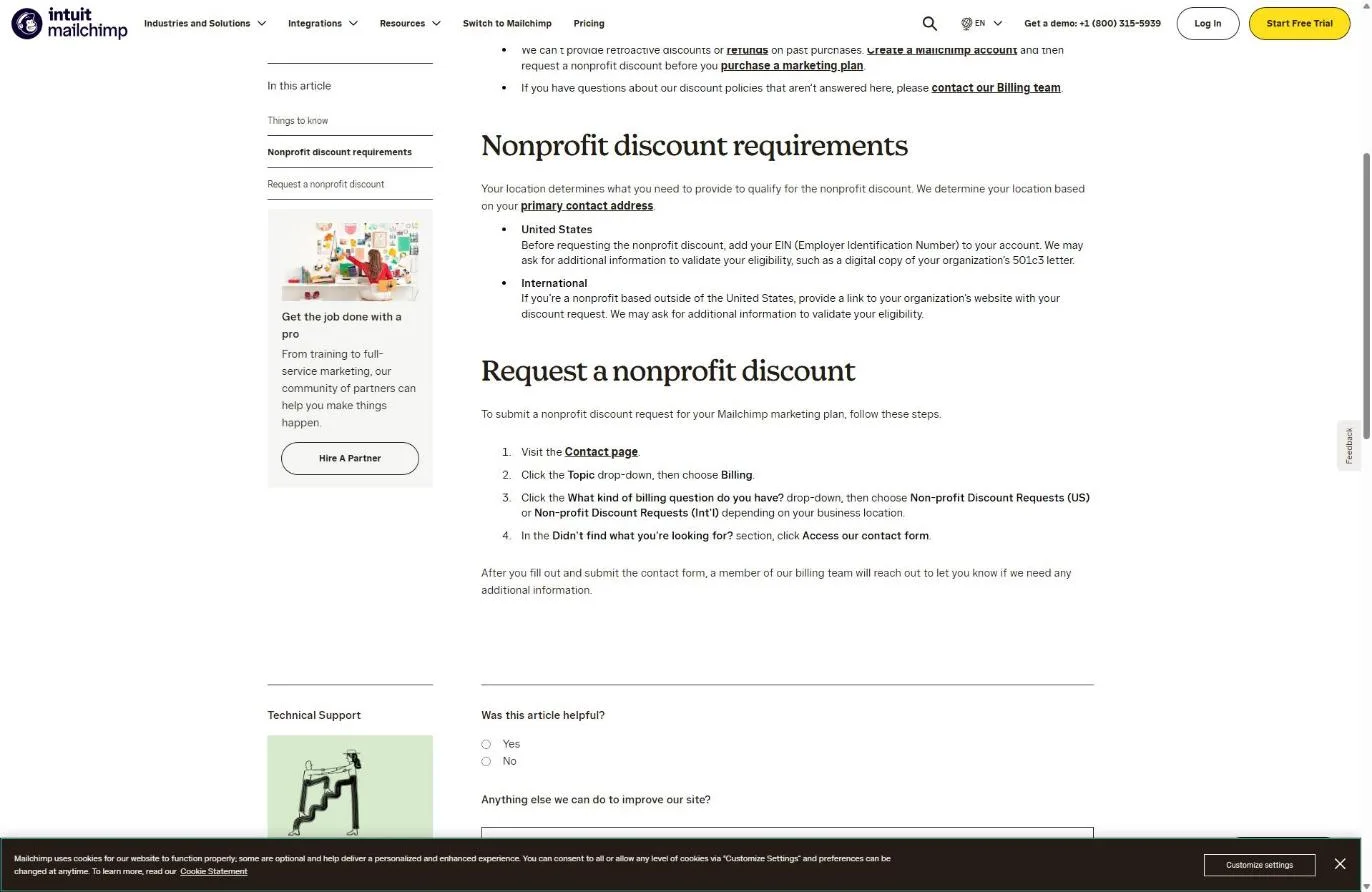
For a US church, Mailchimp needs your EIN (Employer Identification Number) added to the account. The help article adds: “We may ask for additional information to validate your eligibility, such as a digital copy of your organization’s 501c3 letter” (Mailchimp help center, November 2026). Churches outside the US include a link to their website with the request.
So the EIN is the stated bar, and the letter is a maybe. Here’s what that means depending on your paperwork.
| Your church has | What to have ready for Mailchimp | Odds |
|---|---|---|
| Its own IRS determination letter | EIN on the account, plus a PDF of the letter | Strong |
| A denominational group exemption | Your church's own EIN, the denomination's group exemption letter, and a letter from the denomination naming your church as a member | Good, if billing accepts the group letter. Ask. |
| Only an EIN | EIN on the account, plus your bylaws or articles in case billing asks for more | Possible. Stalls if billing insists on a 501(c)(3) letter |
Source: Mailchimp help center, "About the Nonprofit Discount," checked November 5, 2026. The odds column is my judgment, not Mailchimp's.
Plenty of churches are covered by their denomination’s group exemption instead of a letter in their own name. That setup is common, and it’s the one most likely to get a “do you have a 501(c)(3) letter?” email back. Mailchimp’s article doesn’t say whether it accepts group exemption letters. Have the documents ready and ask the question directly.
How do I get the Mailchimp nonprofit discount?
You get the Mailchimp nonprofit discount by creating a free account, adding your EIN, and requesting the discount through the Billing contact form, all before you buy a paid plan. Mailchimp’s wording: “Create a Mailchimp account and then request a nonprofit discount before you purchase a marketing plan” (Mailchimp help center, November 2026).
Step 1: Create a free account with a church-owned email
Sign up at mailchimp.com on the Free plan. Use an address the church office controls, like office@ your church’s domain, not a volunteer’s Gmail. Whoever owns the login owns your list, and volunteers move on.
Don’t start a paid trial or pick a paid plan yet. The Free plan lets you build the account and the audience while billing reviews your request.
Snag: if someone at your church already set up Mailchimp years ago, find that account first. Two accounts means two lists, and you only want to request the discount once.
Step 2: Add your church’s EIN to the account
Mailchimp tells US organizations to add the EIN before requesting anything. Use the EIN your church banks under, and make the organization name on the account match the legal name on your IRS paperwork exactly. “Grace Church” on the account and “Grace Community Church of Springfield” on the letter is the kind of mismatch that earns a follow-up email.
Step 3: Submit the request through the Billing contact form
Go to Mailchimp’s Contact page. Set the Topic drop-down to Billing. In the billing question drop-down, choose Non-profit Discount Requests (US), or the international option if you’re outside the US. Then click Access our contact form under “Didn’t find what you’re looking for?” and submit.
Mailchimp’s pricing page also says to contact billing “with your username and a link to your organization’s website” (Mailchimp pricing page, November 2026). Put both in the first message so nobody has to ask.
Step 4: Answer billing if they ask for your letter
A member of Mailchimp’s billing team reaches out after you submit. If they ask for your 501(c)(3) letter and your church is under a group exemption, send this:
“We’re a church covered by our denomination’s group exemption, so we don’t have a 501(c)(3) letter in our own name. Attached are the group exemption letter and a letter from the denomination confirming we’re a member church. Will that work?”
Mailchimp doesn’t publish an approval time. Watch the inbox you signed up with, including spam.
Step 5: Buy the plan only after billing confirms
Once billing confirms the discount is on the account, pick your plan. Check the first invoice for the 15% line. If it’s not there, reply to the billing thread right away, before the next charge.
What does Mailchimp cost a church with the nonprofit discount?
At 2,500 contacts, Mailchimp’s Standard plan lists at $60 a month, which works out to about $51 a month after the 15% nonprofit discount (Mailchimp pricing page, November 5, 2026; the 15% math is mine). Mailchimp prices by contact count, so your list size sets the bill more than the discount does.
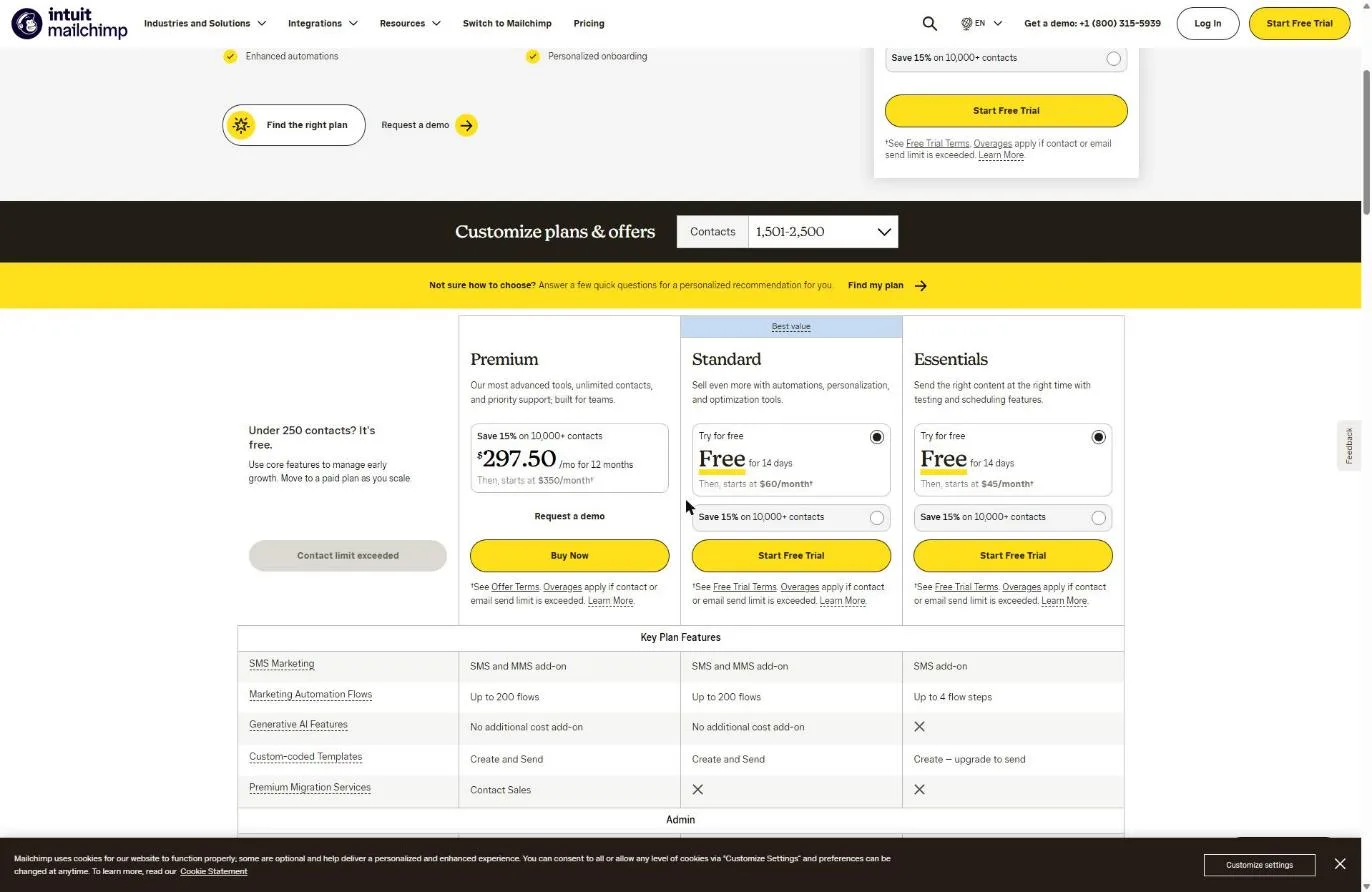
Here’s the math at two list sizes a church actually hits: a 500-person list for a smaller congregation, and 2,500 for a church that’s been collecting emails from guests, events and giving for a few years.
| Plan and list size | List price per month | After 15% (my math) | You save per year |
|---|---|---|---|
| Free, under 250 contacts | $0 | $0 | Nothing to discount |
| Standard, up to 500 contacts | $20 ("starts at") | About $17 | About $36 |
| Essentials, 1,501 to 2,500 contacts | $45 | About $38.25 | About $81 |
| Standard, 1,501 to 2,500 contacts | $60 | About $51 | About $108 |
| Premium, 1,501 to 2,500 contacts | $350 | About $297.50 | About $630 |
Source: mailchimp.com/pricing/marketing, list prices in USD, checked November 5, 2026. The discounted figures are my 15% calculation, not a Mailchimp invoice. I could not confirm the Essentials price at 500 contacts, so it's left out.
Two cautions on those numbers. First, Mailchimp’s pricing page also runs a separate promotion: businesses with 10,000+ contacts save 15% on their first 12 months. That’s not the nonprofit discount, and the help article doesn’t say whether the two stack. Ask billing before you assume. Second, Mailchimp’s pricing page says “Overages apply if contact or email send limit is exceeded.” A church that imports every name from its giving records can jump a tier without meaning to.
The seat count matters too. Mailchimp’s pricing page lists 1 seat on Free, 3 on Essentials, 5 on Standard and unlimited users on Premium (November 2026). If your pastor, office manager and communications volunteer all need logins, Free won’t do it.
Is Mailchimp worth it for a church?
Mailchimp is worth paying for when your church sends email every week to more than 250 people and more than one person needs to log in. Below that, the Free plan covers 250 contacts, 500 emails a month (250 a day) and one seat, per Mailchimp’s pricing page in November 2026. A church plant or a single ministry list may never outgrow it.
The 15% is the small question. On Standard at 2,500 contacts, it saves about $9 a month. That won’t rescue a monthly all-church email nobody opens. A clear weekly email with one thing people should do does.
Here’s how I’d decide:
- Under 250 contacts and one person sending: stay on Free.
- A few hundred to 2,500 contacts, two or three people sending: Essentials or Standard, with the discount requested first. Essentials caps automation flows at 4 steps; Standard raises that limit, which matters for a longer new-guest welcome series.
- Several thousand contacts with ministry-by-ministry lists: price Standard against Premium carefully. Premium’s jump is large, and most churches don’t use what it adds.
Mailchimp isn’t the only email tool with a nonprofit offer. Constant Contact gives 20% off when you prepay 6 months or 30% when you prepay 12, but only with a federal Letter of Determination, and “There is no discount when you pay monthly” (Constant Contact knowledge base, updated August 21, 2026). Mailchimp’s EIN-first rule is friendlier to churches without their own letter. The email and social media nonprofit discounts roundup puts Mailchimp, Constant Contact, Hootsuite and Buffer side by side.
If you’re shopping for a full CRM rather than an email tool, my HubSpot for nonprofits guide covers its 40% discount and why most churches don’t need it.
For what to actually send once you’re set up, see my guide to email marketing for churches.
What if Mailchimp turns down your church’s discount request?
If Mailchimp turns down or stalls your discount request, the cause is almost always proof or timing, not your church’s mission. Mailchimp’s article mentions no religious exclusion, so a “no” usually means billing couldn’t match your church to a nonprofit record, or you’d already bought.
| What went wrong | What it usually means for a church | The fix |
|---|---|---|
| You bought the plan first | Mailchimp says: "We can't provide retroactive discounts or refunds on past purchases." | Request now so the discount covers future billing. Past charges stay paid. |
| No EIN on the account | Someone requested before adding it | Add the EIN, then resubmit the Billing form |
| Billing asked for a 501(c)(3) letter you don't have | Group-exempt or independent church | Group-exempt: send the denomination's group letter plus a membership letter. Independent: see the proof guide on Form 1023. |
| Name mismatch | Account says a short name; IRS records show the legal name | Change the account's organization name to the legal name and reply on the same thread |
| EIN belongs to someone else | You entered the denomination's EIN, or a church school's | Use the EIN your church itself banks under |
The first row quotes Mailchimp's help center (November 5, 2026). The other rows are the common church paperwork problems I see across these programs; Mailchimp doesn't publish a rejection list.
Mailchimp doesn’t publish renewal or recertification rules for the discount. If your church changes its legal name or EIN, tell billing so the account still matches.
Frequently Asked Questions
Free Church Marketing Review for Your Church
A cheaper email plan only helps if the right people are on your list. We'll look at your website, your local search presence, and how new people find your church and stay connected after a first visit. You get a straight assessment and clear next steps, whether or not you ever become a client.
Related Guides
- Nonprofit Software Discounts for Churches: every program, and whether it accepts churches.
- How to Prove Your Church Is a Nonprofit: the documents behind every application, including group exemptions.
- Email and Social Media Nonprofit Discounts: Mailchimp, Constant Contact, Hootsuite and Buffer compared.
- Email Marketing for Churches: what to send once your account is set up.
- HubSpot for Nonprofits: the 40% CRM discount, and whether a church needs it.
- Google Workspace for Churches: free church email addresses to sign up with.
- What Is Goodstack?: the verifier many other programs use, and how churches get through it.
- Canva for Nonprofits: free Canva Pro for designing the graphics in your emails.