The YouTube Nonprofit Program is Google’s free add-on for nonprofit channels. Pastors ask me two things about it: can a church get in, and is it worth the paperwork?
Yes, a church can get in, and the paperwork is mostly already done if you have Google for Nonprofits. YouTube’s help center puts it in one sentence: “If your organization has a Google for Nonprofits account, you’re eligible for the YouTube Nonprofit Program” (YouTube Help, checked November 5, 2026). There is no separate application for status. You click a button inside your Google for Nonprofits account and wait.
The real value for a church is one feature: a card on your sermon videos that sends viewers to any page on your website. Your plan-a-visit page. Your giving page. Your Christmas Eve service times. What the program does not give you is a donate button on your own channel. That’s a different tool with different rules, and I’ll cover it below so you don’t waste an afternoon hunting for it.
No IRS determination letter in your files? Most churches don’t have one, because the IRS never required churches to apply. Google does require IRS recognition, so read how to prove your church is a nonprofit before you start. It covers the three paths: your own letter, a denominational group exemption, or filing Form 1023.
What is the YouTube Nonprofit Program?
The YouTube Nonprofit Program is a free set of channel features for organizations approved through Google for Nonprofits. YouTube’s help center lists three benefits in November 2026: “Link directly to your site from your videos,” “Optimize your content” and “Dedicated technical support.” The standard creator channel features stay available too. It is one of the four no-charge products inside Google for Nonprofits, next to Workspace, the Ad Grant and Maps credits.
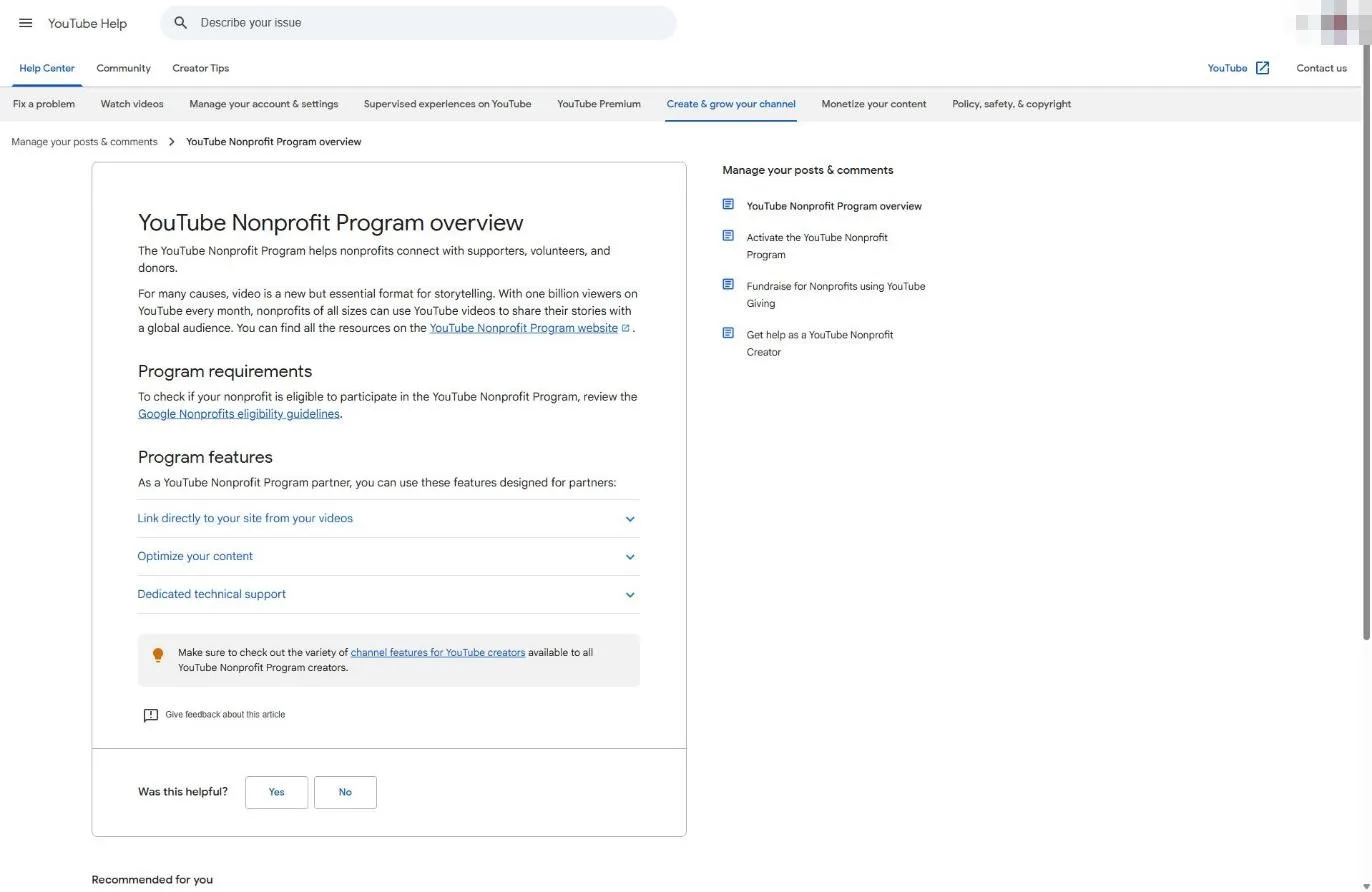
The feature that matters is the Link Anywhere card. YouTube describes it as “a special card type that lets you link to any external URL,” and says nonprofits can use it to “direct your viewers to your external campaign landing pages” (YouTube Help, November 2026).
Why that’s a big deal: YouTube’s general help page on cards says a regular link card to an outside website is for channels “in the YouTube Partner Program” (YouTube Help, November 2026). Most church channels aren’t in the Partner Program and never will be. Read those two pages together and the Nonprofit Program is how a church channel gets a clickable path from a sermon to its own website without first building a monetized channel.
The other benefits are thinner. “Optimize your content” is guidance, and technical support helps with “any issues setting up your nonprofit channel.” Useful when something breaks, not the reason to sign up.
Can churches join the YouTube Nonprofit Program?
Churches can join the YouTube Nonprofit Program if Google for Nonprofits has approved them. YouTube sends eligibility questions to “the Google Nonprofits eligibility guidelines,” and none of the four YouTube help pages I checked on November 5, 2026 mention religion, churches or places of worship. Google’s own nonprofit help center names churches directly and accepts them once the IRS recognizes their 501(c)(3) status.
So the gate isn’t YouTube. It’s Google for Nonprofits, and that gate is about proof. Google wants your church to be IRS-recognized, either with its own determination letter or through your denomination’s group exemption. A church that has been quietly tax exempt for 40 years without ever asking the IRS for a letter isn’t eligible yet.
| Your church's situation | YouTube Nonprofit Program? | Your next move |
|---|---|---|
| Already approved for Google for Nonprofits | Eligible now | Skip to Step 2 below |
| Own IRS letter or denominational group exemption, not yet in Google for Nonprofits | Eligible after Google approves you | Apply to Google for Nonprofits first |
| Never applied to the IRS, no group exemption | Not yet | Get IRS recognition (Form 1023), then apply to Google |
| Church plant using a sending church's status | Usually not on its own | Google lists fiscally sponsored groups without their own 501(c)(3) as ineligible. Confirm group exemption coverage or get your own status |
Sources: YouTube Help and Google for Nonprofits help center, checked November 5, 2026.
New Hope Hawaii Kai, where I serve as Executive Pastor, is a Foursquare church covered by our denomination’s group exemption. That’s the most common setup I see in church offices, and it works with Google, as long as you enter your church’s own EIN and send the group exemption documents. The Google for Nonprofits guide explains that part.
How to join the YouTube Nonprofit Program (step by step)
You join the YouTube Nonprofit Program from inside your Google for Nonprofits account, not from YouTube. YouTube’s activation article (November 2026) lists three requirements: a Google for Nonprofits account, “a YouTube channel and ID for your organization,” and a channel that is “easily verified as belonging to your organization.” Then it’s three clicks and a 2 to 14 business day review.
Step 1: Get approved for Google for Nonprofits
This is the prerequisite, and it’s where every real decision happens. Apply at google.com/nonprofits with a church-owned Google account, enter your legal name and EIN, and clear Goodstack’s verification. Goodstack says it processes applications within 72 hours; Google says its review typically takes 2 to 14 business days. I won’t repeat those steps here. Our Google for Nonprofits guide walks through each screen, the group exemption rules and the rejection fixes.
If you’re still deciding whether to apply at all, the YouTube program alone probably won’t tip it. The Ad Grant will. More on that below.
Step 2: Make the channel obviously the church’s
YouTube says the channel “should be easily verified as belonging to your organization.” Google’s reviewer has to look at your channel and connect it to the organization in your nonprofit account. Make that easy:
- Use the church’s official channel, not a channel a staff member started under a personal account.
- Match the channel name to your church’s name. If your legal name is “Grace Community Church of Springfield, Inc.” and your channel says “GCC Sermons,” add enough in the channel description to connect them.
- Put your church website link in the channel’s About section, on the same domain you used for Google for Nonprofits.
- Upload your church logo as the profile picture and a few recent services or sermons, so the reviewer sees a real, active church channel.
Snag: if the channel lives in a former youth pastor’s personal Google account, sort out ownership now. Doing it after activation is harder, because changing the channel later is permanent (Step 6).
Step 3: Find your channel ID
Your channel ID is not your @handle or your channel name. YouTube’s help center says to sign in, select your profile picture, choose Settings, then Advanced settings, where “you’ll see your channel’s user and channel IDs” (YouTube Help, November 2026). You must be signed in as the channel’s primary owner to see it.
Copy the channel ID into a note. You’ll paste it in the next step.
Step 4: Click Get Started in Google for Nonprofits
YouTube’s activation steps, quoted from its help article (November 2026):
- “Sign in to Google for Nonprofits with your organization’s administrative account.”
- “Under ‘YouTube Nonprofit Program,’ click Get Started.”
- “Follow the steps.”
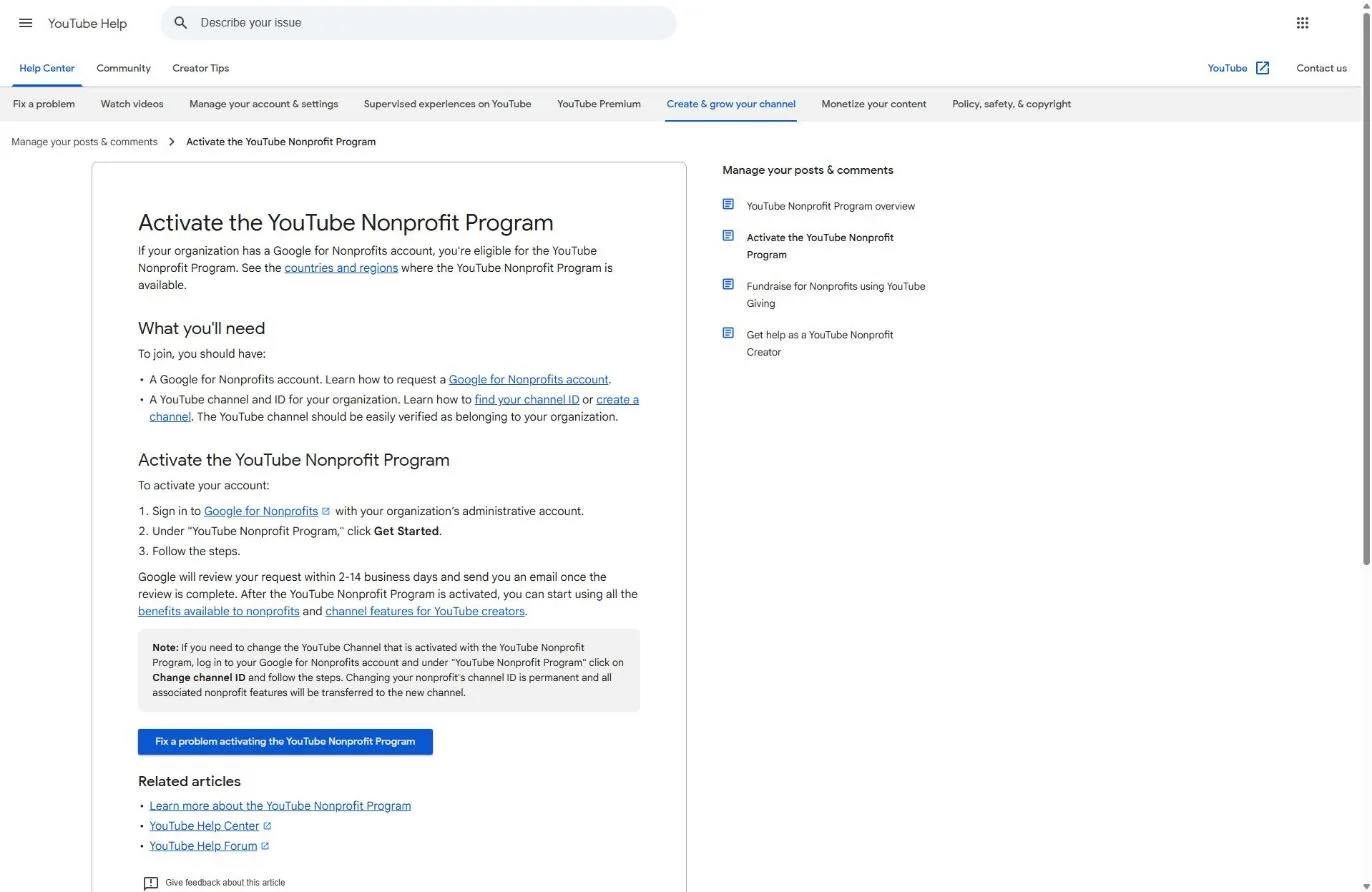
We stopped our walkthrough at the help article, because opening Get Started requires signing in to a live Google for Nonprofits account. The screens after the button aren’t shown here. Expect to be asked for the channel ID from Step 3.
The admin login matters. If the person who set up Google for Nonprofits has left the church, you’ll need to get admin access back before you can activate anything. The Google for Nonprofits guide covers how Google handles access requests.
Step 5: Wait for Google’s review
YouTube says “Google will review your request within 2-14 business days and send you an email once the review is complete” (YouTube Help, November 2026). The email goes to the admin account, so watch that inbox and its spam folder. Keep uploading normally while you wait. Nothing about your channel pauses.
Step 6: Know that switching channels later is permanent
Many churches run more than one channel: a main channel, a youth channel, an old channel from before a rebrand. Only one gets the program features. YouTube’s help center says “Changing your nonprofit’s channel ID is permanent,” and that “all associated nonprofit features will be transferred to the new channel” (YouTube Help, November 2026). You make the change in Google for Nonprofits under the YouTube Nonprofit Program section with Change channel ID.
Pick the channel where your sermons and services live. That’s where the links will earn their keep.
Step 7: Add link cards to your videos
Once approved, add cards in YouTube Studio. YouTube’s cards article (November 2026) gives the path: sign in to YouTube Studio, select Content, click the video, select Editor, choose Info cards, pick the card type, set the start time, add an optional message and teaser text, then click Save. You can add up to 5 cards to one video.
One honest caveat: I could only read YouTube’s public help pages, not an activated nonprofit channel. YouTube calls the nonprofit card a Link Anywhere card; the exact label in your Studio menu may read differently. If you don’t see an external link option after approval, that’s what the dedicated technical support is for.
Where should a church point its YouTube links?
A church should point every YouTube link card at the one page that matches what the video is about, and almost never at the homepage. YouTube allows up to 5 cards per video (YouTube Help, November 2026). Use one or two, timed to the moment the pastor mentions the thing you’re linking to.
| Video | Point the card at | When it appears |
|---|---|---|
| Full Sunday sermon | Plan-a-visit page with service times and what to expect | Near the start, then again at the closing invitation |
| Sermon clip or short teaching | The full sermon series page on your website | At the point the clip ends its main idea |
| Generosity or vision message | Your church giving page | When the pastor talks about giving, not before |
| Event promo (Easter, Christmas Eve, VBS) | The event page with registration or times | Within the first few seconds |
| Testimony or baptism video | Next steps page (baptism class, groups, membership) | At the end of the story |
The pages you link to have to be good. A link card that drops a curious viewer on a page with last year’s service times does more harm than no card at all.
Can a church collect donations through YouTube?
Usually not on its own channel. YouTube’s donation tool is YouTube Giving, and it’s a separate feature from the Nonprofit Program with much stricter rules. Giving runs as a creator-led fundraiser: a creator with a qualifying channel requests your nonprofit, and donations flow to it through Network for Good. Most church channels don’t meet the creator requirements.
Here is how the two tools compare, from YouTube’s help center on November 5, 2026.
| YouTube Nonprofit Program | YouTube Giving | |
|---|---|---|
| What it does | Link cards to any URL, guidance, tech support | Fundraisers and donations inside YouTube |
| Who starts it | Your church, from Google for Nonprofits | A creator who requests your nonprofit |
| Nonprofit requirements | A Google for Nonprofits account | US-registered 501(c)(3) Public Charity, member of Google for Nonprofits, opted into online fundraising via GuideStar, direct deposit with Network for Good |
| Channel requirements | Channel easily verified as the church's | At least 10,000 subscribers, in the YouTube Partner Program, not set as made for kids, in an available country |
| Fees | None | YouTube pays transaction fees; "100% of contributions go to the nonprofit" |
| Timing | 2 to 14 business days to activate | "Up to 2 months" for a donation to reach you; under $10 paid out once a year |
Source: YouTube Help articles on the Nonprofit Program and YouTube Giving, checked November 5, 2026.
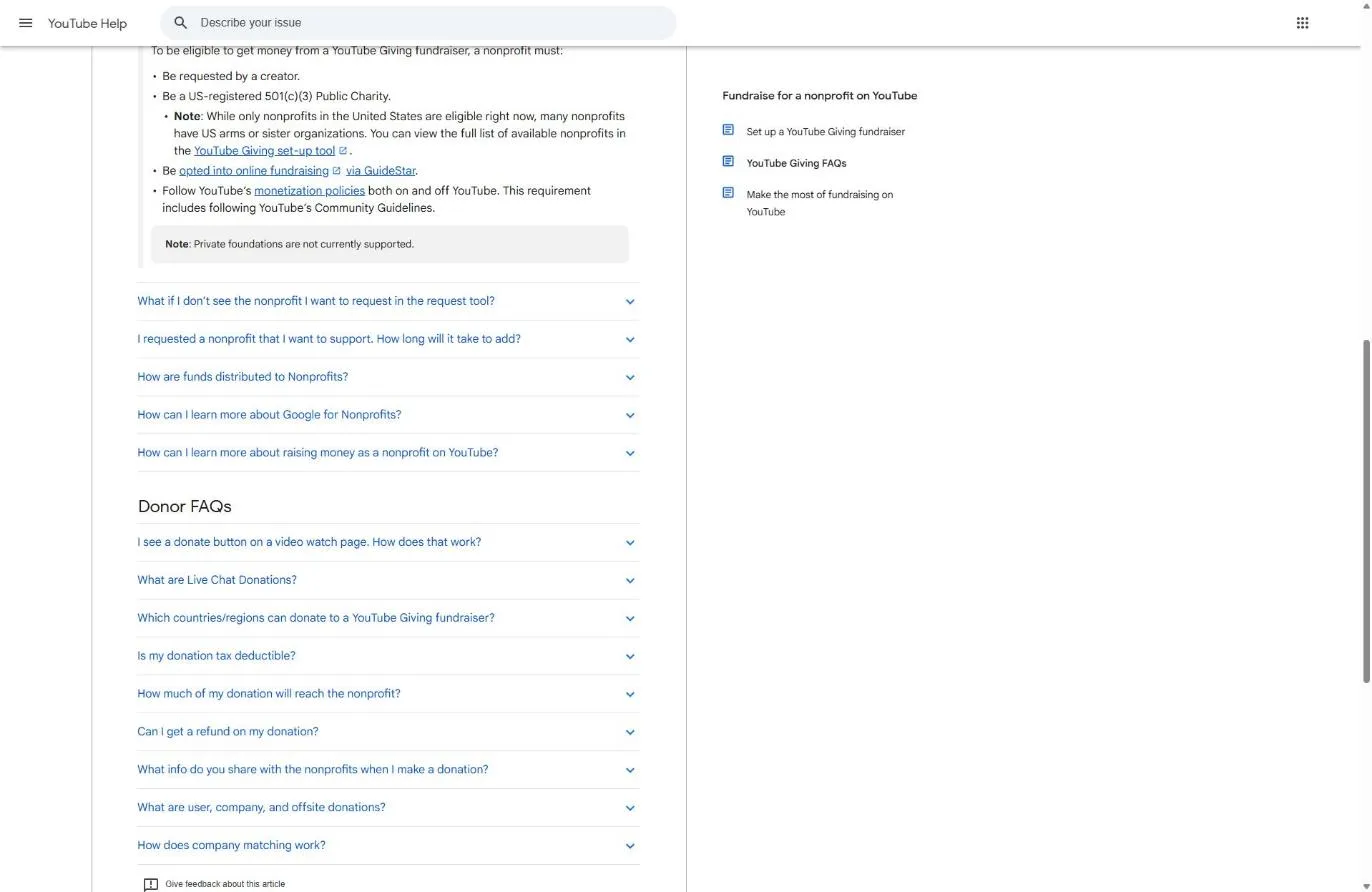
Can your church run a Giving fundraiser on its own channel? YouTube’s answer is that “your channel has to meet certain eligibility requirements,” the same ones in the table. A church channel with 10,000 subscribers in the Partner Program could. Most can’t.
The “Public Charity” line doesn’t shut churches out by itself: the IRS classifies churches as public charities, not private foundations (IRS foundation classification guidance). YouTube’s Giving pages say nothing about churches either way. I did not test whether a church appears in YouTube’s nonprofit list, so treat Giving as possible but unproven for churches.
My take: don’t build your giving strategy around YouTube. Put a link card on generosity messages pointing to your own giving page, where you control the receipt, the fees and the timing. Our online giving comparison covers the platforms. If a member with a big channel wants to raise money for your missions trip, Giving is worth a look then. If you want fundraisers on social media, Facebook fundraising has a clearer path for churches.
If you get rejected
A YouTube Nonprofit Program rejection usually traces back to Google for Nonprofits status or to a channel Google can’t tie to your church. YouTube’s pages don’t publish a list of rejection reasons, so the table below maps the requirements YouTube and Google do publish (November 2026) to the fix a church would make.
| Likely problem | What it means for a church | The fix |
|---|---|---|
| No Get Started button for YouTube | Your Google for Nonprofits application isn't approved yet | Finish Goodstack verification first; see the Google for Nonprofits guide |
| Google for Nonprofits declined | No IRS recognition, or a group-exempt church entered the denomination's EIN | Get recognized or reapply with your own EIN and group exemption documents |
| Channel couldn't be verified as yours | Channel name, website link or ownership doesn't match the church | Fix the name, About section and website link (Step 2), then request again |
| Wrong channel activated | You entered the youth channel or an old channel's ID | Use Change channel ID in Google for Nonprofits; the change is permanent, so get it right |
| Can't sign in to activate | The admin account belongs to someone who left | Request admin access through Google for Nonprofits, then use a shared church account going forward |
| Can't find a donate option | That's YouTube Giving, not this program | Link cards to your own giving page instead |
Based on YouTube Help and Google for Nonprofits help center requirements, checked November 5, 2026.
What else does Google for Nonprofits give a church?
Google for Nonprofits gives a church three other free products besides YouTube, and one of them is worth far more. Google Ad Grants provides $10,000 a month in Google Search text ads (Google Ad Grants page, November 2026). It’s a separate activation with its own website requirements. Google Workspace for Nonprofits gives you church-domain email and shared Drive at $0, covered in our Workspace guide.
If you’re going through Google for Nonprofits for YouTube, activate the Ad Grant the same week. Our complete Google Ad Grant guide explains how churches use it, and you can check whether your church qualifies for the Ad Grant in a few minutes. If you’d rather have a team that only manages church grants run it, that’s our Google Ad Grant management service.
What should a church actually do on YouTube?
A church should treat YouTube as a search engine for people who are curious about faith and about your church, not as a broadcast archive. The Nonprofit Program’s link cards only help if people find and watch the videos. That part has nothing to do with nonprofit status.
Here’s where I’d put the effort:
- Title sermons for what people search, not for your series art. “Week 3: Overflow” tells a stranger nothing. “What the Bible says about anxiety” gets found. Our YouTube SEO guide for churches shows how.
- Cut clips from every sermon. One full message can become several short videos that reach people who’d never watch 40 minutes. See sermon clips for social media.
- Organize playlists by series and topic, so a new viewer can keep watching without hunting.
- Clear your worship music before you post it. Songs your license doesn’t cover can bring copyright claims on a livestream or upload. Read church video and YouTube copyright first.
The complete YouTube guide for churches goes deeper on all of this.
Frequently Asked Questions
Free Church Marketing Review for Your Church
A link card is only as good as the page it opens. We'll look at your website, your local search presence, and how your church shows up when people nearby go looking. You get a straight assessment and clear next steps, whether or not you ever become a client.
Related Guides
- Nonprofit Software Discounts for Churches: every program, and whether it accepts churches.
- How to Prove Your Church Is a Nonprofit: the documents behind every application on this list.
- Google for Nonprofits: the application you need before YouTube, step by step.
- What Is Goodstack?: the verifier behind Google for Nonprofits.
- Facebook Fundraising for Nonprofits: donate buttons and fundraisers on Facebook and Instagram.
- Google Workspace for Nonprofits: free church email through the same Google account.
- The Ultimate Guide to YouTube for Church: what to post and how to grow.