Zoom for nonprofits is a real discount, and churches can get it. As of November 2026, Zoom Cares takes 50% off annual Zoom Workplace plans for 501(c)(3) organizations with operating budgets of $10 million or less, and nothing on Zoom’s page excludes churches.
So the answer to “will Zoom take a church?” is yes, with two conditions. Your church has to pass verification through Goodstack, and your budget has to sit under Zoom’s cap. Most churches clear the budget line easily. The verification step is where churches get stuck, and I’ll show you why below.
There’s a better question underneath, though. A lot of churches paying for Zoom already have free video meetings sitting inside a Google or Microsoft account they set up years ago. Before you apply for anything, I’ll help you figure out if you need paid Zoom at all.
Before you start: if your church has never received an IRS determination letter (most churches haven’t, because the IRS treats churches as exempt automatically), read how to prove your church’s nonprofit status first. Goodstack’s help center says it cannot verify an organization that “does not require registration to operate.” Fix that problem once and every discount in this nonprofit software discounts guide opens up.
Does Zoom Give Churches a Nonprofit Discount?
Yes. Zoom gives churches the same 50% nonprofit discount it gives any 501(c)(3), through the Zoom Cares program. Zoom’s eligibility wording, read live on November 5, 2026, says the discount “is available only to qualifying organizations with 501(c)(3) designation,” verified by Goodstack, with an operating budget of $10 million or less.
The ineligible list on Zoom’s page names education organizations (K-12 schools, colleges), healthcare organizations, government agencies, and “other nonprofit designations like 501(c)(4), 501(c)(6).” Churches, places of worship and religious organizations appear nowhere on it. That puts Zoom in a different camp from Slack and Airtable, which name churches as ineligible.
One wrinkle for church campuses: if your church runs a Christian school or preschool with its own 501(c)(3), that school falls under Zoom’s education exclusion. Apply under the church, not the school.
How Much Is Zoom for Nonprofits?
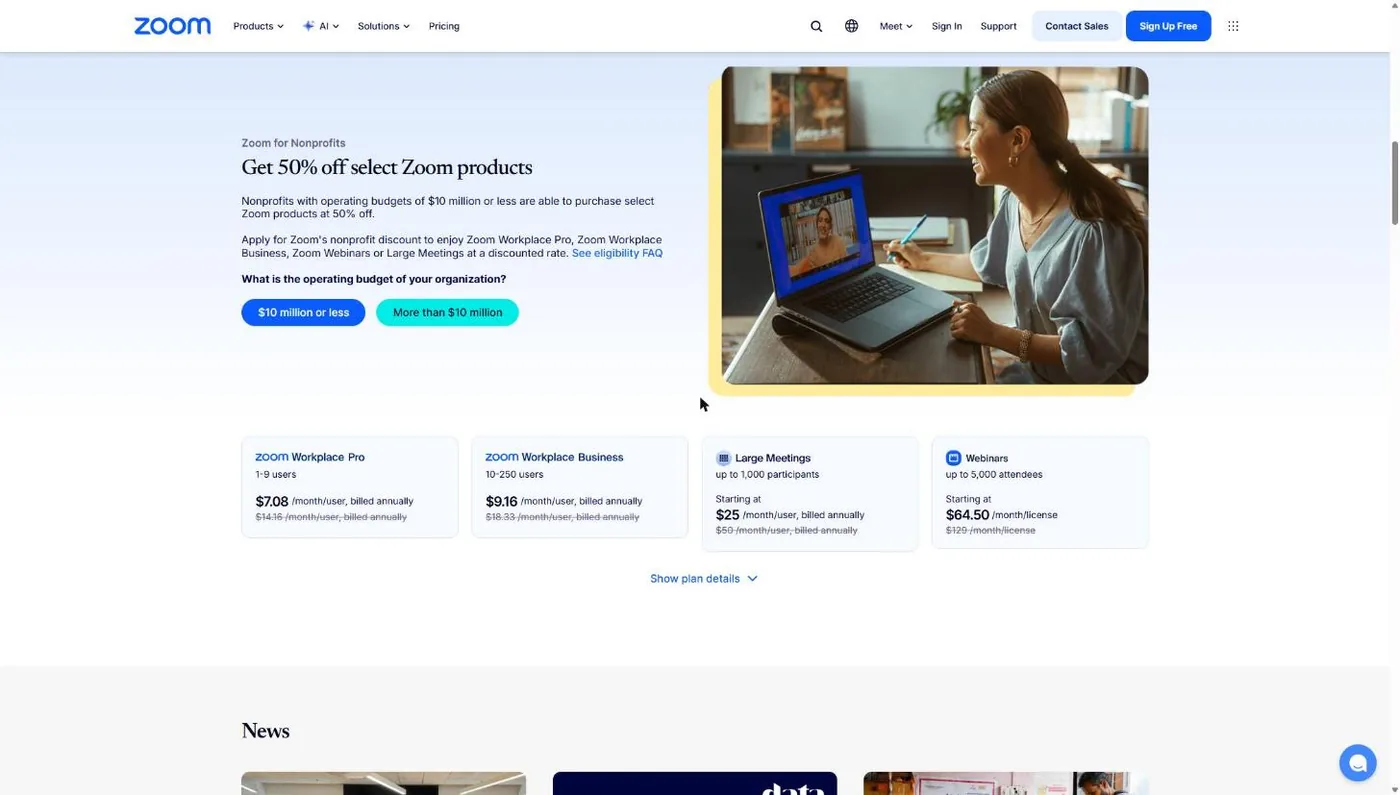
Zoom for nonprofits costs half of list price on four products, billed annually. Zoom’s FAQ says the discount applies to “annual plans only,” so a church on month-to-month billing pays full price until it switches. Prices below come from Zoom’s Zoom Cares and pricing pages as of November 2026.
| Zoom product | Size | List price (annual) | Zoom Cares price |
|---|---|---|---|
| Zoom Workplace Pro | 1-9 users | $14.16 per user per month | $7.08 per user per month |
| Zoom Workplace Business | 10-250 users | $18.33 per user per month | $9.16 per user per month |
| Large Meetings add-on | Up to 1,000 participants | From $50 | From $25 |
| Zoom Webinars | Per license | From $129 | From $64.50 |
Run the math for a typical church office. Four staff members who host meetings on Zoom Workplace Pro cost $679.68 a year at list price. Through Zoom Cares, the same four licenses cost $339.84. Only the people who host need a license. Your small group members, board members and volunteers join for free.
Zoom Workplace Pro gets you meetings up to 30 hours long, 100 participants per meeting and 10 GB of cloud recording storage per user (Zoom pricing page, November 2026). Business raises the participant cap to 300. Products outside the program, like Zoom Phone, can be added at regular price.
Does Your Church Even Need Paid Zoom?
Many churches don’t. If your church already uses Google Workspace for Nonprofits or Microsoft 365 through Microsoft’s nonprofit program, you already own a video meeting tool that costs nothing extra. Paid Zoom makes sense when a host regularly runs meetings longer than 40 minutes and your team doesn’t already have Meet or Teams.
The free Zoom plan’s limits are what push churches to pay. Zoom’s pricing page (November 5, 2026) caps the Basic plan at “40 minutes per meeting” and “100 participants per meeting,” with local recording only. A 90-minute elder meeting on a free Zoom account gets cut off twice.
| Option | Cost to a church | Meeting length | Participants |
|---|---|---|---|
| Zoom Basic (free) | $0 | 40 minutes | 100 |
| Zoom Workplace Pro via Zoom Cares | $7.08 per host per month, annual | 30 hours | 100 |
| Google Meet in Workspace for Nonprofits ($0 plan) | $0 | Not stated on Google's nonprofit page | 150 |
| Google Workspace Business Standard (nonprofit) | $3.50 per user per month, 1-year commitment | Not stated | Not stated on Google's nonprofit page |
| Microsoft Teams in the Business Basic grant | $0, up to 300 users | Not stated | Not stated on Microsoft's nonprofit page |
Sources: Zoom pricing page; Google Workspace for Nonprofits page; Microsoft nonprofit plan comparison. All checked November 5, 2026.
Here’s how I’d decide. If your staff lives in Gmail and Google Calendar, use Meet and skip Zoom. Our Google Workspace for churches guide walks through getting the free tier. If you’re a Microsoft shop, Teams is already in the free Business Basic grant; see Microsoft 365 for nonprofits for what’s still free after Microsoft’s 2025 changes.
Pay for Zoom when your people already know it and won’t follow you to a new link, or when you run webinars and large online events that need Zoom’s add-ons. If volunteers keep getting dropped at minute 40, that’s a sign too, but check Meet or Teams first.
Where I land
A church should not pay for Zoom until it has checked whether the free video meetings in Google Workspace for Nonprofits or Microsoft's Business Basic grant can do the job, and if Zoom still wins, it should never pay more than the 50% Zoom Cares price.
How Do I Apply for Zoom Cares?
You apply for Zoom Cares from Zoom’s own Zoom Cares page, then finish verification with Goodstack, then apply a discount to an annual plan in your Zoom billing settings. Zoom’s page says Goodstack “will correspond with nonprofits to confirm eligibility” and sends instructions for completing the purchase. The whole flow assumes your church already has proof of 501(c)(3) status that Goodstack accepts.
Step 1: Confirm your church clears all three gates
Open the FAQ on the Zoom Cares page and check three things before you start. First, your church holds 501(c)(3) recognition Goodstack can find or verify. Second, your operating budget is $10 million or less. Third, you’re applying as the church, not as an affiliated school, clinic or 501(c)(4).
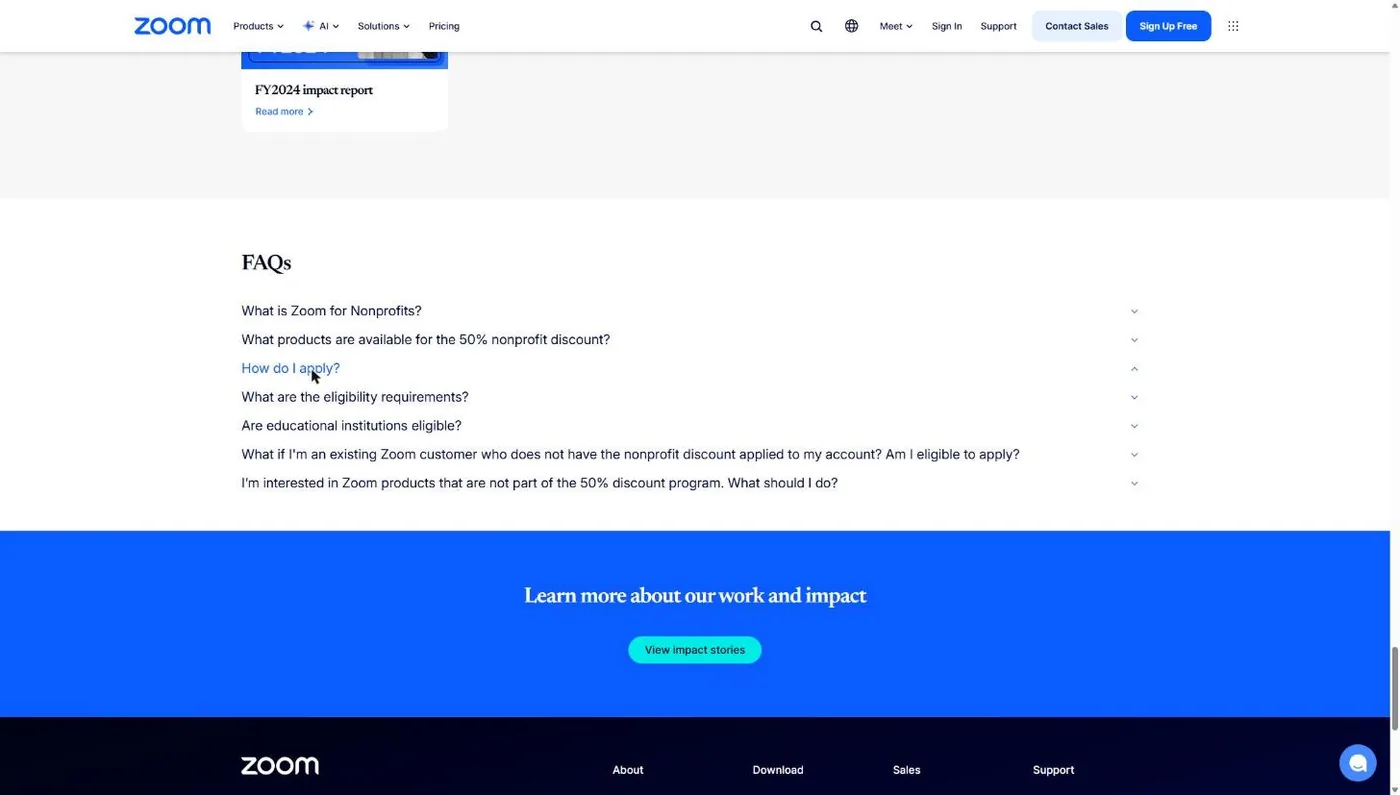
Common snag: the church that’s automatically exempt and never filed Form 1023. Goodstack can’t verify that church on its own. The fix is your denomination’s group exemption documents, covered in the foundation guide.
Step 2: Go to the Zoom Cares page and find the nonprofit pricing
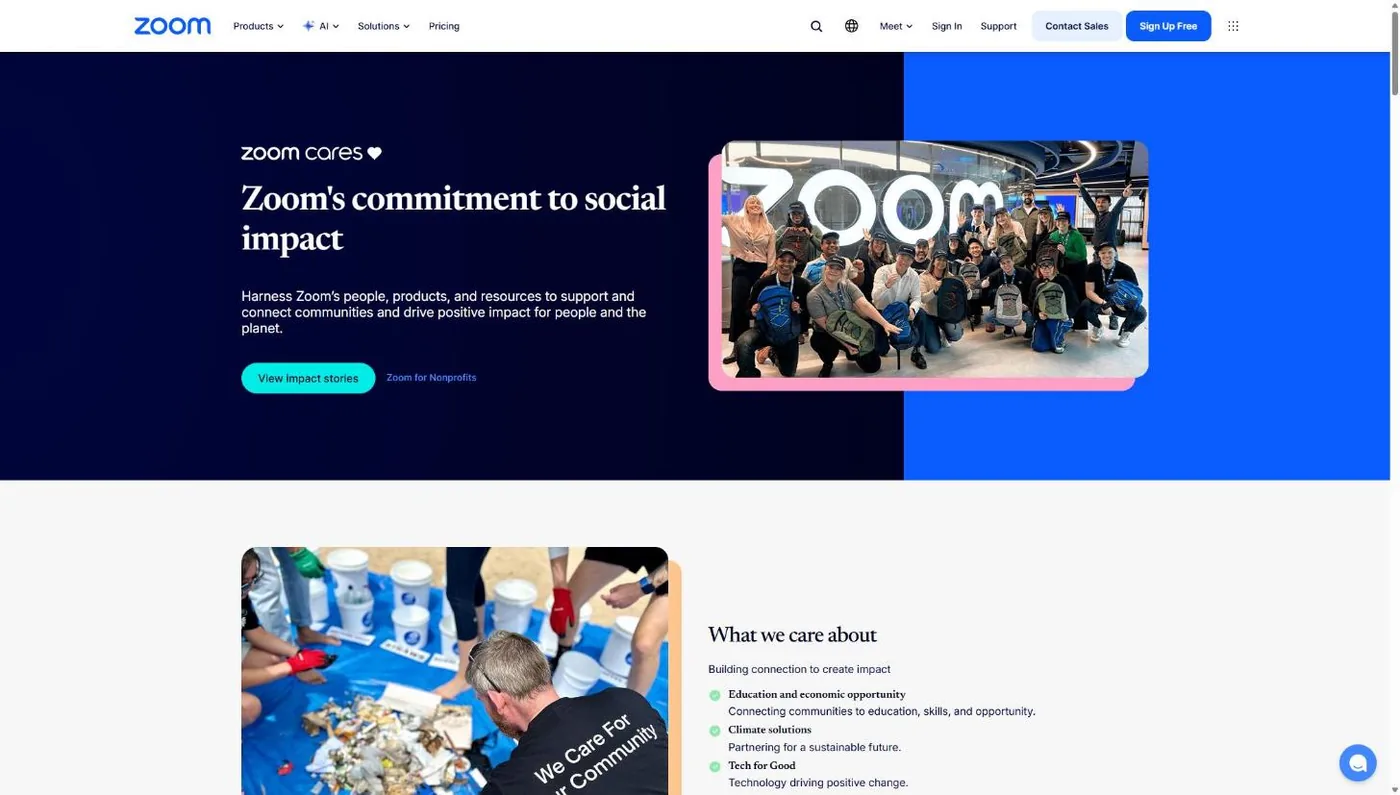
Go to zoom.com/en/zoom-cares. The page opens on Zoom’s social impact program. Scroll to the nonprofit section, where Zoom lists the four discounted products at 50% off.
Step 3: Click the application link and verify with Goodstack
The “apply here” link on the Zoom Cares page hands you to Goodstack. Goodstack’s partner pages start by asking where your organization is registered, then search its registry for your organization. Search by your church’s legal name as the IRS has it, not the name on your sign out front.
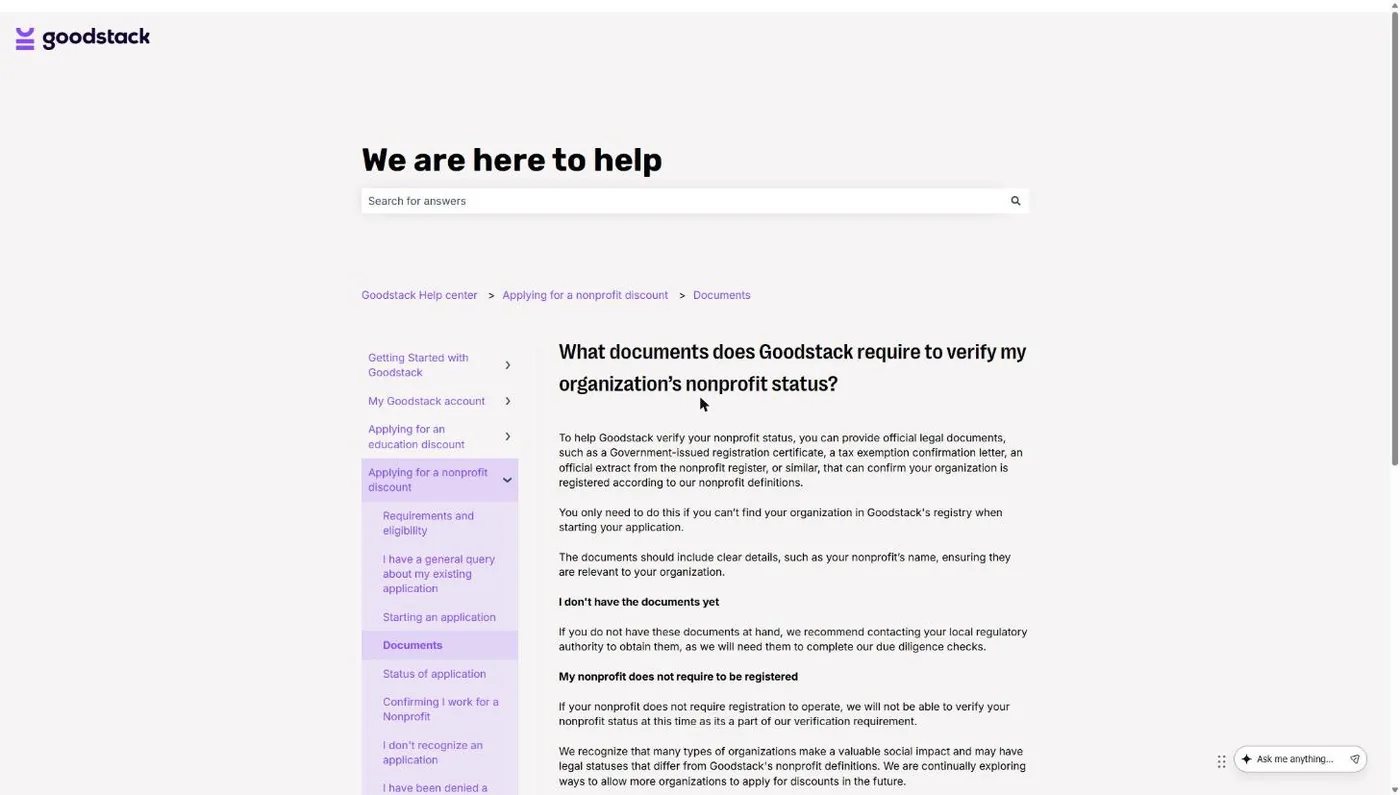
If Goodstack can’t find your church, it asks for documents. Its help center lists “a tax exemption confirmation letter” among the accepted status documents. For a group-exempt church, that means your denomination’s group exemption documentation. Goodstack also confirms that you personally belong to the church, and for US organizations it says an EIN Verification Letter is “strongly recommended.” Our guide to what Goodstack is and how churches get verified covers each document.
Common snag: applying from a personal Gmail address. Use an email on your church’s domain so Goodstack can tie you to the organization.
Step 4: Apply the discount to an annual Zoom plan
After approval, Goodstack sends instructions for the purchase. Goodstack’s Zoom offer page describes the last step as receiving a coupon code, signing in at zoom.us, opening the billing section, entering the code and choosing a plan. Pick annual billing. The discount does not apply to monthly plans.
Common snag: a church that already pays for Zoom. Zoom’s FAQ says customers with paid annual accounts bought on Zoom’s website can apply. If your church bought Zoom through a direct quote from Zoom’s sales team, you’re not eligible through Zoom Cares and need to contact sales.
Step 5: Put the account in the church’s name
Make the account owner a church email address that belongs to a role, like admin@ or office@, not a pastor’s personal login. Staff leave. The church should never have to beg a former employee for the password to its own Zoom account. Then add only the people who host meetings as licensed users.
Why Was My Church Denied the Zoom Nonprofit Discount?
Most denials come from verification, not from Zoom’s rules. Zoom’s page has no religious exclusion, but Goodstack must still confirm that your church is a 501(c)(3) and that you represent it. In Zoom’s community forum, one church reported a Goodstack denial even though other churches it had applied for were approved. Another nonprofit in that forum was turned down because Goodstack classed its work as an ineligible category, so describe your church plainly as a church.
| Why it happened | The fix |
|---|---|
| Church is automatically exempt and has no IRS letter | Submit your denomination's group exemption documents, or file Form 1023 for your own letter |
| Name mismatch (you applied as "Grace Church," the IRS has "Grace Community Church of Springfield Inc.") | Reapply with the exact legal name and EIN on your IRS paperwork |
| Goodstack couldn't confirm you work for the church | Apply from a church-domain email and upload an EIN Verification Letter plus a church-issued document |
| Applied as the church's school or preschool | Education organizations are ineligible. Apply as the church itself |
| Operating budget over $10 million | Zoom Cares is closed to you. Talk to Zoom sales, or use Meet or Teams |
| Approved, but the discount won't apply | Switch to annual billing. If you bought through a Zoom sales quote, contact Zoom sales |
| Denied with no clear reason | Ask Goodstack support for the specific reason, fix it, then reapply from the Zoom Cares link. Goodstack lets you request a review of a rejection |
Did Zoom Leave TechSoup?
Yes. Zoom ended its nonprofit partnership with TechSoup in May 2025, according to TechSoup’s help center, and moved nonprofits to Zoom Cares with Goodstack handling verification. TechSoup now tells members it can’t help with Zoom Cares and sends them to Zoom or Goodstack support instead.
This matters if your church bought Zoom through TechSoup before 2025. TechSoup’s support article says existing customers must re-validate with Zoom Cares before their contract expires, and TechSoup qualification doesn’t carry over. Your church has to verify through Goodstack to keep the half-price rate. If your renewal jumped to full price, that’s the reason.
The upside: Goodstack is also the verifier behind Google for Nonprofits, ChatGPT’s nonprofit pricing and Claude for Nonprofits, so a church that gets its Goodstack record right once uses it again and again. Our TechSoup for churches guide covers what TechSoup still offers churches, including QuickBooks.
How Churches Use Zoom (and Where to Be Careful)
Churches mostly use Zoom for meetings that can’t happen in the building. Board and elder meetings, staff check-ins across campuses and online small groups account for most of it. Any of those needs a licensed host only if it runs past 40 minutes.
Board meetings. Use Pro so the meeting doesn’t cut off mid-vote. Record only if your bylaws or minutes policy call for it, and store the recording where your board secretary controls it.
Small groups. Give each regular online group leader a license, or let a staff member host a recurring meeting the leader runs. Members never need a paid account.
Sunday services. Zoom isn’t a livestream platform for most churches. A 40-minute cap ends a free-plan service before the sermon, and churches that stream usually push video to YouTube or Facebook with dedicated tools. See our guide to live streaming church services.
Pastoral counseling. Be careful here. A counseling call over Zoom is fine, but a few settings deserve a hard look first. Don’t record counseling sessions. Turn off AI meeting summaries and note-taking for those meetings, since Zoom offers AI summaries even on its free plan (three hosted meetings a month, per Zoom’s pricing page). Use a waiting room so the next person can’t walk in, take the call from a closed office, and never counsel from a shared staff account someone else can open later.
Frequently Asked Questions
Saving on software is step one. Getting found is step two.
Our free Church Marketing Review looks at your website, your local search presence, and how your church shows up when people nearby go looking for a church. You get a straight assessment and clear next steps, whether or not you ever work with us.
Related Guides
- Nonprofit Software Discounts for Churches: every program, which ones accept churches, and what changed in 2025-2026.
- How to Prove Your Church’s Nonprofit Status: the documents Goodstack and TechSoup accept.
- What Is Goodstack?: how churches get verified once and reuse it.
- Google Workspace for Nonprofits: free Gmail, Drive and Meet for your church.
- Microsoft 365 for Nonprofits: what’s still free, including Teams.
- TechSoup for Churches: what’s still worth requesting on TechSoup after Zoom left.
- Free Church Software: the tools worth using at $0.